
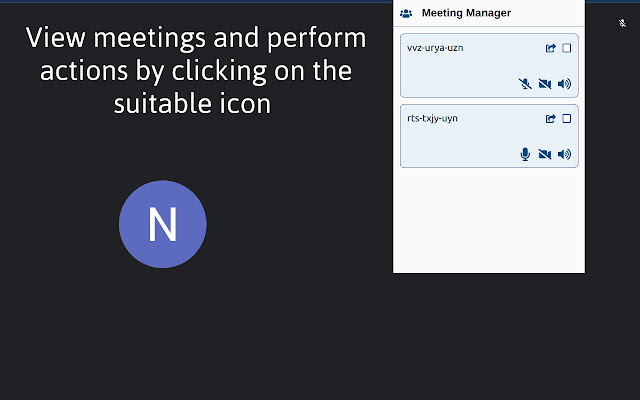


Let's be honest with ourselves, no one can sit in an online conference in the same tab for hours if not minutes. We often do other stuff like watch videos on youtube, play online games, etc during the online conferences. It becomes cumbersome to switch to the meeting tab and mute/unmute yourself whenever someone calls your name.
Introducing Meeting Manager which will allow you to manage all your google meet conferences from a simple list view where you can perform any action like muting/unmuting the mic, camera, and sound from ANY tab or window.
This way now you never have to search through 20+ tabs for that single meet tab and then press the mute button. Just open up the extension wherever you are and perform the action. If you are feeling lazy then you can even perform any action using shortcut keys for a specified meet tab.
Here are all the features of the Meeting Manager Extension.
1. A nice and clean UI to display all your meetings.
2. Supports muting/unmuting of the following items - camera, microphone, and sound of the meet tab.
3. Renaming the meeting tab in the list for easier searching.
4. You can configure any one google meet tab to support shortcut keys for performing the actions by clicking on the checkbox.
5. Switch to any google meet tab by clicking on the icon.
6. All actions are synchronized which means any changes done by you will be updated in the extension in real time.
Here is the list of shortcut keys -
1. Alt + C - Muting/unmuting of camera
2. Alt + S - Muting/unmuting the sound of the meeting tab
3. Alt + M - Muting/unmuting of microphone
Extore is a team of professionals who are passionate about creating extensions for web browsers. This devotion also gives us opportunity to appreciate work of other people. We get inspired by useful, open source extensions made by developers all over the world. Our strong belief is that one should share helpful add-ons with others. That’s why we’d like to present you our ever-growing list of favourite extensions that have inspired us. Moreover, as you probably have already learned, sometimes struggling for the best brings an end to the good. Talking about add-ons it often turns out that an upgrade is worse then previous version. Also it can become really tricky to get back to the beloved version of your favourite extension. That’s why we’re going to make not only the latest, but all versions of our favourite (and we hope yours too) add-ons available for download. No more compromises, just stick to the version you really like!
 Preparing download link, please wait for seconds
Almost done...
Click to download
Error getting file. Please try again
Preparing download link, please wait for seconds
Almost done...
Click to download
Error getting file. Please try again







