
version 0.1.0 - Download ZIP file
version 0.0.9 - Download ZIP file
version 0.0.8 - Download ZIP file
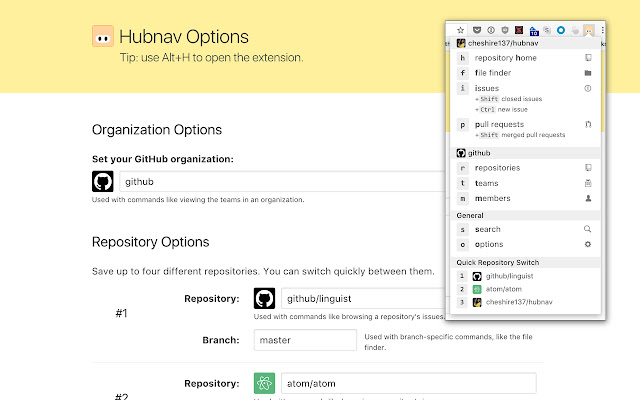
Use keyboard shortcuts to quickly access issues, pull requests, the file finder, and other views of interest for your most frequented GitHub repositories, users, organizations, milestones, and projects. The extension doesn't require any special permissions, you don't have to authorize anything with GitHub.
Change log:
0.1.0
- You can now add shortcuts for user projects.
0.0.9
- Add 'pro[j]ects' shortcut for organizations and repositories.
0.0.8
- You can now add shortcuts for GitHub teams.
- Repositories shortcut for a user now opens the "Repositories" tab on a user profile, instead of taking you to the search results page.
- Fix bug so that you can remove milestone shortcuts.
0.0.7
- You can now add GitHub milestones and switch quickly between them.
- Allow drag-and-drop reordering of shortcuts on the options page.
- Context switcher now includes an icon so you can tell whether it activates a project, repository, organization, user, or milestone context.
- Activating shortcuts that do not apply to the active context no longer opens URLs for previously active contexts.
- Small UI improvements to options page.
- More compact popup so it shouldn't scroll vertically.
0.0.6
- Added ability to have a varying number of shortcuts per type, e.g., you can have 10 repository shortcuts instead of just 4.
- Added documentation on options page about how to change the keyboard shortcut to open the extension.
- Fixed bug where help text would show in the popup even if a project shortcut had been added.
- Fixed bug where renaming the active project would deselect it and require you to reselect it in the popup.
- Fixed bug where file finder could be opened for the last selected repository, even when you had a user, organization, or project selected.
0.0.5
- Added ability to limit viewing a user's issues or pull requests to those within a specified repository or organization.
- Improved UI for adding user or organization shortcuts.
0.0.4
- Fixed bug where the shortcut for viewing merged pull requests for a user would not filter correctly.
- Added ability to set a custom GitHub URL for repository shortcuts. This can be used for GitHub Enterprise installations on custom domains.
- Added shortcut to view closed pull requests in a repository.
0.0.3
- Added ability to save and switch between multiple users and organizations instead of a single organization.
- Added ability to save and switch between multiple projects.
0.0.2
- Reduced permissions the extension requires.
- Added a welcome tip when no settings have been saved for the extension yet.
Extore is a team of professionals who are passionate about creating extensions for web browsers. This devotion also gives us opportunity to appreciate work of other people. We get inspired by useful, open source extensions made by developers all over the world. Our strong belief is that one should share helpful add-ons with others. That’s why we’d like to present you our ever-growing list of favourite extensions that have inspired us. Moreover, as you probably have already learned, sometimes struggling for the best brings an end to the good. Talking about add-ons it often turns out that an upgrade is worse then previous version. Also it can become really tricky to get back to the beloved version of your favourite extension. That’s why we’re going to make not only the latest, but all versions of our favourite (and we hope yours too) add-ons available for download. No more compromises, just stick to the version you really like!
 Preparing download link, please wait for seconds
Almost done...
Click to download
Error getting file. Please try again
Preparing download link, please wait for seconds
Almost done...
Click to download
Error getting file. Please try again







