
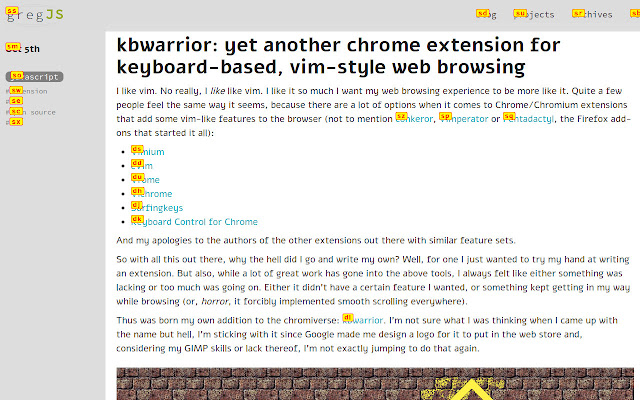
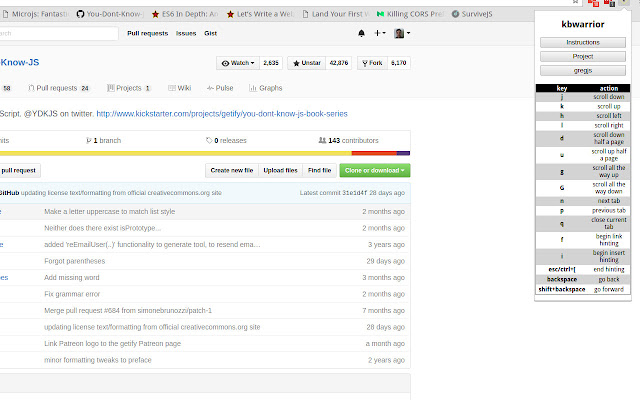


kbwarrior is a simple Chrome extension for people who like the idea of keyboard (or vim)-based web browsing, but for whom the existing extensions that provide such functionality either do too much or too little for their liking.
I aim to keep this simple, and am still not sure about the final feature set. For now though, this is what `kbwarrior` does:
Page navigation
* `j` to scroll down a line
* `k` to scroll up a line
* `h` to scroll left (if applicable)
* `l` to scroll right (if applicable)
* `u` to scroll up half a page
* `d` to scroll down half a page
* `g` to scroll all the way up
* `G` to scroll all the way down
* `backspace` to go back in history (thanks a lot to Google by the way for generously removing that for us!)
* `Shift+backspace` to go forward in history
* NO SMOOTH SCROLLING IT'S THE DEVIL
Keyboard tab navigation
* `n` to switch to the next tab
* `p` to switch to the previous tab
* `q` to close the current tab
Hinting
* `f` to bring up hints (keyboard shortcuts for all visible links on a page)
* all other `kbwarrior` shortcuts will be disabled for as long as hinting is on
* type a hint to navigate instantly to the hinted link
* hold shift to open in a new tab
* press `f` again to cancel and remove the hints
Inserting
* `i` to bring up insert hints (keyboard shortcuts for all visible text inputs and textareas)
* same as above but just for inserts
## Known issues
I've made sure none of these shortcuts will trigger when you're typing in an input field or anything, but there are some websites that provide their own keyboard shortcuts (GitHub and Twitter for example).
Those site-defined shortcuts will interfere with the ones provided by this extension. I wasn't sure how to deal with this, so I've elected to simply disable the extension on sites that make heavy use of such shortcuts. The current list where `kbwarrior` is disabled is:
* Facebook
* GitHub
* Reddit
* Twitter
I will probably update this list as I go along. Feel free to make a PR or open an issue if there are other sites this really doesn't work on.
Extore is a team of professionals who are passionate about creating extensions for web browsers. This devotion also gives us opportunity to appreciate work of other people. We get inspired by useful, open source extensions made by developers all over the world. Our strong belief is that one should share helpful add-ons with others. That’s why we’d like to present you our ever-growing list of favourite extensions that have inspired us. Moreover, as you probably have already learned, sometimes struggling for the best brings an end to the good. Talking about add-ons it often turns out that an upgrade is worse then previous version. Also it can become really tricky to get back to the beloved version of your favourite extension. That’s why we’re going to make not only the latest, but all versions of our favourite (and we hope yours too) add-ons available for download. No more compromises, just stick to the version you really like!
 Preparing download link, please wait for seconds
Almost done...
Click to download
Error getting file. Please try again
Preparing download link, please wait for seconds
Almost done...
Click to download
Error getting file. Please try again







