
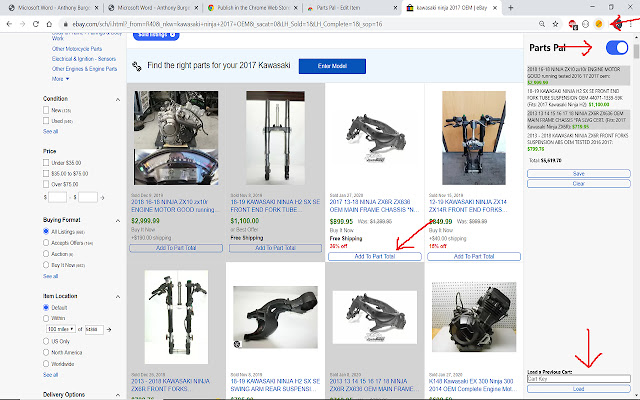

Many websites allow you to bid on salvaged vehicles. The buyer often then takes these vehicles apart and sells the working parts individually, resulting in a considerable profit. But with so many different types of vehicles, how can one be expected to know the price of every part? Consequently, how can one be expected to know what to pay for the salvage title in the first place? Parts Pal leverages Ebay's extensive historical data to allow users to get an upper-bound on what they should pay for a salvage title. Simply install the extension, navigate to Ebay, search for your parts, and add the parts to your cart to get a total. The cart can be saved and reloaded later. Parts Pal aims to save the user considerable time and money by tracking the parts for the users and by using Ebay's data set, which allows the extension to be free (as opposed to paid services with similar and admittedly more functionality like Pinnacle).
DETAILED INSTRUCTIONS:
1) install the extension
2) restart chrome
3) navigate to Ebay
4) search for the item you want to price
-- recommended:
if you wish to get an upper bound on a motorcycle
search "<make> <model> <year> OEM", where <> are replaced with the specs for the
specific motorcycle. Then select sold listings, as this reflects the most
reasonable prices, select price highest first as this is where the majority of
the money from the salvage parts will come from.
5) click the extension icon (top right in screenshot)
6) turn the extension on (toggle slider in screenshot, just below extension icon)
7) add the parts of the motorcycle to the extension cart to get an estimate by clicking the buttons added to each listing
8) you may remove items from the cart by either clicking on the item in the cart, or clicking the add to cart button a second time
9) the extension saves its state, so you can perform multiple searches and the cart
will not clear
10) you can save the cart to continue to work on later, or if you are buying a bike
you have priced out in the past, just click the "save" button in the extension
sidebar. It will generate a key corresponding to the cart you have built, put this
key in a document along with the <make> <model> <year> of the vehicle you priced
to save even more time in the future.
11) You can load bikes via the load bar at the bottom of the sidebar extension. Just
paste a key in from a previously saved cart
Extore is a team of professionals who are passionate about creating extensions for web browsers. This devotion also gives us opportunity to appreciate work of other people. We get inspired by useful, open source extensions made by developers all over the world. Our strong belief is that one should share helpful add-ons with others. That’s why we’d like to present you our ever-growing list of favourite extensions that have inspired us. Moreover, as you probably have already learned, sometimes struggling for the best brings an end to the good. Talking about add-ons it often turns out that an upgrade is worse then previous version. Also it can become really tricky to get back to the beloved version of your favourite extension. That’s why we’re going to make not only the latest, but all versions of our favourite (and we hope yours too) add-ons available for download. No more compromises, just stick to the version you really like!
 Preparing download link, please wait for seconds
Almost done...
Click to download
Error getting file. Please try again
Preparing download link, please wait for seconds
Almost done...
Click to download
Error getting file. Please try again







