
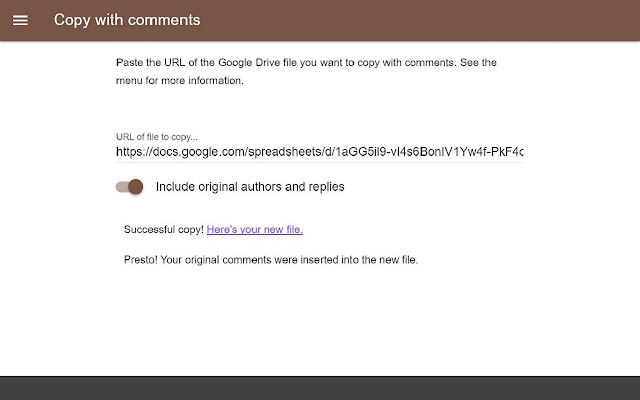
Make copies of Google Drive files that include their comments.
FEATURES
Google Drive currently offers no option to make copies of files that include their comments. This app will copy nearly any file you can store in Google Drive together with their comments. This includes Documents, Sheets, Slides, and Drawings. This app also handles and copies replies to comments. Limitations apply, however (see below).
USAGE
Copy and paste the URL of any Google Drive file to which you have access. Hit enter or return to initiate the copy.
The resulting copy will appear in the folder of the original file, and you can access it directly with the provided link.
LIMITATIONS
1. Google does not make the direct copying of comments technically possible, and their API for processing comments is often inscrutable (i.e. buggy). In this app, comments are not technically copied; they are inserted programmatically by you (the user) into a fresh copy of a document.
As a result, every comment will appear to have been made by you (the copier) at the time you make the copy--even comments from others at other times. However, this app provides the option of retaining the original author and time information alongside the actual comments.
This limitation can actually be a feature, depending on your case. For example, the copy of a standard, commented form or teacher's assignment will always be fresh if you turn off the option.
2. Google Documents will copy as you expect, with comments anchored to specific sections of text. All other file types will copy comments without specific anchors. They appear in the comments menu for the file.
This limitation is a direct result of a standing bug in Google's comment architecture, which this app cannot solve.
If you need to retain specific anchor information in non-Doc files, one workaround is to place reference information directly inside of comments before copying the file. For example, in Sheets, include a cell reference (e.g. "Sheet 1 C6") directly in your comment.
TECHNICAL NOTES
This app was tested on the modern Chrome browser, and no effort was made to test or support other browsers. Docs, Sheets, Slides, and Drawings were all tested successfully with the limitations above as of 11/26/2016.
Extore is a team of professionals who are passionate about creating extensions for web browsers. This devotion also gives us opportunity to appreciate work of other people. We get inspired by useful, open source extensions made by developers all over the world. Our strong belief is that one should share helpful add-ons with others. That’s why we’d like to present you our ever-growing list of favourite extensions that have inspired us. Moreover, as you probably have already learned, sometimes struggling for the best brings an end to the good. Talking about add-ons it often turns out that an upgrade is worse then previous version. Also it can become really tricky to get back to the beloved version of your favourite extension. That’s why we’re going to make not only the latest, but all versions of our favourite (and we hope yours too) add-ons available for download. No more compromises, just stick to the version you really like!
 Preparing download link, please wait for seconds
Almost done...
Click to download
Error getting file. Please try again
Preparing download link, please wait for seconds
Almost done...
Click to download
Error getting file. Please try again







