

Reclaim your time
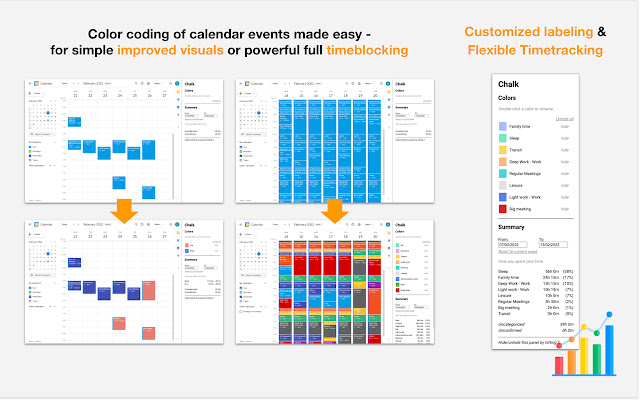
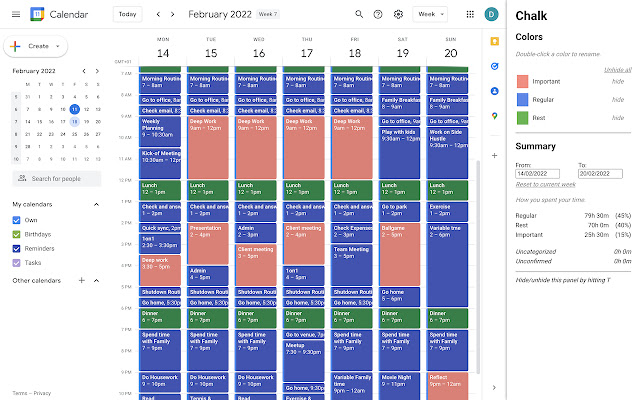
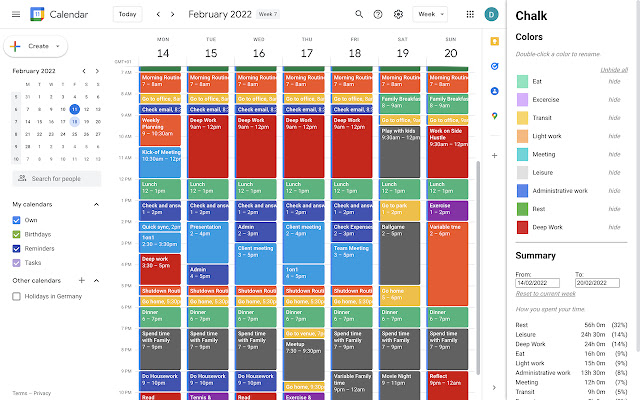
Chalk allows you to easily color code your events, label individual colors and analyze time spent per color - all in your existing Google Calendar. Use it for timeblocking, timetracking, improving your calendar visuals or however else color coding helps your workflow.
*Key Features*
- Color coding of calendar events made easy
- Customized labeling of each calendar color
- Flexible tracking of time spent per color
*Use Cases*
- Turbocharged Timeblocking in your existing Google Calendar environment
- Enhanced color coding-based Calendar Mgmt
- Calendar management-based Timetracking
- Integrated, customizable Reporting, e.g. as input for freelancer invoicing
Please find a short usage guide below the line.
We are continuously improving the tool and are grateful for feedback on existing features, bugs and suggestions on what to improve and suggestions for additional features
Thanks!
-----
*Usage guide*
Starting up
- Download and enable the extension
- Go to your signed-in Google Calendar session
- Press “T” to enable the Chalk panel on the right hand side. This will switch to the current day/week
(Batch) Color coding
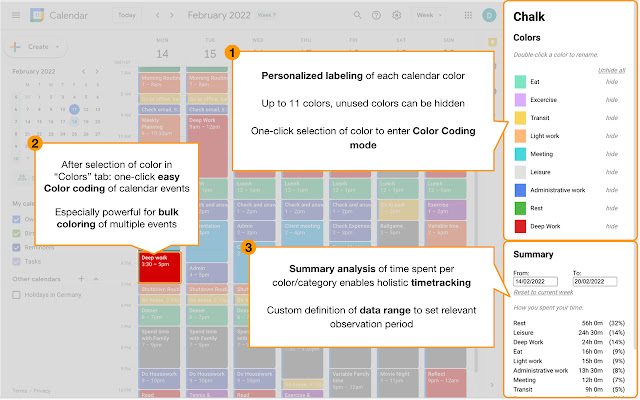
- In the “Colors” section on the top of the panel, click a color to activate it. A black frame around the activated color will appear
- Click an existing time slot in your calendar to assign the activated color to it. This can be done quickly for multiple time slots (batch color coding)
- A delay of a few seconds in the color switch is to be expected. Press the refresh shortcut (“command+r” on mac) to expedite the color switch
- Creating a new time slot with a color activated will not change the color of that new slot
Press “Esc” to deactivate the color, or press on a different color to activate it
- Note: You can also right-click on a time slot to recolor it (and the color will be recognized by Chalk’s time tracking feature - see below), but this process is significantly streamlined by Chalk. The right-click method might be still preferable when you want to color each instance of a recurring time slot.
Color labeling
- In the “Colors” section on the top of the panel, double click on a color to rename it; confirm the
renaming by pressing “Enter”
- Click “hide” next to a color to hide it; click “unhide” to unhide all hidden colors
Time tracking
- In the “Summary” section on the bottom of the panel, click the “From:” and “To:” fields to activate a selection field for the time tracking time range. You can also type in custom dates
- Press “”Reset to current week” to switch back to the current week time frame
The table indicates the time spent per category
Chalks icons created by Freepik - Flaticon (https://www.flaticon.com/free-icons/chalks)
Extore is a team of professionals who are passionate about creating extensions for web browsers. This devotion also gives us opportunity to appreciate work of other people. We get inspired by useful, open source extensions made by developers all over the world. Our strong belief is that one should share helpful add-ons with others. That’s why we’d like to present you our ever-growing list of favourite extensions that have inspired us. Moreover, as you probably have already learned, sometimes struggling for the best brings an end to the good. Talking about add-ons it often turns out that an upgrade is worse then previous version. Also it can become really tricky to get back to the beloved version of your favourite extension. That’s why we’re going to make not only the latest, but all versions of our favourite (and we hope yours too) add-ons available for download. No more compromises, just stick to the version you really like!
 Preparing download link, please wait for seconds
Almost done...
Click to download
Error getting file. Please try again
Preparing download link, please wait for seconds
Almost done...
Click to download
Error getting file. Please try again







