

Overview
Access the local tunnel in CrossBrowserTesting with a click with the Local Connection extension. Local Connection brings the power of the CrossBrowserTesting cloud testing platform right to your application, allowing you to instantly test your website right from your browser dashboard.
Easily connect to wherever your website or application is located and test before it hits production, using our robust tunnel technology to secure your data.
CrossBrowserTesting Local Connection lets you test locally, behind a firewall, or across a proxy in 1500+ real desktop and mobile browsers. Quickly jump into a Live Testing session or take screenshots of the web page you’re on to find and debug issues in seconds.
To begin using the extension, simply install and click the icon while on the page you’d like to test. To use Local Connection, go to the CrossBrowserTesting app and follow the instruction to install the Local App: https://help.crossbrowsertesting.com/local-connection/general/using-chrome-tunnel-app/
You’ll be presented with browsers to choose from for live testing. From here, you can jump right into a secure testing session by clicking one of the browsers.
To add a new browser, simply click Add and select the operating system, browser, and resolution. To remove a browser, click Edit, and the X in the upper right-hand corner. In this view, you can also change the resolutions of each configuration.
To run a screenshot test, choose a configuration from the pre-defined browser list. You can create and edit these in the CrossBrowserTesting app.
An active local connection is not needed to take screenshots or run live tests on pages that are publicly available.
Features
-Easy Connect to Tunnel Connection With a Few Clicks - The Local Connection plugin allows you to access tunnel connection faster and easier than ever by clicking right from your browser.
-Local Connection Status - See the status of the local connection and close open connections from the extension.
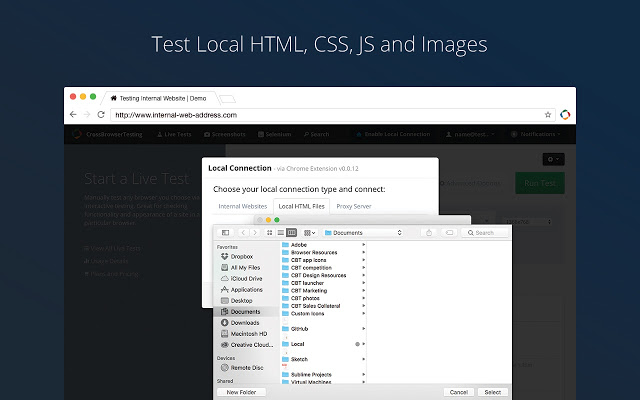
-Test Local HTML, CSS, JavaScript, and Images - Run full-scale browser tests on websites that are hosted locally in a test or development environment.
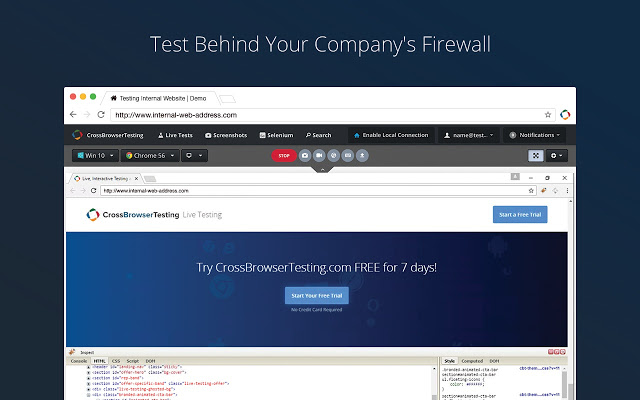
-Test Behind Your Company’s Firewall - Easily connect to your local site or internal network throughout the tunnel, allowing testing within the firewall.
-Test Across a Proxy - Test websites that need to be accessed via a proxy server by supplying the IP and Port, allowing for GeoLocation testing.
-Quickly Jump Into Full Page Screenshots or Live Testing - Manually test your website with Live Testing or use our screenshot comparison tool.
-Access to Over 1500 Browsers - Test on 1500+ real desktop and mobile browsers including iOS and Android devices.
-Debugging Tools - Fix issues as soon as you find them with native debugging tools.
Extore is a team of professionals who are passionate about creating extensions for web browsers. This devotion also gives us opportunity to appreciate work of other people. We get inspired by useful, open source extensions made by developers all over the world. Our strong belief is that one should share helpful add-ons with others. That’s why we’d like to present you our ever-growing list of favourite extensions that have inspired us. Moreover, as you probably have already learned, sometimes struggling for the best brings an end to the good. Talking about add-ons it often turns out that an upgrade is worse then previous version. Also it can become really tricky to get back to the beloved version of your favourite extension. That’s why we’re going to make not only the latest, but all versions of our favourite (and we hope yours too) add-ons available for download. No more compromises, just stick to the version you really like!
 Preparing download link, please wait for seconds
Almost done...
Click to download
Error getting file. Please try again
Preparing download link, please wait for seconds
Almost done...
Click to download
Error getting file. Please try again







