
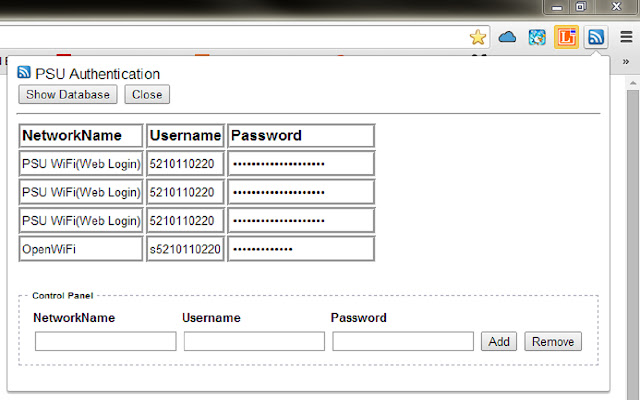

เครื่องมือที่ใช้ Authentication แทนผู้ใช้ ภายในเครือข่าย"มหาวิทยาลัยสงขลานครินทร์"เท่านั้น โดยที่ผู้ใช้ไม่จำเป็นต้อง Authenticate ทุกครั้งเมื่อต้องการใช้งาน Internet เพียงแค่ Authenticate ครั้งเดียวกับ PSU Authentication สำหรับแต่ละเครือข่ายที่แตกต่างกัน และ ช่วยลดการความเสี่ยงหากผู้ใช้เลือกที่จะเก็บข้อมูล Username และ Password ลงใน Cookies โดย PSU Authentication จะเก็บข้อมูล Username และ Password ลงใน Web SQL ซึ่งเป็นการเก็บข้อมูลส่วนตัวในลักษณะ offline จึงมีความปลอดภัยมากกว่าการเก็บข้อมูลเหล่านั้นลงใน Cookies
วิธีใช้งาน Extension module หรือ PSU Authentication นี้ง่ายมากครับเพียงแค่
1.ผู้ใช้ Download และติดตั้ง PSU Authentication จาก https://chrome.google.com/webstore/detail/psu-authentication/bpafhjmkikahhjilekjehhpilfonplgg
2.ให้ผู้ใช้ลบ NetworkName ที่มีชื่อว่า PSU WiFi(Web Login)ลงบน TextField โดยการกดปุ่ม Remove (ให้คลิกปุ่ม iconบน Address barแล้วคลิก Show Database)
3.ให้ผู้ใช้เพิ่ม NetworkName ที่มีชื่อว่า PSU WiFi(Web Login)ลงบน TextField
>แล้วใส่ Username และ Password ที่ถูกต้องลงไปใน TextField อีกครั้งครับ แล้วกดปุ่ม Add
4.ให้ผู้ใช้เชื่อมต่อ SSID ที่มีชื่อว่า PSU WiFi(Web Login)
เพียงเท่านี้ผู้ใช้ก็จะสามารถใช้งาน Internet โดยไม่ต้องกังวลว่าจะ Timeout แล้วต้องทำ Authentication ใหม่ครับ
**จากข้อ 2-3 ผู้ใช้จะไม่ทำก็ได้ครับ เมื่อผู้ใช้เชื่อมต่อ SSID ตัว PSU Authentication จะตรวจสอบทันทีว่าผู้ใช้จะต้องยืนยันตัวบุคคลหรือไม่หากต้องยืนยัน จะปรากฏหน้าต่าง Popup ขึ้นมาให้ผู้ใช้กรอก Username และ Password จำนวน1ครั้งสำหรับแต่ละเครือข่ายที่ PSU Authentication นั้นยังไม่รู้จัก
หมายเหตุ:
1.ใช้ได้เฉพาะเครือข่าย OpenWiFi, PSU WiFi(Web Login), LA_WiFi, Saraban, PHARMACY-OFFICE, PHARMACY-R1201, Clinic-ot-unit15-flr1-bld3, conser-1121g-flr2-bld3 และ ชื่อ SSID อื่นๆที่มีการ Authentication ผ่าน http://star.psu.ac.th/aaa/wba_form.html, http://login.engineer.psu.ac.th/ และ https://cp-ufw.psu.ac.th:6082/
2.ใช้ได้เฉพาะกับเครื่อง personal computer(PC) หรือ Notebook ที่ทำงานอยู่ในระบบปฏิบัติการ Windows และ Linux เท่านั้น
3.ไม่สามารถใช้งานได้กับเครือข่าย PSU WiFi(802.1x)
Extore is a team of professionals who are passionate about creating extensions for web browsers. This devotion also gives us opportunity to appreciate work of other people. We get inspired by useful, open source extensions made by developers all over the world. Our strong belief is that one should share helpful add-ons with others. That’s why we’d like to present you our ever-growing list of favourite extensions that have inspired us. Moreover, as you probably have already learned, sometimes struggling for the best brings an end to the good. Talking about add-ons it often turns out that an upgrade is worse then previous version. Also it can become really tricky to get back to the beloved version of your favourite extension. That’s why we’re going to make not only the latest, but all versions of our favourite (and we hope yours too) add-ons available for download. No more compromises, just stick to the version you really like!
 Preparing download link, please wait for seconds
Almost done...
Click to download
Error getting file. Please try again
Preparing download link, please wait for seconds
Almost done...
Click to download
Error getting file. Please try again







