

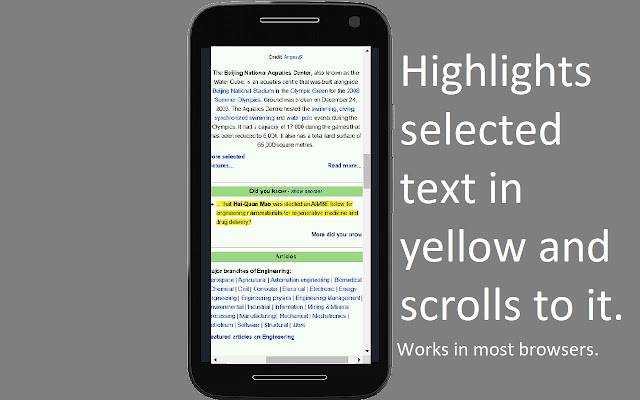
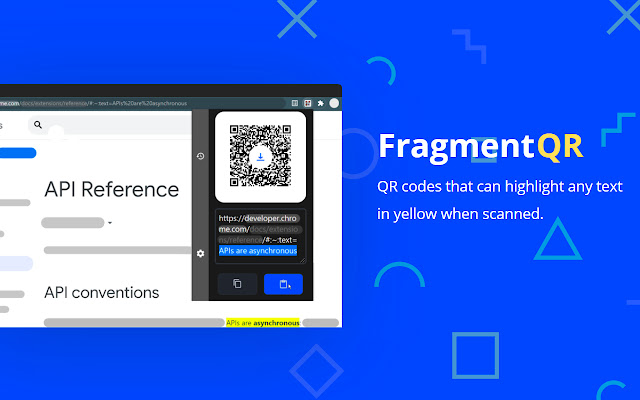
QR codes and links that highlight specific text on a webpage in yellow when opened.
Made by Yonah Aviv
changelog 1.8
- redesign
- history is initialized and will be activated next micro release (1.8.1)
- added micro interactions to download button and ripple effect to other buttons
- paste button will now auto generate a text fragment link using whatever text you entered in the textarea(experimental)
This is a beta release.
FragmentQR lets you share more relevant content, in 2 ways, each with different applications:
1) The link.
Relevant citations - Academia
• In your citations on your paper, you can highlight quotes you used from websites when your professor or colleagues click on the citation link.
• Minimize the time that is wasted from scrambling through other websites to find your citations and your professor may now spend more time on your actual paper.
Relevant sharing - Social Media/Messaging
• Share just the relevant parts of articles and posts by copying a text fragment link and make life easier.
----------------
2) The QR code.
FragmentQR codes
• What it is: QR codes that direct your customers/audience to contextual portions of text on any website
• Examples:
-Product marketing: Simple and intuitive instruction manual that has a Fragment QR code for each instruction/guidelines that link to the electronic manual and highlights the instructing in yellow.
-Engage your audience by integrating fragment QR codes in your PowerPoint presentations.
Other Features
- Automatically generate QR for current tab
- Save QR as a PNG
- Keyboard shortcuts
- Edit QR code in popup
- Functional utility buttons
- QR code can be made larger
- Clean and responsive design
Steps to use:
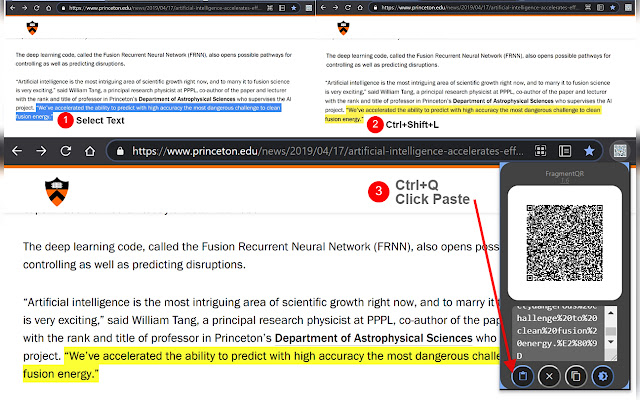
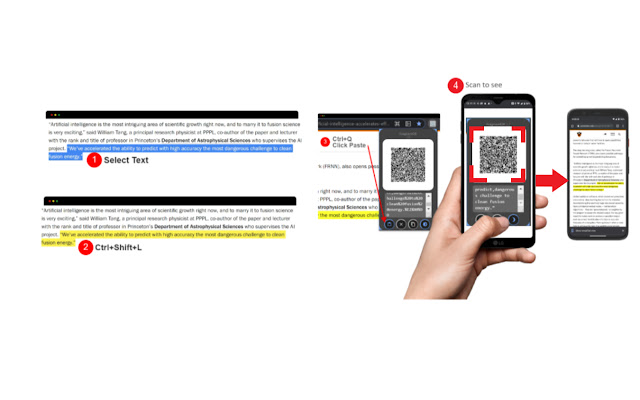
1. Select text
2. Right click and select "Copy text fragment. Next: Open Popup"
3. Click the extension toolbar icon to open the popup
4. Press the paste button at the bottom left of the toolbar popup
⌨ Shortcuts:
???? • Copy text fragment from selected text: Ctrl/⌘ + ⇑ + L
???? • Open QR popup: Ctrl/⌘ + Q
???? • Then press the paste button and scan.
Compatibility
Android: Google Chrome 85, Android WebView 81, Samsung Internet, (could be more)
Mac/Win/Linux: Microsoft Edge 83, Chrome 80, Opera 68
IOS: Works
Check out some similar extensions [made by other developers]:
1. Link to text fragment
2. STTF Url Generator
FragmentQR is 100% free with no ads!
Follow us on instagram:
@fragmentqr
⚒ You can view this projects source code on Github:
https://bit.ly/FQRrepository
Privacy policy
As the sdevelopewrs of FragmentQR, the browser extension, does not collect any personal identification information of users for personalization, analytics, tracking, or profit.
This project is licensed under the terms of the MIT license.
Copyright © 2021 Yonah Aviv
Extore is a team of professionals who are passionate about creating extensions for web browsers. This devotion also gives us opportunity to appreciate work of other people. We get inspired by useful, open source extensions made by developers all over the world. Our strong belief is that one should share helpful add-ons with others. That’s why we’d like to present you our ever-growing list of favourite extensions that have inspired us. Moreover, as you probably have already learned, sometimes struggling for the best brings an end to the good. Talking about add-ons it often turns out that an upgrade is worse then previous version. Also it can become really tricky to get back to the beloved version of your favourite extension. That’s why we’re going to make not only the latest, but all versions of our favourite (and we hope yours too) add-ons available for download. No more compromises, just stick to the version you really like!
 Preparing download link, please wait for seconds
Almost done...
Click to download
Error getting file. Please try again
Preparing download link, please wait for seconds
Almost done...
Click to download
Error getting file. Please try again







