
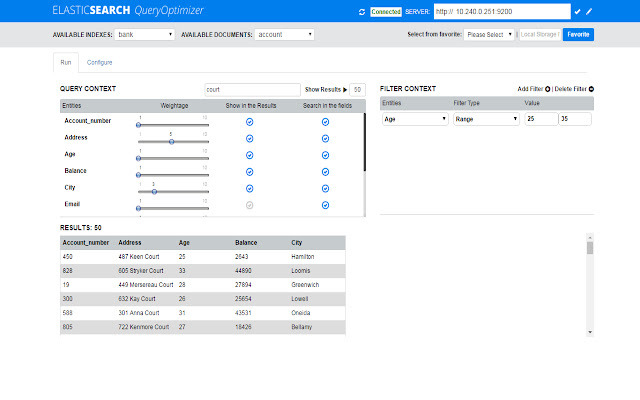

This chrome extension provides easy to use interface to configure different weightage and dynamically boost the search results for a selected fields.This will reduce the learning curve by giving Index settings and document mappings required to obtain the desired search results.It also builds the query for you to reduce the development time by running the same query in the ES and show you the result in the Result panel.
One can change the settings at run time to fine-tune the search results and save all the setting under favorite for later use.
Connecting to ElasticSearch Server :
Mention the host and port (10.240.0.251:9200) on which the ES is running and press the connect button .
Building the Query :
Once it is connects to the server, it will list all the Indexes and their corresponding document under the available Indexes and documents drop-down.
Select the document for which you want to build the query.Now,under the configure tab you can see list of all the fields of the selected document.
options under Configure Tab
Dynamic Score: It is used to boost a particular record from multiple matching records that has the value defined in the booster field in addition to the search keyword.
Search In Same order : This will give priority to the words that are found in the same order as oppose to be found in the same line in different order.
Special Characters : This will allow the search of a alpha numeric, camelCase, and words separated with special characters like (_,- etc).
Generate Query : Based on the selected options,it will dynamically generate the required Index setting,document mappings and build query.
Options under Configure Tab
Weightage: This is used to give a priority to a field ,if same word is found in multiple fields. The record having higher score for the given field will be given more priority and come at the top.
Filter: This is used to filter out the results received from query.If any filter is selected along with value ,only those records will be shown which fulfills filter criteria .
Filters like (must, range) can be added/deleted on different numeric fields by pressing on the +/- button
Show in the Results: This allow to configure the fields that ,one wants to see in the results You can choose number of result to be displayed along with the field that you want to see by default first five fields are shown. You can select any fields as per your requirement. The results of the query will be shown in a table.
Search in the Fields : This allow the user to select the document fields which should be searched for the given query.
Show Results: This button will take the words to be searched along with the maximum size of the results to be shown and build a dynamic query ,which is fired against the select document Index and it will fetch the result and show under the results panel.
Extore is a team of professionals who are passionate about creating extensions for web browsers. This devotion also gives us opportunity to appreciate work of other people. We get inspired by useful, open source extensions made by developers all over the world. Our strong belief is that one should share helpful add-ons with others. That’s why we’d like to present you our ever-growing list of favourite extensions that have inspired us. Moreover, as you probably have already learned, sometimes struggling for the best brings an end to the good. Talking about add-ons it often turns out that an upgrade is worse then previous version. Also it can become really tricky to get back to the beloved version of your favourite extension. That’s why we’re going to make not only the latest, but all versions of our favourite (and we hope yours too) add-ons available for download. No more compromises, just stick to the version you really like!
 Preparing download link, please wait for seconds
Almost done...
Click to download
Error getting file. Please try again
Preparing download link, please wait for seconds
Almost done...
Click to download
Error getting file. Please try again







