


version 2.10.0.21 - Download ZIP file
version 2.10.0.18 - Download ZIP file
version 2.9.0.4 - Download ZIP file
version 2.6.1.0 - Download ZIP file
version 2.5.1 - Download ZIP file
version 2.4.0.12 - Download ZIP file
version 2.3.0.12 - Download ZIP file
version 2.2.0.9 - Download ZIP file
version 2.2.0.6 - Download ZIP file
version 2.2.0 - Download ZIP file
version 2.1.0.14 - Download ZIP file
version 2.1.0.11 - Download ZIP file
version 2.1.0 - Download ZIP file
version 2.0.1 - Download ZIP file
version 2.0.0 - Download ZIP file
version 1.0.72 - Download ZIP file
version 1.0.71 - Download ZIP file
version 1.0.70 - Download ZIP file
version 1.0.69 - Download ZIP file
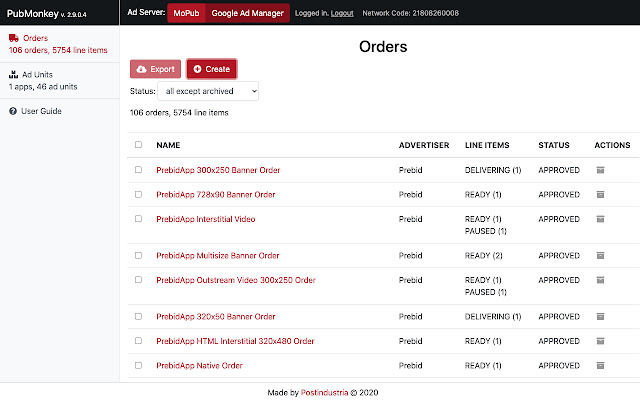
PubMonkey automates creation of Google Ad Manager and MoPub orders with hundreds of line items in seconds - doing all the “monkey job” instead of you! (hence the name). PubMonkey supports a number of header bidding / in-app bidding services. Please refer to the screenshot section to see the list of supported Header Bidding Services.
Full list of features:
✅ Export and Backup your orders configuration.
It exports order and all included line items settings to a JSON file so that you can store them locally and synchronize between your devices.
✅ Export ad sources for a particular ad unit (MoPub only).
You get a CSV export of the ad sources set up for a particular ad unit. This allows you to backup the configuration and compare it to the adjusted setup later.
✅ Import and Transfer your orders configuration.
Tune your orders even being offline by editing JSON file. Import it to any Mopub/GAM account in seconds. Same way you can restore pre-saved configuration.
✅ Create orders with granular line items.
Header bidding specifics requires a big set of similar line items that target a specific price niche. Do not waste hours on routine one-by-one operations! Let us do it for you.
✅ Duplicate orders easily.
Experiment with different granularity, advertisers, ad servers, ad units etc. making changes in the whole order, including all embedded line items.
✅ Multiply line items with custom settings.
Just make a template line item with custom settings and multiply it with one click. Thus, you will have a possibility to “play” with settings and organise monetization strategy.
✅ Perform a “health check” of your configuration and performance.
A note on permissions. The extension requests the following permissions:
"tabs",
"identity",
"webRequest",
"webRequestBlocking",
"https://app.mopub.com/*",
"https://ads.google.com/apis/*"
These are absolutely necessary to communicate with the MoPub or Google Ad Manager website opened in a separate tab. "tabs" permission translates into "Read your browsing history" human readable permission, but we don't access the actual history - we just access a MoPub/GAM tab.
Extore is a team of professionals who are passionate about creating extensions for web browsers. This devotion also gives us opportunity to appreciate work of other people. We get inspired by useful, open source extensions made by developers all over the world. Our strong belief is that one should share helpful add-ons with others. That’s why we’d like to present you our ever-growing list of favourite extensions that have inspired us. Moreover, as you probably have already learned, sometimes struggling for the best brings an end to the good. Talking about add-ons it often turns out that an upgrade is worse then previous version. Also it can become really tricky to get back to the beloved version of your favourite extension. That’s why we’re going to make not only the latest, but all versions of our favourite (and we hope yours too) add-ons available for download. No more compromises, just stick to the version you really like!
 Preparing download link, please wait for seconds
Almost done...
Click to download
Error getting file. Please try again
Preparing download link, please wait for seconds
Almost done...
Click to download
Error getting file. Please try again







