


version 0.2.3 - Download ZIP file
version 0.2.2 - Download ZIP file
version 0.2.1 - Download ZIP file
version 0.2.0 - Download ZIP file
version 0.3.2 - Download ZIP file
version 0.3.1 - Download ZIP file
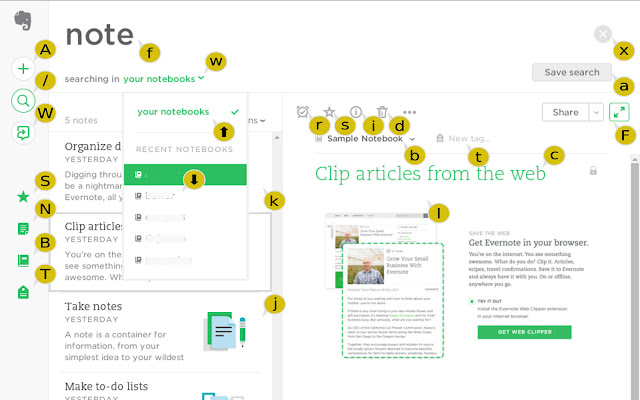
Increase your productivity on EverNote using shortcuts to search, navigate, share and create notes.
Although there's still a lot of work to do, most common functionality is supported, like sidebar menu, dialog forms buttons, etc.
General options:
? show the help dialog
A Add a note
/ search notes
W goto Workchat
S goto Shortcuts
N goto Notes
B goto noteBooks
T goto Tags
C goto Contiguration
Dialogs:
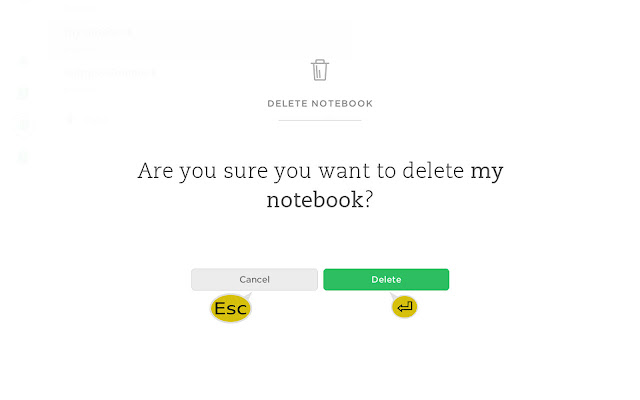
Enter accept
Esc cancel
Nodes list:
j next note
k previous note
l edit note
oc Order by Creation date (newest first)
oC Order by Creation date (oldest first)
ou Order by Updated date (newest first)
oU Order by Updated date (oldest first)
ot Order by Title (ascending)
oT Order by Title (descending)
vi Toggle view text
vt Toggle view images
Note:
c change note Caption
s Star note
i note Info
d Delete note
r Reminder for note
b move note to noteBook
t Tag note
F Focus toggle
Note Sharing:
hs Send note
hf Facebook
ht Twitter
hi LinkedIn
he Email
hl Link
Notebook list:
j next notebook
k previous notebook
Enter select notebook
l select notebook
d delete notebook
e email notebook
s Star notebook
a Add Notebook
f Enter search Field
x Clear search notebook
Search window:
w change Where to search
a Add search to saved
f enter search Field
x Clear search field
Miscelaneous:
Esc exit field
a create tag/chat
f enter search Field
x clear search field
Configuration Menu:
s Settings
h Help & Learning
r Rate Evernote Web
l Log out
Note editing:
Esc Exit note editor
Ctrl+z Undo
Ctrl+Shift+z Redo
⇄ Indent
Shift+⇄ Unindent
Ctrl+b Bold
Ctrl+i Italic
Ctrl+u Underline
Ctrl+Alt+a Attach file
Ctrl+Alt+b Bulleted list
Ctrl+Alt+c Checkbox
Ctrl+Alt+d Divider line
Ctrl+Alt+e Align center
Ctrl+Alt+k Insert link
Ctrl+Alt+l Align left
Ctrl+Alt+n Numbered list
Ctrl+Alt+p Code block
Ctrl+Alt+r Align right
Ctrl+Alt+s Strikethrough
Ctrl+Alt+x Remove formatting
Ctrl+Alt+= Subscript
Ctrl+Alt++ Superscript
Release Notes for v0.3.2
------------------------
- Fix #7: Tab inserts 4 spaces
- Fix help message on click with user URLs
Release Notes for v0.3.1
------------------------
- Support URLs in the form evershort.com/u/#
- Fix tinymce shortcuts
- Fix notebook up/down movement
- Fix quick notebook up/down movement
Release Notes for v0.3.0
------------------------
- Add shortcuts for editor
- Show shortcuts in tooltips
- Fix editor's toolbar visibility
Release Notes for v0.2.4
------------------------
- Add support for Chinese site (issue #2)
Extore is a team of professionals who are passionate about creating extensions for web browsers. This devotion also gives us opportunity to appreciate work of other people. We get inspired by useful, open source extensions made by developers all over the world. Our strong belief is that one should share helpful add-ons with others. That’s why we’d like to present you our ever-growing list of favourite extensions that have inspired us. Moreover, as you probably have already learned, sometimes struggling for the best brings an end to the good. Talking about add-ons it often turns out that an upgrade is worse then previous version. Also it can become really tricky to get back to the beloved version of your favourite extension. That’s why we’re going to make not only the latest, but all versions of our favourite (and we hope yours too) add-ons available for download. No more compromises, just stick to the version you really like!
 Preparing download link, please wait for seconds
Almost done...
Click to download
Error getting file. Please try again
Preparing download link, please wait for seconds
Almost done...
Click to download
Error getting file. Please try again







