
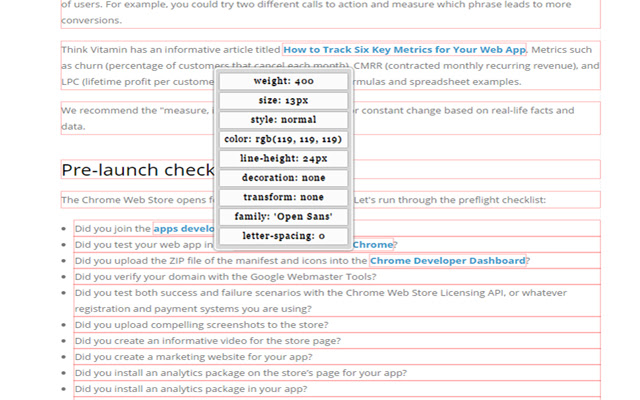


An extention to show/inspect text fonts in webpages.
Show in page the following informations:
* font size;
* font weight;
* font main family;
* font style;
* font color;
* line height;
* font decoration;
* font transformation;
* letter spacing;
Right-click contextual menu!
An option to hide contextual menu!
An option to show on mouse-over all the infos on the font or single info.
For any problem or bug open a ticket on the support tab, i will answer as soon as possible.
====Possible problem====
Case not on hover:
* If text is inside nested overflow:hidden element the popup will be hidden
* If your element have some overflow this pugin will override them with overflow:visible than it will revert them when turn off.
* If there are async element you should re-launch.
====Change Log====
* 4.0.0 : review graphics, removed contestual menu "showAlways", now on click the popup will appear, and add option page to toggle contextial
* 3.2.4 : resetting others contextual menus on page reload
* 3.2.1 : resetting contextual menu on page reload
* 3.2.0 : change radio button to checkbox in contextual menu and code review
* 3.1.0 : font change
* 3.0.0 : Restyle and code refactoring, add some other option and right-click menu single info
* 2.1.0 : refactoring code
* 2.0.0 : Add right-click contextual menu that will show all fonts info on mouse hover, add option to prevent click to the left-click, clicking a text save the info on a right panel if "select on click" is enabled, add letter spacing to the list
* 1.7.0 : resolved some problem with overlapping elements
* 1.6.0 : add line height to the list
* 1.5.0 : resolved problem with override position "relative" and "absolute" of the plugin, now if text is in relative or absolute the style will not change
* 1.4.9 : added IT localization for web store
* 1.4.7 : small restyle
* 1.4.6 : resolved over problem on nested text elements
Extore is a team of professionals who are passionate about creating extensions for web browsers. This devotion also gives us opportunity to appreciate work of other people. We get inspired by useful, open source extensions made by developers all over the world. Our strong belief is that one should share helpful add-ons with others. That’s why we’d like to present you our ever-growing list of favourite extensions that have inspired us. Moreover, as you probably have already learned, sometimes struggling for the best brings an end to the good. Talking about add-ons it often turns out that an upgrade is worse then previous version. Also it can become really tricky to get back to the beloved version of your favourite extension. That’s why we’re going to make not only the latest, but all versions of our favourite (and we hope yours too) add-ons available for download. No more compromises, just stick to the version you really like!
 Preparing download link, please wait for seconds
Almost done...
Click to download
Error getting file. Please try again
Preparing download link, please wait for seconds
Almost done...
Click to download
Error getting file. Please try again







