



For a more easily readable description please visit:
https://github.com/peterdotjs/quick-find
****
Change Log:
0.0.12 - Added ability to change default shortcut keys
0.0.11 - Fixed issue where search is broken in Chrome 40.
Motivation
--------------------
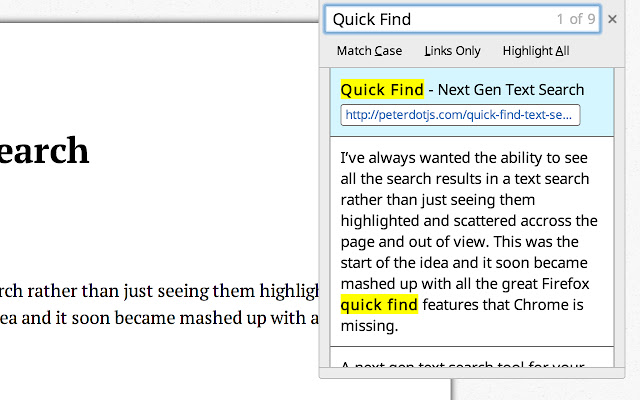
I’ve always wanted the ability to see all the search results in a text search rather than just seeing them highlighted and scattered across the page and out of view. This was the start of the idea and it soon became mashed up with all the great Firefox quick find features that Chrome is missing.
If you like it please rate it and if you have any feature requests, questions or bugs you file it here:
https://github.com/peterdotjs/quick-find/issues
Demo
------------
https://www.youtube.com/watch?v=x2PEyTyJ6iM
Description
--------------------
Next generation text search. A new text search tool for your Chrome web page. Start a search and simply press enter/return on a highlighted link and you’ll instantly navigate to that page. A mashup of Firefox quick find features (case match, links only search, highlight all, search selected text) as well as awesome new ones (scroll/navigate through all search results with context) - brought to Chrome.
SHORCUT KEYS
---------------------------
Getting started
-----------------------------
/ or ctrl + shift + f : forward slash or ctrl+shift+f will open Quick Find menu
' : single quote key will open Quick Find menu in links mode (only links are searched)
esc : escape key will close Quick Find menu
Menu navigation
-------------------------------
↑ or ↓ : navigate results by using up or down arrow keys
enter or return : pressing enter on highlighted menu with link will navigate to the link
Search Options
-----------------------------
alt + a : toggle highlight all results mode
alt + c : toggle match case mode
alt + l : toggle links mode
Tips
-------------------
Quick Find search box is pre-populated with any selected/highlighted text prior to opening the search menu.
Toggle occurs only when cursor focus is on the Quick Find menu.
Limitations
-------------------------
Extension only works on sites that allow content scripts. The chrome webstore page itself for example doesn't even allow content scripts to be run.
After you've installed it make sure you are using it on a newly loaded or refreshed page. The script won’t be loaded on existing tabs without a refresh.
Quick find does not search through iframes, script, or code html elements.
When results show up in same html element, will be shown only as one result.
Other website shortcuts or extensions may conflict with these shortcuts. A future enhancement can be to select your own shortcuts to open the menu.
Additional Notes
-------------------------------
Anonymous page view tracking is used to improve the extension and user experience. You can opt out in the options menu.
Chrome is a trademark of Google Inc. Use of this trademark is subject to Google Permissions.
Extore is a team of professionals who are passionate about creating extensions for web browsers. This devotion also gives us opportunity to appreciate work of other people. We get inspired by useful, open source extensions made by developers all over the world. Our strong belief is that one should share helpful add-ons with others. That’s why we’d like to present you our ever-growing list of favourite extensions that have inspired us. Moreover, as you probably have already learned, sometimes struggling for the best brings an end to the good. Talking about add-ons it often turns out that an upgrade is worse then previous version. Also it can become really tricky to get back to the beloved version of your favourite extension. That’s why we’re going to make not only the latest, but all versions of our favourite (and we hope yours too) add-ons available for download. No more compromises, just stick to the version you really like!
 Preparing download link, please wait for seconds
Almost done...
Click to download
Error getting file. Please try again
Preparing download link, please wait for seconds
Almost done...
Click to download
Error getting file. Please try again







