

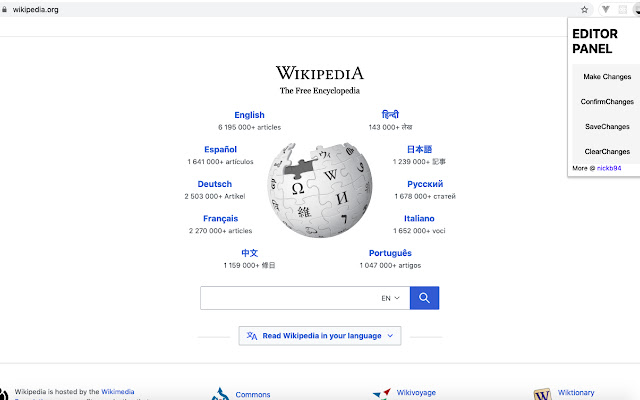

This Google Chrome extension allows every visitor(with Tweak installed) to tweak or edit the data on a webpage. These tweaks can be saved against accidental refreshes and reset if user required to see original webpage.
In a designer-developer ecosystem, web-designers need to tweak a lot of small and big contents over a webpage. We(the developers) needed a way to allow our designer peers (and also a generic user) to make changes over a hosted webpage to see the influence at the shortest amount of time, and decrease feedback process timings. The Tweak extension allows web-designers to change and save a state of a webpage, as and how it is required as per designs. This makes the community more bonded and promotes a healthy culture.
Installing this extension, users especially designers find it way easier to point out ways to improve a hosted webpage by changing content, save against a refresh and clearing as and when they require it from their local systems(localStorage).This extension not only works over https but also localhost ports and privately hosted webpages, so it can be used by anyone and everyone in the industry.
Moreover, people want the power to change content on a webpage so often and they wish what if the banner was a little bit to the right or left, this extension makes it possible for that user to do the changes in realtime also get the changes back with a refresh, moreover if they want to reset everything as it was, clear changes option allows them to do the same. We developed this extension to enable users tweak the webpages contents according to their wish, see the content again against successive refreshes, and clear changes if at all they don't like it.
The extension gets activated on every tabs refresh action, on a refresh, the functionality turns on the design mode (document.designMode = 'on') and allows user to make changes to the webpage as and how required, after making changes extension allows to confirm changes in order to turn off the design mode(clicking confirm changes turns off the design mode; document.designMode = 'off'). Now the user have an option to save the changes done on entire page after confirmation. This is achieved by usage of localStorage. The innerHTML of the entire webpage is stored on the localStorage of browser in a Stringified JSON format. This same or changed JSON string is retrieved from localStorage on subsequent refreshes unless ClearChanges is clicked, by which localStorage is cleared using the .clear() function. On a refresh, extension take string from the key puts it over the DOM structure as inner HTML showing the webpage as influenced.
Extore is a team of professionals who are passionate about creating extensions for web browsers. This devotion also gives us opportunity to appreciate work of other people. We get inspired by useful, open source extensions made by developers all over the world. Our strong belief is that one should share helpful add-ons with others. That’s why we’d like to present you our ever-growing list of favourite extensions that have inspired us. Moreover, as you probably have already learned, sometimes struggling for the best brings an end to the good. Talking about add-ons it often turns out that an upgrade is worse then previous version. Also it can become really tricky to get back to the beloved version of your favourite extension. That’s why we’re going to make not only the latest, but all versions of our favourite (and we hope yours too) add-ons available for download. No more compromises, just stick to the version you really like!
 Preparing download link, please wait for seconds
Almost done...
Click to download
Error getting file. Please try again
Preparing download link, please wait for seconds
Almost done...
Click to download
Error getting file. Please try again







