

Turbo charge your admin power during code deployments! Boost your productivity with this google chrome change set helper extension!
*** Version 2.2 (Bugfix & UI Label Changes)****
1. Fixed bug: If record type is included then All option doesn't work in view mode
2. Fixed bug: Show All Components in edit mode is limited to 1000 records per page. Updated the link label to "Show More Components on Page".
*** Version 2.1 (New & Improved) ****
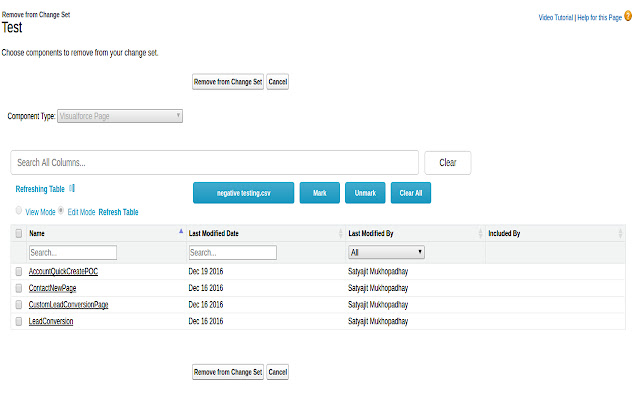
1. New ajaxified interface for adding as well as removing components.
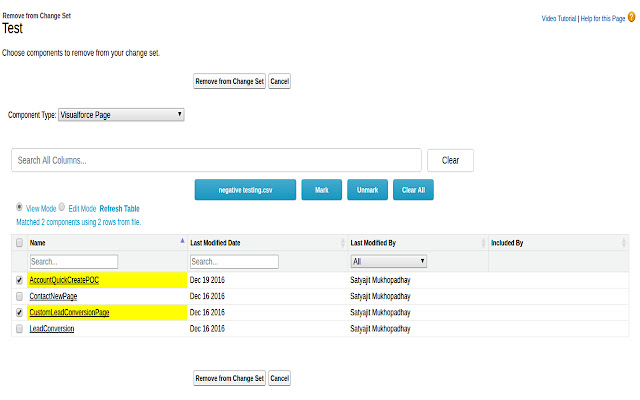
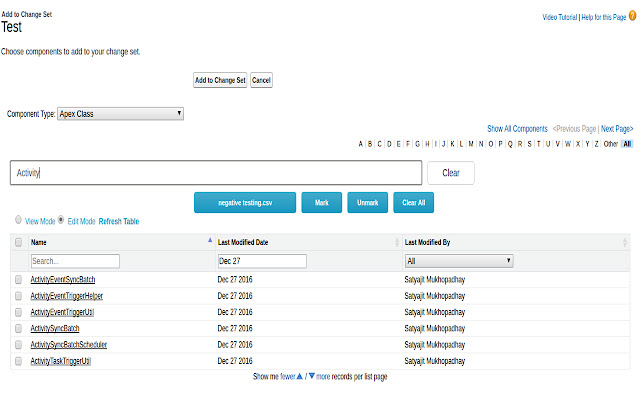
2. Introduced "view" and "edit" mode for removing/ adding components respectively. Everything can be done from a single screen and without page reload!
3. View last modified date, last modified by, report folder name.
4. Search/ sort/ group by individual columns as well as search globally.
5. Remove multiple components by selecting manually or uploading CSV.
6. Matching columns are highlighted in yellow. Removed restriction where number of CSV columns should match with number of columns on screen.Only requirement is all CSV columns should be visible on screen and should match.
7. Configure different options to suit your need.
...
and many more improvements. Visit extenstion options page for complete list.
*** Version 1.5.3 ****
1. Fixed issue of incorrect generation of unmatched rows CSV file when there are duplicates in the original csv
*** Version 1.5.2 ****
1. View field and object API names when "Custom Field" is selected from the Component Type dropdown!
2. Filter by object API name when viewing custom fields!
3. Upload a CSV file of components and let this extension automatically match and mark components at once. Please note that all CSV header columns should be visible in the current screen. Column names are case-insensitive and should not necessarily be in the same order as displayed in the current screen. Rows which couldn't be matched can be downloaded using "Download unmatched rows" link.
4. Real time search for all displayed columns!
5. View all records at once instead of having to click on "Show More" or "Next Page" multiple times.
Extore is a team of professionals who are passionate about creating extensions for web browsers. This devotion also gives us opportunity to appreciate work of other people. We get inspired by useful, open source extensions made by developers all over the world. Our strong belief is that one should share helpful add-ons with others. That’s why we’d like to present you our ever-growing list of favourite extensions that have inspired us. Moreover, as you probably have already learned, sometimes struggling for the best brings an end to the good. Talking about add-ons it often turns out that an upgrade is worse then previous version. Also it can become really tricky to get back to the beloved version of your favourite extension. That’s why we’re going to make not only the latest, but all versions of our favourite (and we hope yours too) add-ons available for download. No more compromises, just stick to the version you really like!
 Preparing download link, please wait for seconds
Almost done...
Click to download
Error getting file. Please try again
Preparing download link, please wait for seconds
Almost done...
Click to download
Error getting file. Please try again







