


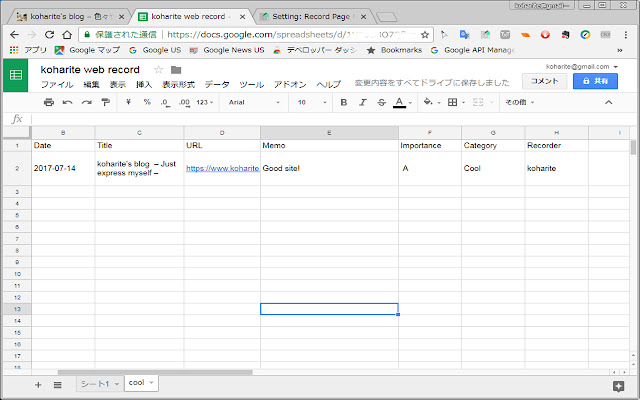
現在見ているWebページについて、Google Spread Sheetに分類・コメントを付与して記録することができます。
この拡張機能アイコンをクリックする前にWebページ上で選択していたテキストは、Memo欄にコピーされます。
使い始める前に設定をしてください。
1. 記録先のGoogle Spread Sheetを用意する
2.拡張機能の「オプション」ページの設定
2.1 記録先のGoogle Spread SheetのIDを入力する。
下のようなアドレスの[spread sheet ID]部分
https://docs.google.com/spreadsheets/d/[spread sheet ID]/edit
2.2 この拡張機能がSpread Sheetにアクセスできるようにユーザー認証を行う。
2.3 (オプション)記録者情報を与える
(オプション)Spread Sheetのワークシートごとにカテゴリを分けて記録できるようにリンク付けする。
English Explanation:
This extension send viewing web page information with your comment to your Google Spread Sheet.
Selected text on web page copy to Memo section of this extension.
Please setup before using the extension.
1. Prepare your Google Spread Sheet for record
2. Configure this Extension option page
2.1 Enter your Google Spread Sheet's ID for record
Spread Sheet's ID is in your Spread Sheet address such as example below. [spread sheet ID] part is your Spread Sheet's ID.
https://docs.google.com/spreadsheets/d/[spread sheet ID]/edit
2.2 User authenticate to permit this extension accessing your Spread Sheet.
2.3 (Optional)Add recorder Information.
(Optional)Link Spread Sheet's worksheets to Category name that you entered.
Extore is a team of professionals who are passionate about creating extensions for web browsers. This devotion also gives us opportunity to appreciate work of other people. We get inspired by useful, open source extensions made by developers all over the world. Our strong belief is that one should share helpful add-ons with others. That’s why we’d like to present you our ever-growing list of favourite extensions that have inspired us. Moreover, as you probably have already learned, sometimes struggling for the best brings an end to the good. Talking about add-ons it often turns out that an upgrade is worse then previous version. Also it can become really tricky to get back to the beloved version of your favourite extension. That’s why we’re going to make not only the latest, but all versions of our favourite (and we hope yours too) add-ons available for download. No more compromises, just stick to the version you really like!
 Preparing download link, please wait for seconds
Almost done...
Click to download
Error getting file. Please try again
Preparing download link, please wait for seconds
Almost done...
Click to download
Error getting file. Please try again







