

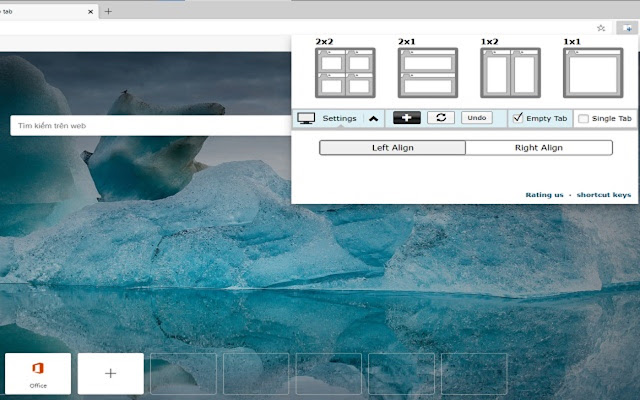
This extension splits your browser windows into two with just 2 clicks.
The ratio of the windows can be adjusted according to your needs.
This extension is great for presenters who need to use Google Meet/Zoom and need to split their screen so that they can see their presentation & also see the faces of their students/attendees of the Google Meet call.
Most of our users are on hangouts meet and want to see the faces of the attendees while they are doing screen sharing.
This extension/feature is great for teachers who are teaching online classes at the moment. You can monitor your students via "Grid Mode in Google Meet" on one tab and do "screen sharing" in another Chrome tab which contains your teaching materials.
Split the current browser window into a pair so it acts like a dual monitor setup. Try dualless mode today using this extension. Our software works well with google hangouts meet
Permissions Required - Please note we do NOT read your browsing data, the only reason we use the browsing tabs permission is to allow the software extension to split your current Chrome Browser Windows into 2+ windows.
This extension is useful for users who do not have dual monitors and want to split their browser windows into different sections, mainly when you're on a call using google meet app
To begin using the software, simply do the following
1) Install our software extension
2) Click on the extension icon
3) Choose the layout ratio you wish to use for this split screen extension
4) Our software will split screen and display the browser into the split screen ratio you selected
If you have any feedback for us for our extension which is meant to work with google video conference, please contact us.
Disclaimer: Please note this extension is NOT made by Google and is made by an independent development team. All copyrights belong to their respective owners. Google doesn’t endorse or sponsor this Chrome extension. Split Screen is not owned by, it is not licensed by and is not a subsidiary of Google Inc.
Extore is a team of professionals who are passionate about creating extensions for web browsers. This devotion also gives us opportunity to appreciate work of other people. We get inspired by useful, open source extensions made by developers all over the world. Our strong belief is that one should share helpful add-ons with others. That’s why we’d like to present you our ever-growing list of favourite extensions that have inspired us. Moreover, as you probably have already learned, sometimes struggling for the best brings an end to the good. Talking about add-ons it often turns out that an upgrade is worse then previous version. Also it can become really tricky to get back to the beloved version of your favourite extension. That’s why we’re going to make not only the latest, but all versions of our favourite (and we hope yours too) add-ons available for download. No more compromises, just stick to the version you really like!
 Preparing download link, please wait for seconds
Almost done...
Click to download
Error getting file. Please try again
Preparing download link, please wait for seconds
Almost done...
Click to download
Error getting file. Please try again







