


version 1.3.0 - Download ZIP file
version 1.2.2 - Download ZIP file
version 1.2.0 - Download ZIP file
version 1.1.0 - Download ZIP file
version 1.0.1 - Download ZIP file
version 1.6.2 - Download ZIP file
Save images, web content and screen capture to FileCloud (#1 Self-hosted Enterprise File Sharing and Sync Solution)
The Save to FileCloud Chrome extension helps users to save web content and screen captures to FileCloud.
* Adds a browser action to save the current page.
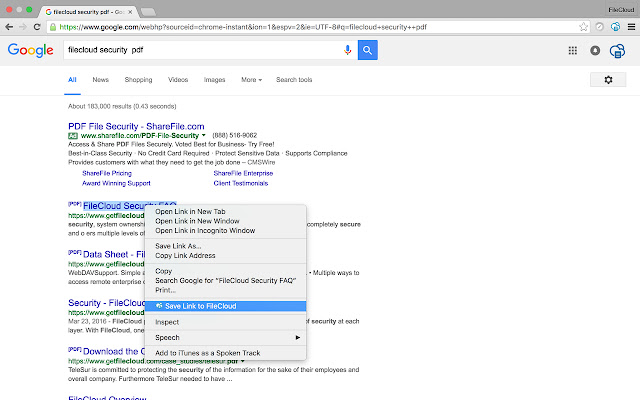
* Adds a right-click context menu to save hyperlinks, files, images and media.
This extension allow you to save web content directly to FileCloud through a browser action or context menu. You can save documents, images and media by right clicking and selecting 'Save to FileCloud'. You can also save the entire page as screenshot.
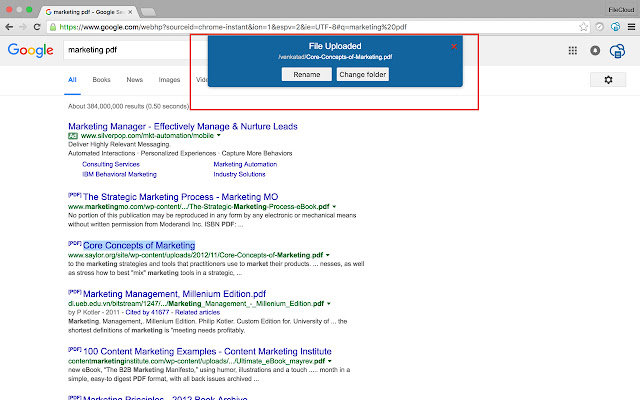
After your content is saved, the progress dialog allows you rename the file or change the target folder location.
FileCloud is the leading, self-hosted file sharing, sync and mobile access for Businesses. FileCloud client apps are available for all the desktop and mobile operating systems ( Windows, Mac , Linux, iOS, Android and Windows Phone 8). Our 5 star rated mobile apps provide secure access to organization content from anywhere. In addition to file sharing and sync, FileCloud also provides endpoint backup, data leak prevention (DLP) and HIPAA compliant auditing. FileCloud can be completely customized to reflect your organization brand: company logo and run FileCloud under your own domain.
FileCloud's unique capabilities to monitor, prevent, and fix data leakage assure corporate data is protected across all your devices (Laptops, Desktops, Smartphones and Tablets). FileCloud can save you over 10,000 USD for 100 user licenses when compared to the similar enterprise file share and sync products. FileCloud is currently used by more than 1000 businesses across 35 countries including world's leading Universities, Research organizations, Government entities and Enterprises.
By installing this item, you agree to the FileCloud Terms of Service and Privacy Policy at https://www.getfilecloud.com/.
Release Notes:
### 1.6 ###
Support for Team Folders
### 1.5 (1/17/2016)
FileCloud v14 support
### 1.3 (10/19/2016)
minor fixes and new Options page
### 1.2.2 (2016.08.31)
- Escape DateTime name (last Chrome changes)
### 1.2.1 (2016.08.27) - not published
- Show loader wheel when loading fileList
- Indicate Connect process (loader, hide button)
- Better name parsing for images
- Fix wrong window error when taking screenshot from popup (can appear when a few browser windows was opened)
- Do not duplicate extension options page if already opened
- Hide status badge (or folder choose if opened) on `ESC` key pressed
- Minor styles changes
- Minor optimizations
v 1.2.0
- Link to the `Options page` on the `Status Badge` (Down/Up/Error/Status container on the top of the page)
- Bug fixes and UI improvements
Extore is a team of professionals who are passionate about creating extensions for web browsers. This devotion also gives us opportunity to appreciate work of other people. We get inspired by useful, open source extensions made by developers all over the world. Our strong belief is that one should share helpful add-ons with others. That’s why we’d like to present you our ever-growing list of favourite extensions that have inspired us. Moreover, as you probably have already learned, sometimes struggling for the best brings an end to the good. Talking about add-ons it often turns out that an upgrade is worse then previous version. Also it can become really tricky to get back to the beloved version of your favourite extension. That’s why we’re going to make not only the latest, but all versions of our favourite (and we hope yours too) add-ons available for download. No more compromises, just stick to the version you really like!
 Preparing download link, please wait for seconds
Almost done...
Click to download
Error getting file. Please try again
Preparing download link, please wait for seconds
Almost done...
Click to download
Error getting file. Please try again







