


version 1.11.0 - Download ZIP file
version 1.10.2 - Download ZIP file
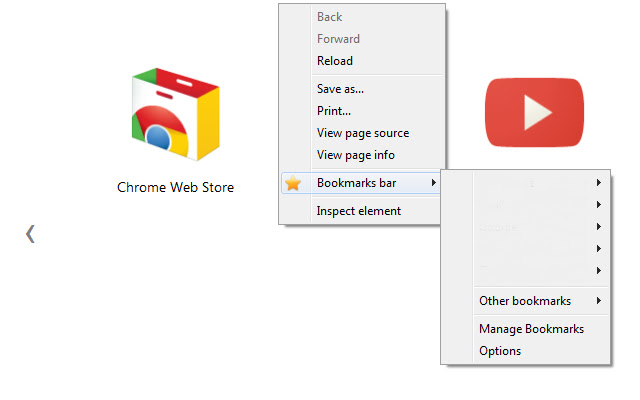
Add an entry in your contextual menu, allowing you to access quickly to your bookmarks.
You can search for a bookmarks folder and open all its content directly in the omnibox: type 'f' followed by a space to start your search.
And more:
- Javascript bookmarks!
- Choose which folder to display in the context menu!
- Quickly add a bookmark from the context menu!
- Open all the bookmarks from a folder with the right click button!
Sadly it's impossible to display the favicons... So, unnamed bookmarks are replaced by their URL.
Especialy usefull in "fullscreen" mode or if you hide the bookmarks bar to gain some screen space.
---------------------------------------------------------
Changelog:
1.12.0
- The menu is displayed everywhere in chrome
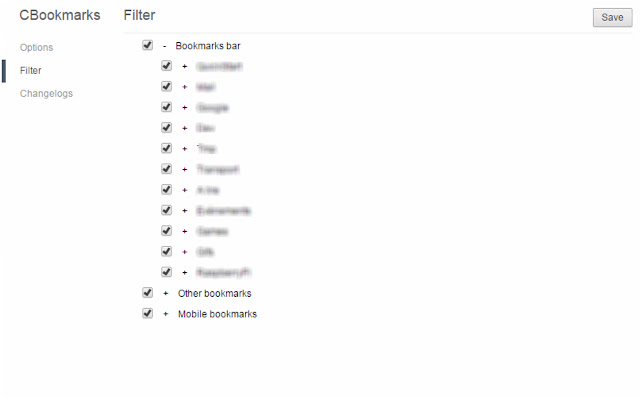
- Behaviour of the Filter page reworked: It will allow you to display only one folder
1.11.0
- New option: "Apps" - You can now access the Apps tab from your context menu
1.10.2
- Options: Partial compatibility with the new option page format
1.10.1
- Bugfix: Couldn't open link and folder
1.10.0
- New option: "Filter" - You can choose which folder to display in the context menu
1.9.0
- Bookmarks without names are displayed with their URL
- Bookmarks with javascript are now called properly
- New option: "Add Bookmark" - You can now add a bookmark in any folder from your context menu
1.8.2
- Bugfix: Omnibox: can't open links and folders
1.8.1
- Bugfix: Options: Bad text id
1.8.0
- Options: nice option page, nicely integrated in chrome (thanks to chrome-bootstrap)
1.7.2
- Bugfix: Omnibox: Results are not displayed
1.7.1
- Manifest v2.0
- Options page compatibility update
1.7.0
- Bugfix: Omnibox: Selecting an item doesn't open the associated bookmarks
- Bugfix: Omnibox: Paths of the bookmarks folders are innacurate
- New: Omnibox: Links are also searched and appened to the result list
- New option: Omnibox: Open links in new tabs
- New option: Omnibox: Open the new tabs in background
- Bugfix: menu disappears after a change in the "Options" page
1.6.0
- Added an omnibox shortcut "f" to search and open folders
1.5.1
- Bugfix: Continuously refreshing when adding multiple bookmarks at the same time
1.5.0
- Added a button to reverse the order of changelogs
- Bugfix: Adding multiple bookmarks at the same time create duplicate contextual menus
- New option: Display the "Manage bookmarks" menu item
- Clicking the name of an option will check the box
- Added support for localization (currently supported langage are english and french)
1.4.0
- New option: Right click on a folder opens all the links
- New option: Open the new tabs in background
1.3.0
- UI improvments for the option page
- Changing an option saves only this option (and not all the options each time)
- New option: Display the "Refresh" menu item
- New option: Display the "Options" menu item
1.2.0
- Added changelogs to the option page
- Added an "Options" button in the context menu
- Added a "Refresh" button in the context menu
- New option: Refresh the menu when bookmark changes are detected
- Added default values for the options (only first install and new options will be affected)
1.1.0
- Added an option page
- New option: open in a new tab
- New option: open the tab in background
1.0.0
- Initial release
Extore is a team of professionals who are passionate about creating extensions for web browsers. This devotion also gives us opportunity to appreciate work of other people. We get inspired by useful, open source extensions made by developers all over the world. Our strong belief is that one should share helpful add-ons with others. That’s why we’d like to present you our ever-growing list of favourite extensions that have inspired us. Moreover, as you probably have already learned, sometimes struggling for the best brings an end to the good. Talking about add-ons it often turns out that an upgrade is worse then previous version. Also it can become really tricky to get back to the beloved version of your favourite extension. That’s why we’re going to make not only the latest, but all versions of our favourite (and we hope yours too) add-ons available for download. No more compromises, just stick to the version you really like!
 Preparing download link, please wait for seconds
Almost done...
Click to download
Error getting file. Please try again
Preparing download link, please wait for seconds
Almost done...
Click to download
Error getting file. Please try again







