
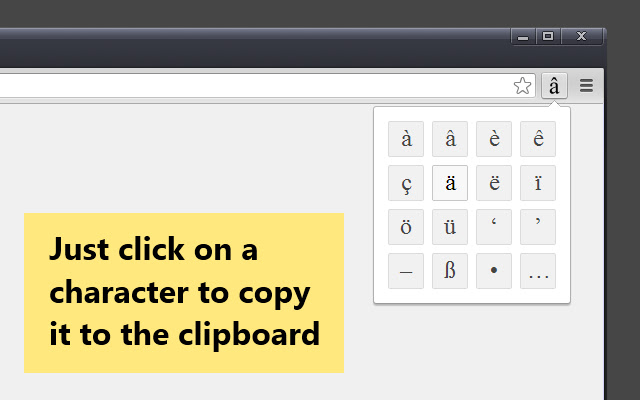


Typing in accented letters or special characters on a PC keyboard is a pain in the neck. This simple Chrome extension aims to make that task slightly easier.
The extension button displays a four-by-four grid of characters. Clicking on a character copies it to the clipboard. Pressing the shift key does what you would expect: it toggles the grid between lowercase and uppercase letters.
You can also use the keyboard to copy characters to the clipboard. The keys 1-4, Q-R, A-F and Z-V correspond to the grid characters in the obvious manner. Chrome allows you to assign a keyboard shortcut to the extension itself: just go to the bottom right hand corner of the Extensions page and follow the link.
The options page lets you customise the choice of characters in the grid. The defaults are set up for common French and German letters, plus a few extras such as smart quotes and dashes.
I haven't included acute accents in the default setup since these can be typed in directly on US and UK keyboards. For instance, Ctrl + Alt + E gives you an E with an acute accent. Macs have a rich variety of keyboard shortcuts for accents built in, rendering this extension somewhat redundant. It should still work though!
Comments, bug reports and suggestions for improvement are very welcome. You can email me on [email protected] or contact me on Twitter at @bat020.
Extore is a team of professionals who are passionate about creating extensions for web browsers. This devotion also gives us opportunity to appreciate work of other people. We get inspired by useful, open source extensions made by developers all over the world. Our strong belief is that one should share helpful add-ons with others. That’s why we’d like to present you our ever-growing list of favourite extensions that have inspired us. Moreover, as you probably have already learned, sometimes struggling for the best brings an end to the good. Talking about add-ons it often turns out that an upgrade is worse then previous version. Also it can become really tricky to get back to the beloved version of your favourite extension. That’s why we’re going to make not only the latest, but all versions of our favourite (and we hope yours too) add-ons available for download. No more compromises, just stick to the version you really like!
 Preparing download link, please wait for seconds
Almost done...
Click to download
Error getting file. Please try again
Preparing download link, please wait for seconds
Almost done...
Click to download
Error getting file. Please try again







