


Automatically insert media into live posts or pages
The purpose of WP Grab and Attach is to automatically upload media into your WordPress Media Library, and attach it to live posts or pages.
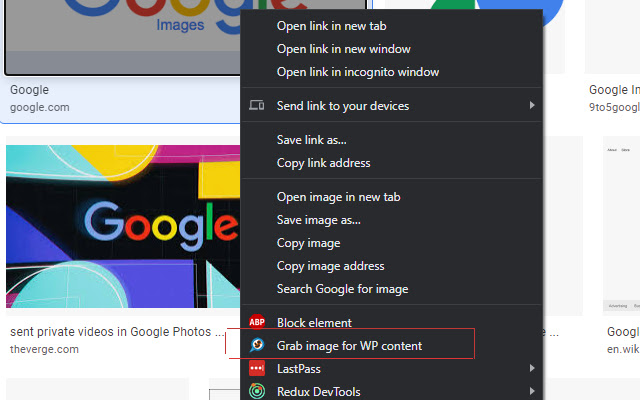
This is a companion Chrome extension, necessary for the "WP Grab and Attach" WordPress plugin. This extension allows for modification to the right-click (context) menu, plus other options. Once activated, you can right-click on images, select "WP Grab and Attach." A dialog will appear, and if extension's setup is correct, you can type in a post (or page) title in an auto-fill box. Then use the Down arrow to highlight your selection, and the Enter button to select your post. If successful, a success message will appear, and the image will be saved your WordPress Media Library. Let's not forget the best part, the image is attached to your live post (or page)!
Currently, all that can be uploaded and attached are images from the Chrome browser. That will change in future versions. We will add the ability to grab and attach various media types and offer an extension on other browsers.
PLEASE NOTE: Once installed, it is necessary to set the WordPress database password and domain value in the extension options. Example: google.com - All other options are not required. There will be an link to the Chrome extension options from the presented dialog.
We DO NOT save your information to our servers. Your information is only saved on your local computer.
If there's an issue connecting to your WordPress installation, make sure in Advanced Settings, the directory/path is set correctly. Sometimes WordPress installations will be installed in a child path from of root, e.g., public_html/wpress/<WordPress files>. In this given case, the value entered into the path field in options would be: wpress/ -- Note: do not begin with a '/', but DO end with a '/'.
Feel free to drop me a line with any questions: [email protected]
Extore is a team of professionals who are passionate about creating extensions for web browsers. This devotion also gives us opportunity to appreciate work of other people. We get inspired by useful, open source extensions made by developers all over the world. Our strong belief is that one should share helpful add-ons with others. That’s why we’d like to present you our ever-growing list of favourite extensions that have inspired us. Moreover, as you probably have already learned, sometimes struggling for the best brings an end to the good. Talking about add-ons it often turns out that an upgrade is worse then previous version. Also it can become really tricky to get back to the beloved version of your favourite extension. That’s why we’re going to make not only the latest, but all versions of our favourite (and we hope yours too) add-ons available for download. No more compromises, just stick to the version you really like!
 Preparing download link, please wait for seconds
Almost done...
Click to download
Error getting file. Please try again
Preparing download link, please wait for seconds
Almost done...
Click to download
Error getting file. Please try again







