
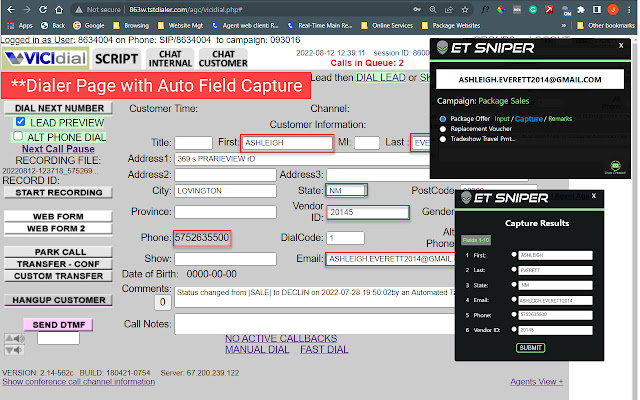


ET Sniper allows you to send pre-constructed Email and Text messages from any webpage by simply clicking on an email address or phone number. You can easily create an unlimited number of messages (including full HTML emails), manage them within campaigns, and make them available throughout your organization for Users to quickly and easily access.
ET Sniper messaging includes powerful personalization features such as:
User Input Fields, where you define fields that will appear in a popup when the message is selected that the User will complete in order to send it. Great for proposals, quotes, and other types of messages where data is obtained from conversations with your customer.
Field Capture Groups, which allow you to define fields, easily map them to your web-based applications such as a dialer or CRM, and capture the data automatically when the message is selected. Users can view the results of the capture before sending the message and edit or change data if necessary. Field Capture is also available for messages initiated from Google Sheets through a one-step copy-and-paste process that creates the Group and mapping.
Personal Remark, which can be selected for any message and allow the User to enter a personal message that can be included in the pre-built Email or Text message.
All data acquired through the Personalization features are stored as part of the message record and can be used within the message with Text Anchors. Additionally, System Variables, which include ‘Today’s Date’, ‘User Name’, ‘User Email’, and ‘User Phone’ can be utilized within messages at your option. All data within the message record is available to the client to download or receive through an automated process.
OfferPad is our instant presentation platform that customers access from an autogenerated link within an ET Sniper Email or Text message. Offers are created by defining sections and populating those sections with content including images, video, and rich text documents. Your Offer would include all possible options you may want or need to present to a customer, however, items that collectively make up the “base”, or starting Offer would be initially selected.
The OfferPad User Dashboard allows the user to see all options for the Offer, those that have been selected, and a window of exactly what the customer is seeing. The User can then select/unselect content items to change the offer while in discussion with the customer. Users can save adjusted offers and also specify how long the customer's link will remain active. What’s more, the OfferPad code can be easily embedded on a page within the Client’s website, increasing the Offer’s credibility by appearing on your domain.
Please see https://etsniper.com/features/ for a complete list of the features available within ET Sniper.
Extore is a team of professionals who are passionate about creating extensions for web browsers. This devotion also gives us opportunity to appreciate work of other people. We get inspired by useful, open source extensions made by developers all over the world. Our strong belief is that one should share helpful add-ons with others. That’s why we’d like to present you our ever-growing list of favourite extensions that have inspired us. Moreover, as you probably have already learned, sometimes struggling for the best brings an end to the good. Talking about add-ons it often turns out that an upgrade is worse then previous version. Also it can become really tricky to get back to the beloved version of your favourite extension. That’s why we’re going to make not only the latest, but all versions of our favourite (and we hope yours too) add-ons available for download. No more compromises, just stick to the version you really like!
 Preparing download link, please wait for seconds
Almost done...
Click to download
Error getting file. Please try again
Preparing download link, please wait for seconds
Almost done...
Click to download
Error getting file. Please try again







