

This Extension enables the content authors to open associated content in Sitecore(Content Management) straight from the Website pages(Content Delivery)
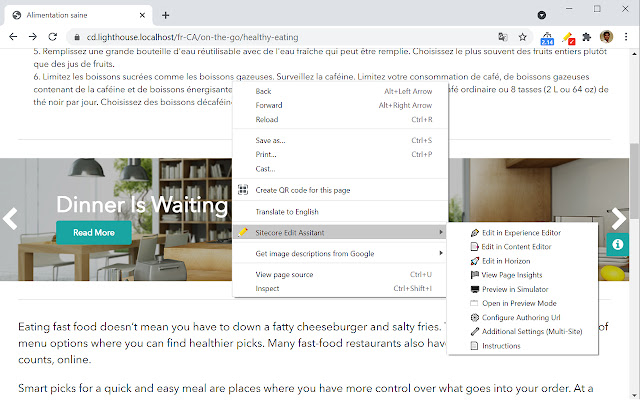
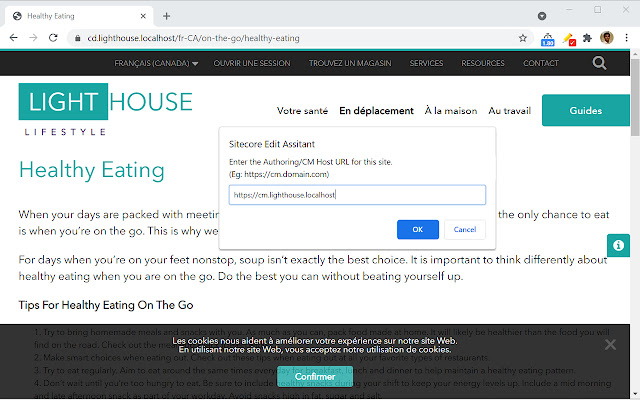
To launch associated Experience Editor, Content Editor or Horizon links, you must right-click on the intended website page and select 'Sitecore Edit Assistant' to choose your preferred editing option as shown in the screenshot. You will be asked to provide the authoring/CM host url, which will be stored in your local browser storage for subsequent requests.
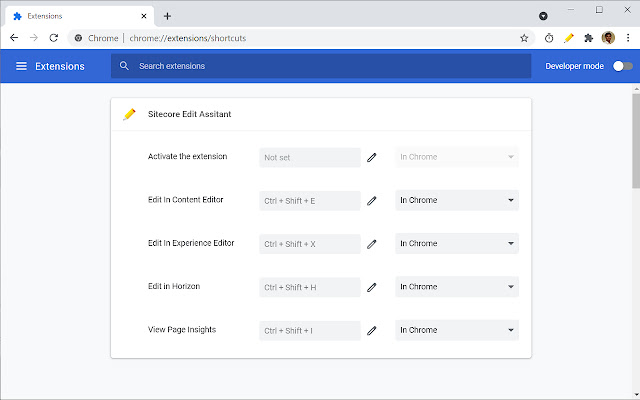
This extension also includes few shortcuts to accelerate the authoring process,
Ctrl+Shift+X - Edit In Experience Editor
Ctrl+Shift+E - Edit In Content Editor
Ctrl+Shift+H - Edit in Horizon
Ctrl+Shift+I - View Page Insights
Above default shortcuts can be modified from chrome://extensions/shortcuts if required
IMPORTANT: For Multi-site implementation, you may experience the below issues if the site is not auto-resolving as expected,
'Edit in Content Editor' might redirect to Sitecore login page again even if user is already authenticated.
'Edit in Experience Editor' might redirect to 404 Page Not Found Error.
To mitigate this issue, you need to right-click and select the 'Additional Settings (Multi-Site)' option to mention the associated site's name as specified in your site config(if non-SXA site) or /sitecore/content/<tenant>/<site>/Settings/Site Grouping/<site> item(if SXA site). Alternatively, if you do not have access to site configuration, you can preview a page item from Sitecore Content Editor and obtain the site name from 'sc_site' querystring of the preview url.
NOTE: 'Edit in Content Editor' can find the associated item only when you are logged in to Sitecore. It might redirect you to Sitecore login page in case if you're not logged in and you may want to try 'Edit in Content Editor' button again after logging in.
Thank you for using this extension!
Extore is a team of professionals who are passionate about creating extensions for web browsers. This devotion also gives us opportunity to appreciate work of other people. We get inspired by useful, open source extensions made by developers all over the world. Our strong belief is that one should share helpful add-ons with others. That’s why we’d like to present you our ever-growing list of favourite extensions that have inspired us. Moreover, as you probably have already learned, sometimes struggling for the best brings an end to the good. Talking about add-ons it often turns out that an upgrade is worse then previous version. Also it can become really tricky to get back to the beloved version of your favourite extension. That’s why we’re going to make not only the latest, but all versions of our favourite (and we hope yours too) add-ons available for download. No more compromises, just stick to the version you really like!
 Preparing download link, please wait for seconds
Almost done...
Click to download
Error getting file. Please try again
Preparing download link, please wait for seconds
Almost done...
Click to download
Error getting file. Please try again







