

version 6.28 - Download ZIP file
version 6.20 - Download ZIP file
version 6.18 - Download ZIP file
version 6.14 - Download ZIP file
version 5.64 - Download ZIP file
version 5.63 - Download ZIP file
version 5.61 - Download ZIP file
version 5.60 - Download ZIP file
version 5.59 - Download ZIP file
version 5.57 - Download ZIP file
version 5.11 - Download ZIP file
version 5.10 - Download ZIP file
version 5.9 - Download ZIP file
version 5.7 - Download ZIP file
version 5.6 - Download ZIP file
New Tools available in v6.24+
• Voice notes
• Screen + Camera recording
• Equation Editor
• Line, Rectangle, and Ellipse
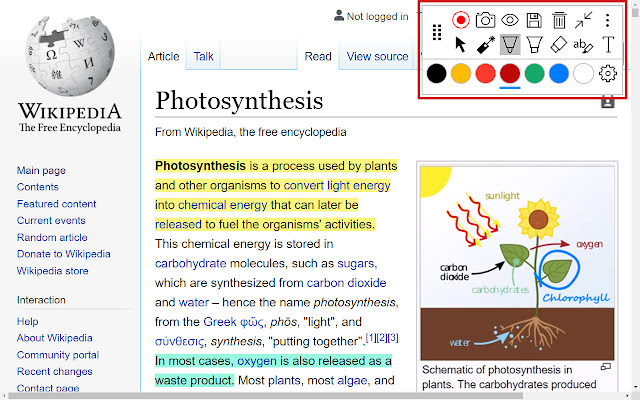
Freely annotate web pages, PDF documents, Google Slides and Google Docs content when presenting. Keep your audience engaged with live annotations during your remote learning and Google Meet sessions.
New! Annotate PDFs on your Google Drive or on the web by selecting “Open with Annotate”. Annotations are sticky and remain in place as you zoom, scroll, and navigate. The same user interface and annotation tools now work across PDFs, Google Slides, Google Docs, and web pages.
With improved compatibility with Google Slides and Google Docs, we track annotations for every slide/ page so your annotations remain in sync as you navigate across slides/ pages. Tight integration with Google Slides and Google Docs also enables switching between app controls/ menus and our annotation tools seamlessly. Our annotations are smooth, fast, and anchored in place as you zoom and navigate, making your content look professional and engaging.
Save your annotations in your account for review later. Share them with others or come back and continue working from where you left off. Capture screenshots of marked up pages and insert them directly into your Annotate notebook. All this as you share¹ your entire screen, an application, or just a single Chrome tab with a projector² and multiple student devices.
The plugin works seamlessly with your Annotate.net instructor account to enable annotations over web pages and screen sharing¹ during LiveStreams. When installed on classroom devices, you can empower students to take an active role in their learning by giving them the ability to annotate web pages and share their screens using the "Pass Control" feature.
Teachers, students, and Google Meet users shall be able to:
• Freely annotate web pages, PDFs, Google Slides, and Google Docs using the pen and highlighter tools³.
• Annotate PDFs on their Google Drive or on the web by selecting “Open with Annotate”.
• Annotate Google Slides in both edit and present modes. Google slides annotations are tracked and saved for every slide.
• Save annotations directly into their Annotate web account⁴.
• Share their annotations with others⁴.
• Capture screenshots of web pages with annotations and add them directly into an Annotate notebook.
• Insert images from the web, including image searches, directly into their Annotate notebook with just a click.
• Use the laser pointer tool to point out details and draw attention.
• Stream their entire desktop screen, a single application, or just a Chrome tab¹.
• Stream speaker and microphone audio¹ from their computer to a projector² and student devices.
• Select a monitor for sharing if they have multiple screens/monitors connected to their computer¹.
Create an account at https://annotate.net to access these awesome features.
¹The extension provides screen sharing and audio streaming support in your Annotate web account in older versions of Chrome.
²Requires the Annotate Mirror Client v11.0+ or the Annotate Chrome Client Lite running on the PC/ Mac/ Chromebox connected to your projector.
³Feature limitations may apply depending on your account type. Please review https://annotate.net/pricing for the list of features available in different accounts.
⁴Some features are not available in student accounts.
Extore is a team of professionals who are passionate about creating extensions for web browsers. This devotion also gives us opportunity to appreciate work of other people. We get inspired by useful, open source extensions made by developers all over the world. Our strong belief is that one should share helpful add-ons with others. That’s why we’d like to present you our ever-growing list of favourite extensions that have inspired us. Moreover, as you probably have already learned, sometimes struggling for the best brings an end to the good. Talking about add-ons it often turns out that an upgrade is worse then previous version. Also it can become really tricky to get back to the beloved version of your favourite extension. That’s why we’re going to make not only the latest, but all versions of our favourite (and we hope yours too) add-ons available for download. No more compromises, just stick to the version you really like!
 Preparing download link, please wait for seconds
Almost done...
Click to download
Error getting file. Please try again
Preparing download link, please wait for seconds
Almost done...
Click to download
Error getting file. Please try again







