
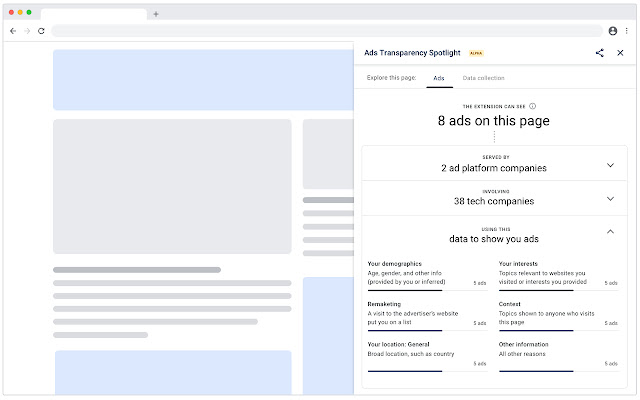
Our new Ads Transparency Spotlight (Alpha) extension for Chrome is part of our ongoing initiative to give people more visibility into the data used to personalize ads and more control over that data.
At the time of this alpha release (July 2020), it only shows information about those ads purchased through Google Ads that have implemented the Ad Disclosure Schema (https://github.com/Ads-Transparency-Spotlight/documentation/blob/main/implement.md). As others implement this schema, these ads will also appear in the extension. Over time, we hope the industry will incorporate the Ad Disclosure Schema into their ads. Learn more (https://services.google.com/fh/files/misc/ads_transparency_spotlight_overview.pdf)
The extension includes the criteria used to show these ads, the ad tech companies helping to display these ads, and the ad platform companies serving these ads on a web page. It also lists all companies and services with a presence on the page (for example, content delivery networks or analytics providers). We are currently exploring other controls for users.
Our initial goal is to provide a tool for transparency into the criteria being used to show ads. Your feedback on this early version will help us shape the future versions of the extension.
Our ultimate goal is to support a more transparent ad ecosystem globally.
We hope you’ll try the extension and give us feedback so that we can continue to improve it.
Features:
• View detailed information about the ads on a web page
• View a list of ad providers responsible for delivering ads to the page
• View all companies and services that have a presence on the page (for example, content delivery networks or analytics providers), regardless of who has implemented the schema.
• View the reasons why ads are shown on a page
How to use the extension
1. After downloading the extension, the Ads Transparency Spotlight icon will appear at the top of the Chrome window.
2. Click the Ads Transparency Spotlight icon.
3. In the Ads Transparency Spotlight flyout:
• To view information about ads on the page, click the Ads tab.
• To view all companies that have a presence on the page, click the Entities tab. The extension shows all companies that have a presence on the page (for example, content delivery networks or analytics providers), regardless of who has implemented the schema.
• To get more information about this extension, click the How to participate button at the top of the extension.
4. IMPORTANT! Send us your feedback (https://forms.gle/E3pixhHefK7BBpHw6)
We appreciate your feedback on this browser extension. Your contributions will help us as we work to increase transparency in digital advertising.
Extore is a team of professionals who are passionate about creating extensions for web browsers. This devotion also gives us opportunity to appreciate work of other people. We get inspired by useful, open source extensions made by developers all over the world. Our strong belief is that one should share helpful add-ons with others. That’s why we’d like to present you our ever-growing list of favourite extensions that have inspired us. Moreover, as you probably have already learned, sometimes struggling for the best brings an end to the good. Talking about add-ons it often turns out that an upgrade is worse then previous version. Also it can become really tricky to get back to the beloved version of your favourite extension. That’s why we’re going to make not only the latest, but all versions of our favourite (and we hope yours too) add-ons available for download. No more compromises, just stick to the version you really like!
 Preparing download link, please wait for seconds
Almost done...
Click to download
Error getting file. Please try again
Preparing download link, please wait for seconds
Almost done...
Click to download
Error getting file. Please try again







