


Instant Dark Mode
Lightweight extension to instantly invert website colors for dark mode. It uses a smart invert that does not invert colors on most images and videos.
How To Use:
1. Go to any website that is not a chrome:// page, a new tab or the Chrome Web Store
2. Click on the Instant Dark Mode extension icon ????
3. Click on "Start/Stop"
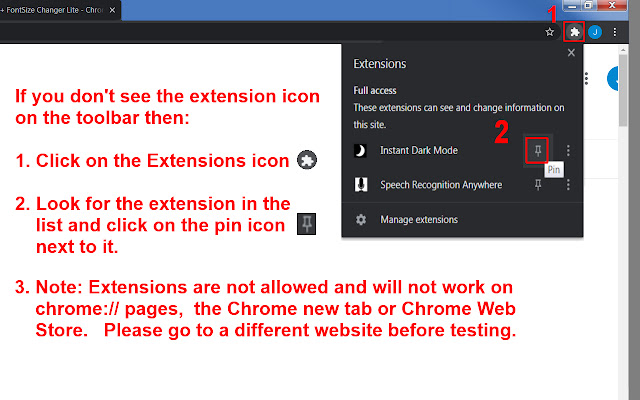
NOTE: If you do not see the extension icon on the Chrome toolbar then click on the "Extensions" icon that looks like a jigsaw puzzle piece on the Chrome toolbar. Look for "Instant Dark Mode" extension and then click on the pin icon ???? next to it.
NOTE: Chrome extensions are not allowed and will not work on special chrome:// pages or the new tab or Chrome Web Store.
Options Available For Purchase:
* Invert website colors
* Invert images and videos
* Deep scan to invert background images (and some images in iFrames)
* Add gray background to images with transparent backgrounds
* Invert canvas element (Some games, some images and Google Sheets)
* Start automatically with Chrome browser
* Enable keyboard shortcut Start/Stop. (Default Alt+i). Change shortcut key at: chrome://extensions/shortcuts
* Detect if website already has dark mode and do not invert
* Darken background colors that do not invert well
Notes: You may want to use "Invert images and videos" by itself to make image colors look normal if you are using an OS inverter such as Windows Magnifier or MAC OS Accessibility > Display > Invert Colors. Adding a gray background to images with transparent backgrounds makes it easier to see black icons on some websites like Gmail.
Version History
8/16/2021 - Version 0.9.2 - If "Detect if website already has dark mode and do not invert" was checked and a few websites were visited such as webmd.com then the extension incorrectly detected that it already had dark mode. This seems to have been fixed. The extension also might be able to detect if a website already has dark mode more quickly now. Keyboard shortcut will now also start/stop on all tabs instead of just the current tab.
6/2/2021 - Version 0.9.1 - Changed extension link to go to Chrome Web Store Listing. Changed support link to go to dark mode extension support FAQ. Changed so that background-image is removed from body tag if there is one otherwise when (re)inverting images the css will add the invert filter to the body tag again. Always adding css to documentElement and not document.head because some websites were not adding it to document.head.
5/31/2021 - Version 0.9.0 - Instant Dark Mode Extension added to Chrome Web Store
Extore is a team of professionals who are passionate about creating extensions for web browsers. This devotion also gives us opportunity to appreciate work of other people. We get inspired by useful, open source extensions made by developers all over the world. Our strong belief is that one should share helpful add-ons with others. That’s why we’d like to present you our ever-growing list of favourite extensions that have inspired us. Moreover, as you probably have already learned, sometimes struggling for the best brings an end to the good. Talking about add-ons it often turns out that an upgrade is worse then previous version. Also it can become really tricky to get back to the beloved version of your favourite extension. That’s why we’re going to make not only the latest, but all versions of our favourite (and we hope yours too) add-ons available for download. No more compromises, just stick to the version you really like!
 Preparing download link, please wait for seconds
Almost done...
Click to download
Error getting file. Please try again
Preparing download link, please wait for seconds
Almost done...
Click to download
Error getting file. Please try again







