
version 0.1.6 - Download ZIP file
version 0.1.3 - Download ZIP file
This extension offers integration of Notepad++ with your browser
Video Tutorials:
Windows: https://youtu.be/xX-j-HQ8WJI
Linux and Mac: https://youtu.be/8r756Z3wQ8M
Features:
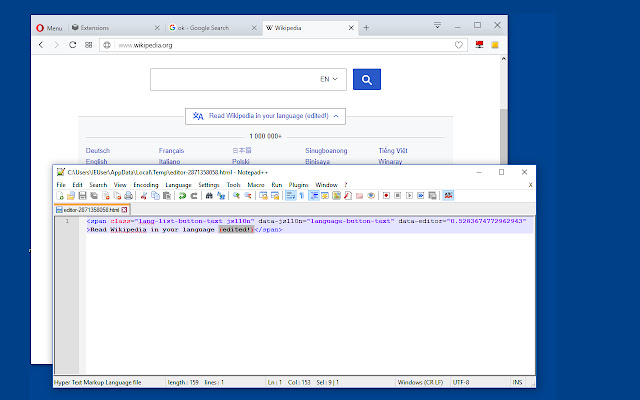
Edit content of "input[type=text]", "input[type=search]", and "textarea"
Edit innerHTML and outerHTML of node elements
Edit CSS stylesheets
Edit JavaScript source code
The extension monitors the local file in real-time, and when changes are observed, the content of the node gets edited. The only thing that you need to do is to save changes. Note that this extension requires a native client to be able to communicate with the Nodepad++ editor. Also, you need to have the Nodepad++ application installed on your operating system. If you are using a portable version, go to the options page of the extension and see the absolute path of the editor.
To send an HTML element to the editor, click on the browser action button once. Now place your mouse over the HTML element that you need to interact with.
To edit a content editable element, use the right-click context menu item
To send an HTML element to the editor, you can also use the DevTools. Open the DevTools and switch to the inspect tab, select the desired element and in the right-panel, click on the "Edit with Notepad++" panel.
Note: You can edit multiple nodes simultaneously with this extension
Note: Files are stored in the OS temporary directory, so there is no need to delete them manually
Extore is a team of professionals who are passionate about creating extensions for web browsers. This devotion also gives us opportunity to appreciate work of other people. We get inspired by useful, open source extensions made by developers all over the world. Our strong belief is that one should share helpful add-ons with others. That’s why we’d like to present you our ever-growing list of favourite extensions that have inspired us. Moreover, as you probably have already learned, sometimes struggling for the best brings an end to the good. Talking about add-ons it often turns out that an upgrade is worse then previous version. Also it can become really tricky to get back to the beloved version of your favourite extension. That’s why we’re going to make not only the latest, but all versions of our favourite (and we hope yours too) add-ons available for download. No more compromises, just stick to the version you really like!
 Preparing download link, please wait for seconds
Almost done...
Click to download
Error getting file. Please try again
Preparing download link, please wait for seconds
Almost done...
Click to download
Error getting file. Please try again







