
version 1.7.1 - Download ZIP file
version 1.5.5 - Download ZIP file
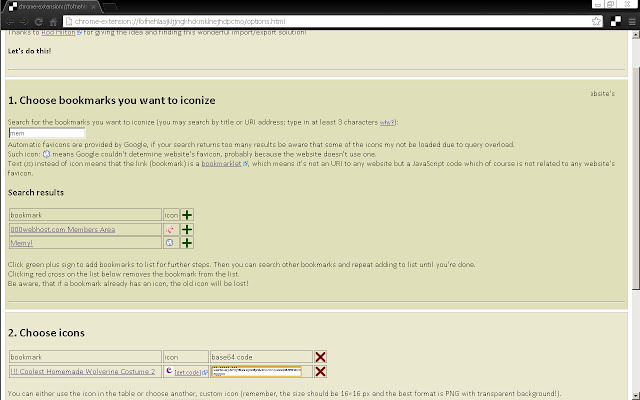
Some of your bookmarks don't have any favicon (icon)? Well, then add one!
Google Chrome doesn't let you do this natively ¯\_(°∩°)_/¯ So this extension uses a hack on Google Chrome, that works ;)
FEATURES:
→ If your bookmark doesn't have an icon (or has a blank icon) this will let you set it a favicon!
→ This is permanent, so favicons stay even if you turn off or uninstall this extension :D Unlike in every other extension I saw! (hat's why I made this one.)
→ If you leave it, though, it will provide you a simple quick and dynamic search through your bookmarks :)
→ This extension allows you also to set favicons also for bookmarklets (=scripts)! \o/
USER'S SAY:
→ "A tiny bit of fiddling around involved but worth it."
→ "it's a bit fiddly but it works"
INCOVENIENCES:
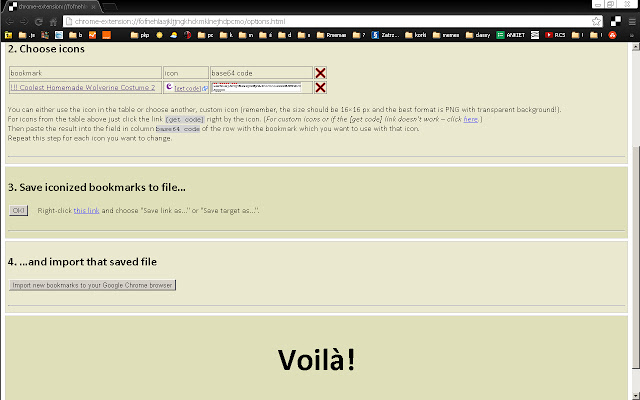
→ Google Chrome doesn't let extensions managing favicons. The only way to do this is to import bookmarks (one or more) from a backup file with a fixed favicon stored in it. This extension will let you choose bookmarks, choose favicons, create such backup file automatically and then you'll have to export it and import it again. There's no other way ¯\_(°∩°)_/¯
→ And while it's importing bookmarks which you already have, it results in duplication of them. No worries, the duplicates are all in one directory (folder) at the end of Bookmarks Bar.
→ In Google Chrome favicon is related to a bookmark's address (URL) and is permanent (when set in this way). So if *you* change favicon once, you can't change it again. The workaround is to change the URL of bookmark a little (e.g. add "#" or "/" at the end, or empty parameter "?sth" or "&sth") – for Chrome it will be a new bookmark.
→ While you can set a favicon for bookmarklets (scripts) it's not possible to set if for bookmarklets with only anonymous function, like: "javascript:(function(){…})()". Sorry. I also had to edit half of my bookmarklets.
→ It is not possible in Google Chrome to change icons of folders. Sorry. I'm sad, too.
ANY PROBLEMS WITH THIS EXTENSION?
Questions, problems, requests – report on GitHub:
→ https://github.com/Vinne2/bookmark-iconizer/issues
If you like it then please buy me a beer ???? (donate me on PayPal: [email protected]) ;)
= Version history =
1.7.1 – minor text modification in popup
1.7.0 – more detailed Store description, more detailed instructions, fixed dead links
1.6.0 – fix: auto-remove newly imported duplicates; more instructions
1.5.6 – added data policy (extension doesn't collect/send *any* data), icon bug fix
1.5.3 – scroll fix, disabled some useless functions
1.5.2 – scroll fix
1.5.1 – minor fixes
1.5.0 – fixed importing URIs with quotes, added info about manual import (because Google has removed automatic import feature from Chrome extensions)
1.4.0 – debugging options included
1.3.1 – minor fixes
1.3.0 – iconized bookmarks code in form of a link
1.2.0 – iconized bookmarks code enveloped in an iframe
1.1.0 – added [get code] link for default favicons in table
1.0.0 – first deployment
Extore is a team of professionals who are passionate about creating extensions for web browsers. This devotion also gives us opportunity to appreciate work of other people. We get inspired by useful, open source extensions made by developers all over the world. Our strong belief is that one should share helpful add-ons with others. That’s why we’d like to present you our ever-growing list of favourite extensions that have inspired us. Moreover, as you probably have already learned, sometimes struggling for the best brings an end to the good. Talking about add-ons it often turns out that an upgrade is worse then previous version. Also it can become really tricky to get back to the beloved version of your favourite extension. That’s why we’re going to make not only the latest, but all versions of our favourite (and we hope yours too) add-ons available for download. No more compromises, just stick to the version you really like!
 Preparing download link, please wait for seconds
Almost done...
Click to download
Error getting file. Please try again
Preparing download link, please wait for seconds
Almost done...
Click to download
Error getting file. Please try again







