
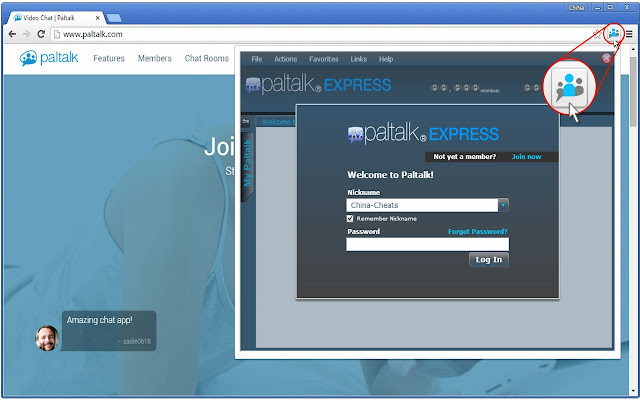


Join Worlds Largest Voice and Webcam Chat with "Paltalk Express (Popup Chat)" Extention for Chrome and Opera Browsers. The Application it self is a Flash Chat supported by Paltalk Express and Paltalk Messengre. The Main Chat itself comes with unique Software and can be downloaded from Paltalk Website at Paltalk.com.
As for this Application you can use it as Basic Flash Chat Application and Join Chat Rooms Directly from your Chrome or Opera Web Browser. Just Install the Chat Extension and on your Top right Corner Click on the Chat Icon to Load the Chat Application.
============================
Download for Other Browsers
============================
Download Chrome: https://chrome.google.com/webstore/detail/paltalk-express-pop-up-ch/hdgjcbfamiendfldfaggicnapeiceboj?hl=da
Download Opera: https://addons.opera.com/nb/extensions/details/paltalk-express-pop-up-chat
Download Firefox: https://addons.mozilla.org/en-US/firefox/addon/paltalkchatapp/
==============================================
How to use the Popup Button (The first time)?
==============================================
The Extension creates a Button on your Browser Top right Corner.
1) To Load the Flash Chat Panel > Click on the Button on your Browser
- If this if this is your First time Loading the Chat for the day, then the Chat may take upto 30 Seconds to Fully Load. When the Chat has loaded then the Popup Panel will show up in Chrome.
It can be confusing when Loading the Chat the firs time as it may take a few seconds. When the Flash has Loaded the Chat Panel will always load quicker than the first time.
==================================
How to Login and Join a Chat Room?
==================================
- In order to Login and Join the Chat Rooms, you have to Register a Username and a Password. You can Register through Flash Chat Application.
- After you Login, Simply "Double Click" on a Chat Room and Wait for it to join.
- You can also Register and Login to the Chat using the Main Software from Paltalk.com.
==============
Release Note:
==============
- Version 1.0.0.4
- Slow Popup Window Fixed. Now Loads right away.
====================
Upcoming Releases
====================
For future releases we will also Include Paltalk Messengers Top 10 Staff Pick Rooms Users can select to join upto 10 Different rooms directly from their Browsers.
Firefox Update: If you use Firefox then you can already Download the new Version with more rooms and more options.
Extore is a team of professionals who are passionate about creating extensions for web browsers. This devotion also gives us opportunity to appreciate work of other people. We get inspired by useful, open source extensions made by developers all over the world. Our strong belief is that one should share helpful add-ons with others. That’s why we’d like to present you our ever-growing list of favourite extensions that have inspired us. Moreover, as you probably have already learned, sometimes struggling for the best brings an end to the good. Talking about add-ons it often turns out that an upgrade is worse then previous version. Also it can become really tricky to get back to the beloved version of your favourite extension. That’s why we’re going to make not only the latest, but all versions of our favourite (and we hope yours too) add-ons available for download. No more compromises, just stick to the version you really like!
 Preparing download link, please wait for seconds
Almost done...
Click to download
Error getting file. Please try again
Preparing download link, please wait for seconds
Almost done...
Click to download
Error getting file. Please try again







