
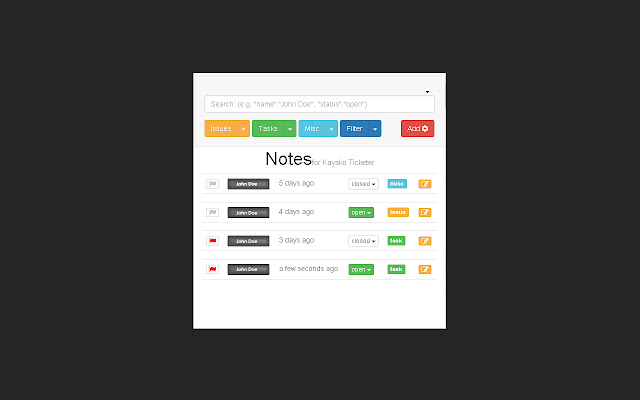

Notes for Kayako is an extension to boost your productivity and workflow in the business environment.
If your workplace uses Kayako Ticketer (http://www.kayako.com) you can add this extension to boost the (rather basic) functionality of the stock software.
Key features:
- Escalate/De-escalate a note with a simple flag so that management can see when they are needed
- Categorise note by 'issue', 'task' or 'misc' - depending on what you feel the note is about
- Give the note a status, so that other staff know when the note is irrelevant (i.e. 'closed') and no longer requires being looked at
- Insert steps to completion, and check them off when done. This keeps all staff in the loop about what has been done so far, saving embarrassment when having to check with customers.
- Search for any text in the note body with a live search function, or filter by name, status, type, or all at once!
- Edit and Updates in Ajax, so no need to refresh the page
- Auto-expanding 'steps' when creating or editing a note, allowing rapid data entry that works with you, not against you.
- Auto-hides the cumbersome 'bubble' display above email replies, compacting everything in to the extension popup screen.
- A useful counter badge on the icon, showing you how many notes there are on the page. This goes green when all tickets are not escalated, and red when at least one is.
No known bugs. Please note that this extension uses JSON formatting to overwrite the note body. If you use it to edit any existing notes in your software, you will be overwriting the format of that note to use the new JSON formatting. I take no responsibility should this not be desired in your business environment, so please check with your management team that this extension has been approved prior to this.
Alternatively you can just 'not' use the editing features, and use it to display notes in a nice, clean interface. When you need to edit an existing note or add a new one, you can click the drop down above the search bar to show/hide the original ticket display.
Extore is a team of professionals who are passionate about creating extensions for web browsers. This devotion also gives us opportunity to appreciate work of other people. We get inspired by useful, open source extensions made by developers all over the world. Our strong belief is that one should share helpful add-ons with others. That’s why we’d like to present you our ever-growing list of favourite extensions that have inspired us. Moreover, as you probably have already learned, sometimes struggling for the best brings an end to the good. Talking about add-ons it often turns out that an upgrade is worse then previous version. Also it can become really tricky to get back to the beloved version of your favourite extension. That’s why we’re going to make not only the latest, but all versions of our favourite (and we hope yours too) add-ons available for download. No more compromises, just stick to the version you really like!
 Preparing download link, please wait for seconds
Almost done...
Click to download
Error getting file. Please try again
Preparing download link, please wait for seconds
Almost done...
Click to download
Error getting file. Please try again







