



version 2016.9.15.0 - Download ZIP file
version 2016.6.24.0 - Download ZIP file
version 2016.6.23.0 - Download ZIP file
- AUTO CC & AUTO BCC FOR GMAIL™ -
Integrated with Gmail Compose.
Set up multiple Gmail "from" accounts with different BCC addresses.
Automatic Bcc or Cc when you send Compose, Reply, or Forward mail.
Fullscreen Google Mail. Pop out Reply/Forward and maximize.
Compatible with CRM systems (Salesforce, Outlook, Zoho CRM, Insightly, ACT! by Sage, SugarCRM, Highrise CRM, Hubspot CRM, Prophet, Tactile, Capsule CRM, Apptivo, Contactually, Batchbook, Nimble, PipelineDeals, Maximizer, Infusionsoft, Goldmine, ...etc).
===[ NOTES ]===
★ The extension is free for personal use. For commercial users, please upgrade to Premium.
+ To get a license, click "Upgrade to Premium" in the extension's Option page and follow instructions.
+ The available plans are: $4.99 for 2 PCs, $19.99 for 20 PCs, and $89.99 for 100 PCs. When paid, we will send a license key to your email. You may enter this key in the extension's Option page to activate on multiple computers (browsers). You can share this key with your colleagues.
+ If you have more than one computer (browser), you should activate the license on each of the computers (browsers). Re-activate license every time you re-install AutoBcc or install it on a new computer (browser).
★ We don't inject ads to users, problem was solved in recent versions. If you still see the ads, just reinstall to get it fixed.
★ "Auto Bcc & Auto Cc" extension can be used in combination with CRM systems (Salesforce, Outlook 365, Zoho CRM, Insightly, ACT! by Sage, SugarCRM, Highrise CRM, Hubspot CRM, Prophet, Tactile, Capsule CRM, Apptivo, Contactually, Batchbook, Nimble, PipelineDeals, Maximizer, Infusionsoft, Goldmine, ... You may do automatic Bcc to your Salesforce email, Highrise or Zoho Bcc Dropbox addresses, or any CRM mail address.
★ UPDATED 2017.1.20:
+ Fix compatibility issues in latest "Inbox by Gmail".
★ UPDATED 2016.9.15:
+ Bug fixes for "Inbox by Gmail".
★ UPDATED 2016.6.24:
+ Some bug fixes and minor changes.
+ Add new option to "Leave cursor at message body". Add a "Remind me later" button to Upgrade dialog.
★ UPDATED 2016.2.25:
+ Bug fix: emails were mistakenly removed when reply all with multiple contacts.
★ UPDATED 2016.2.20:
+ Add new feature: Cc automatically for Gmail & Inbox.
+ You can enable/disable Auto BCC & Auto CC features anytime you want.
+ You can enable/disable bonus features (auto enlarge to full email window, pop-out reply/forward).
+ You can upgrade to Premium with a license key.
★ UPDATED 2015.10.6:
+ Support both Gmail (mail.google.com) & Gmail Inbox (inbox.google.com).
★ UPDATED 2015.10.1:
+ Added 40 language translations.
+ You can manually add new accounts and edit old accounts, using the "Add more accounts" button.
+ You can use the "Add from compose" button to retrieve emails automatically from different GMail accounts.
★ If you run into a problem, contact us at [email protected] or the "Send Feedback" button to the right before you post a negative review. We appreciated that. It helps other people too.
===[ HOW TO USE ]===
- Install the extension
- Close Chrome and Re-open Chrome
- Go to Gmail™
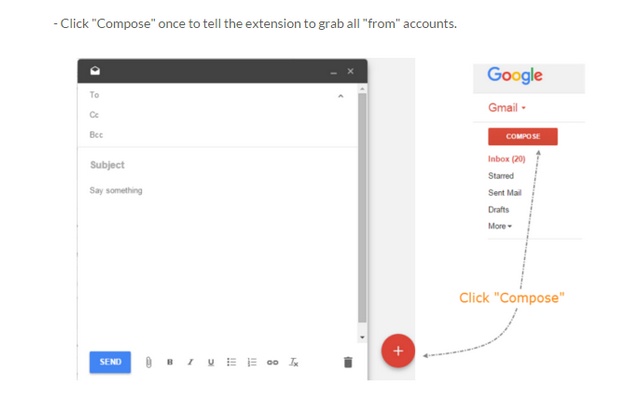
- Click "Compose" once to tell the extension to grab all "from" accounts
- Discard that compose
- Go to Chrome Settings > Extensions
- find the AutoBcc extension and click on "Options"
- enter email to BCC automatically for each "from" account
(add multiple emails to BCC by separating with a comma and space.
Example: [email protected], [email protected])
- use "Add more accounts" button to manually add/edit accounts.
- use "Add from compose" button to retrieve emails automatically from different accounts.
- click "Save"
- refresh Gmail or Inbox page (important)
- drink some beer while sending emails awesomely
Setup instructions & How to use: http://autobcc.com/auto-bcc-cc-for-gmail-and-inbox-extension/
How to upgrade Auto Bcc to get Premium license: http://autobcc.com/upgrade-to-premium/
Contact support: http://autobcc.com/contact-us/
===[ ABOUT THE AUTHOR ]===
Developed by AutoBcc.com
We developed browser addons, toolbars, plugins and extensions just for fun and helping people in our free time. If you got issues or feature requests, do not hesitate to leave us a message at http://autobcc.com/contact-us/ or email to [email protected] - You are welcome!
Extore is a team of professionals who are passionate about creating extensions for web browsers. This devotion also gives us opportunity to appreciate work of other people. We get inspired by useful, open source extensions made by developers all over the world. Our strong belief is that one should share helpful add-ons with others. That’s why we’d like to present you our ever-growing list of favourite extensions that have inspired us. Moreover, as you probably have already learned, sometimes struggling for the best brings an end to the good. Talking about add-ons it often turns out that an upgrade is worse then previous version. Also it can become really tricky to get back to the beloved version of your favourite extension. That’s why we’re going to make not only the latest, but all versions of our favourite (and we hope yours too) add-ons available for download. No more compromises, just stick to the version you really like!
 Preparing download link, please wait for seconds
Almost done...
Click to download
Error getting file. Please try again
Preparing download link, please wait for seconds
Almost done...
Click to download
Error getting file. Please try again







