



???? A new Google Meet experience powered by AI & advanced technologies
❤️️ Now available in English, Español, Português ❤️️
Features:
???? Multitasking Mode
Enables you to multitask without losing the focus. It's exceptional useful when presenting
????Launch Google Meet session to a split window
????Multiple split window positions to choose from
????See participant's videos while presenting
???? Realtime AI Emotion Tracking
Helps you understand the perceived emotion of your current facial expression and be able to gauge the meeting atmosphere in realtime
???? Tracking your emotion change in realtime
???? Tracking other users emotion
???? Participants multiple emotion ranking
???? Meeting Notes
Enables you to take formatted notes and save to Google Drive
???? Integration with Google Drive or download to your machine
???? Load & edit saved notes from Google Drive
???? Google Doc style editing
???? Notes panel transparency adjustment
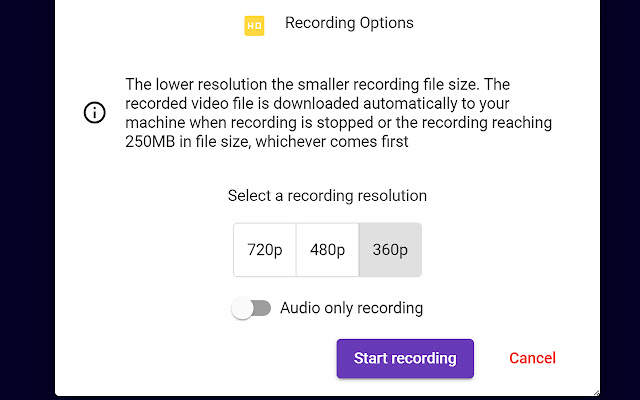
???? Meeting Recording
Gives you the ability to record the meeting anytime you want.
???? Recorded downloaded to your computer automatically
???? Choices of recording resolution and audio only option
???? Pause and resume during recording
???? Meeting Transcription
Captures conversations in the format of text in realtime with timestamp & speaker name
???? One click to start capturing conversations
???? Integration with Google Drive or download to your computer
???? Pause and resume during recording
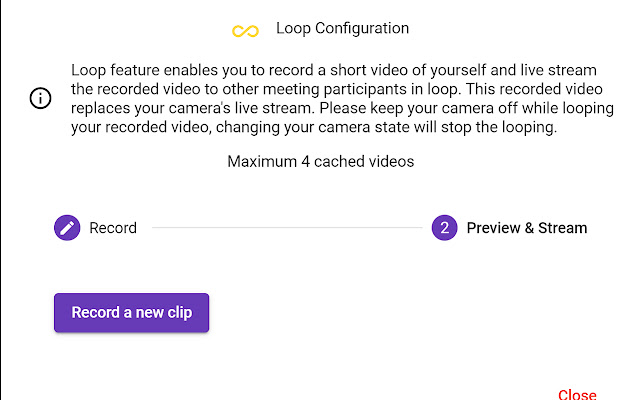
???? Camera Loop
Stream a recorded video clip to participants in loop
???? Multiple recording length options
???? Seemly integration with Google Meet
???? Reusable recorded video clips
???? Speech Duration Tracking
Shows you who talks the most during the meeting
????Tracking participants speech duration
????Realtime ranking chart display
????Draggable & transparent chart panel
???? Streamer
Stream an image to replace your camera video
???? Stream whiteboard drawing to Google Meet participants
???? Support multiple image file format
???? Drag & drop to upload the image file
???? Able to set background color for transparent images
???? Meeting Utilities
Provides a list of useful settings that give you a better experience
????Join automatically without clicking
????Mute microphone and turn off camera when joining
????Picture in Picture mode
????Default profile setting
????Shared screen zooming
All features of this extension are free to use with a certain amount of usage limit which resets every month. Please sign up for BM PRO at https://beyondmeet.app for unlimited access to all features.
❓How we use your data?
The extension only collects your user's name and email in order to identify you and support functionalities of the extension.
Our Privacy Policy and Terms & Conditions can be viewed at https://beyondmeet.app/pages/legal
❓Permission to accessing to your browser history?
The extension stores its configuration/settings in your browser cache which requires the access to your browser history storage, therefore this permission is required. The extension DOES NOT read your browser history other than the extension related configuration/settings.
Extore is a team of professionals who are passionate about creating extensions for web browsers. This devotion also gives us opportunity to appreciate work of other people. We get inspired by useful, open source extensions made by developers all over the world. Our strong belief is that one should share helpful add-ons with others. That’s why we’d like to present you our ever-growing list of favourite extensions that have inspired us. Moreover, as you probably have already learned, sometimes struggling for the best brings an end to the good. Talking about add-ons it often turns out that an upgrade is worse then previous version. Also it can become really tricky to get back to the beloved version of your favourite extension. That’s why we’re going to make not only the latest, but all versions of our favourite (and we hope yours too) add-ons available for download. No more compromises, just stick to the version you really like!
 Preparing download link, please wait for seconds
Almost done...
Click to download
Error getting file. Please try again
Preparing download link, please wait for seconds
Almost done...
Click to download
Error getting file. Please try again







