


version 1.0.3 - Download ZIP file
version 1.0.2 - Download ZIP file
Faxes can be sent in different formats, like .tiff, .png, .jpeg, and others. However, it’s easier to store and then process them in a unified format. Converting documents online becomes more convenient with compact, easy-to-use, and powerful Google Chrome extensions.
There’s no need to waste time searching for secure websites and applications for your document management. You can easily transform your fax files into PDFs while preserving all the original formatting with the fast and intuitive AltoFaxtoPDF extension in only a couple of clicks. Add it to your browser settings to keep it at your fingertips, anytime you need it.
Why is Alto Fax to PDF add-on a great choice?
The extension is free of charge and doesn’t have any hidden costs.
No registration or personal information is required.
It saves space on your device requiring minimal memory.
There are no limits to the number of conversions you can make daily, weekly or monthly.
File processing is fast and secure so you’ll have your documents ready for download in only a few seconds.
The tool works from the cloud keeping your data safe from any unwanted access.
There’s no need to open new windows or apps as changes take place in the same tab you’re working in, in a small pop-up window.
It features a powerful online editor as an advanced option for converted docs.
How to turn a fax into a PDF online with AltoFaxtoPDF converter for Google Chrome:
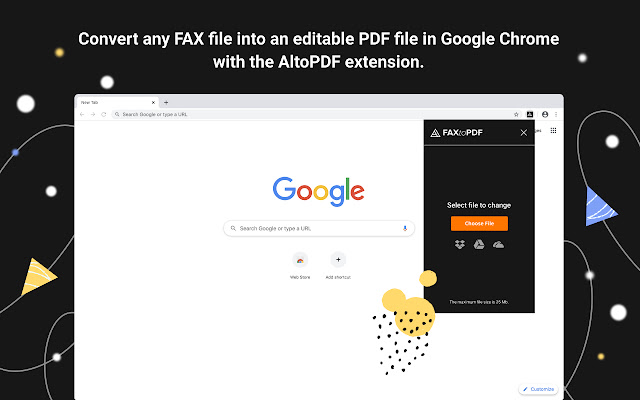
After you’ve installed the extension, click on its icon to launch it. It’ll open in a pop-up window in the top-right corner of the screen.
Upload the file you want to transform. Choose it from your hard drive or take it right from your Google Drive account. If you’ve selected the wrong one, just use the Upload Another Document option.
Convert fax to PDF with the Convert Now! button. In just a few seconds, your new sample is ready.
Download the file you’ve created to your device or save it directly to Google Drive.
Continue editing and get access to more advanced document management tools. The editor will open in the new tab where you can add text and replace text, insert images, shapes, lines, make annotations and comments, and even electronically sign.
Please note that once you've uploaded the file for conversion, you shouldn't switch to another tab until the entire process is finished. Otherwise, you'll have to start over from the beginning.
Say goodbye to traditional printing and scanning or looking for other online applications. The Alto Fax to PDF extension saves time, money, and effort. Enhance your productivity and make your document management smart and effective. Try it now!
Extore is a team of professionals who are passionate about creating extensions for web browsers. This devotion also gives us opportunity to appreciate work of other people. We get inspired by useful, open source extensions made by developers all over the world. Our strong belief is that one should share helpful add-ons with others. That’s why we’d like to present you our ever-growing list of favourite extensions that have inspired us. Moreover, as you probably have already learned, sometimes struggling for the best brings an end to the good. Talking about add-ons it often turns out that an upgrade is worse then previous version. Also it can become really tricky to get back to the beloved version of your favourite extension. That’s why we’re going to make not only the latest, but all versions of our favourite (and we hope yours too) add-ons available for download. No more compromises, just stick to the version you really like!
 Preparing download link, please wait for seconds
Almost done...
Click to download
Error getting file. Please try again
Preparing download link, please wait for seconds
Almost done...
Click to download
Error getting file. Please try again







