

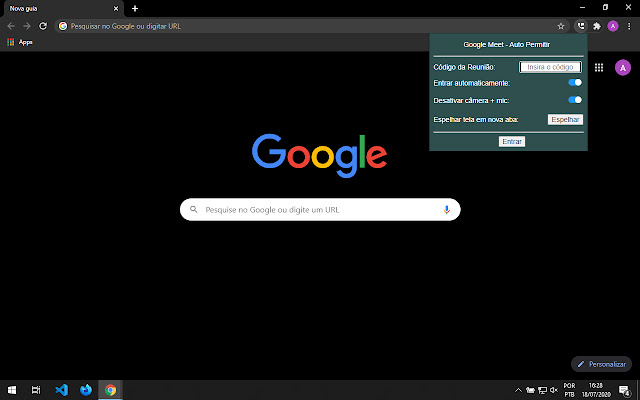
This extension makes it easy to manage Google Meet meetings.
The extension is for people who have access to the meeting domain (that is, people who can create meeting rooms), and does not apply to guests.
Automatically accepts all guests in a meeting. This function does not need to be activated, it is possible to deactivate or reactivate it during the meeting.
How to use:
- Click on the extension icon that will appear in the upper right corner of the browser;
- Insert the meeting code;
- Select the desired options;
- Click on Enter;
- Done, a new tab will open with permissions enabled.
The field for filling in the meeting code accepts only valid meeting codes, in the format "xxx-xxxx-xxx".
The extension maintains the user's preferences, even when closing the browser, for easy use. All data entered in the extension is stored locally in the user's storage.
The Auto Allow Guests function works even with the user navigating in another tab (in the same window and without being minimized), however, the permission occurs more slowly, and the guest's entry request may expire. Therefore, it is recommended to have the meeting tab open to automatically accept guests.
Keyboard shortcuts:
"p" key: Opens the presentation menu;
"s" key: Stop presentation;
"y" key: Enables Auto Allow Guests;
"n" key: Disable Auto Allow Guests;
"r" key: Remove all participants from the meeting;
"m" key: Silence all meeting participants.
The "Remove All" and "Mute All" functions apply to all meeting participants, not just guests. Remember that only the participants themselves can rejoin the meeting or reactivate their microphones.
The "Remove All" function is particularly useful when ending a meeting, when there is a need to remove all other participants from the room.
The "Silence All" function is particularly useful in a meeting with a speaker, in which it is necessary to silence all other participants.
Version 2.0:
"Mirror screen" button:
It allows you to mirror the screen in a new tab, making it possible that, when sharing only one window in the meeting, it is possible to share the entire screen through the mirroring tab.
This function is particularly useful when there is a need to interrupt the presentation at all times to switch sharing between just one window and the entire screen.
Screen mirroring, like all extension functionality, only works with the active window, that is, it is necessary that the shared window is not minimized.
Version 3.0:
Allows you to silence all participants in a meeting.
Extore is a team of professionals who are passionate about creating extensions for web browsers. This devotion also gives us opportunity to appreciate work of other people. We get inspired by useful, open source extensions made by developers all over the world. Our strong belief is that one should share helpful add-ons with others. That’s why we’d like to present you our ever-growing list of favourite extensions that have inspired us. Moreover, as you probably have already learned, sometimes struggling for the best brings an end to the good. Talking about add-ons it often turns out that an upgrade is worse then previous version. Also it can become really tricky to get back to the beloved version of your favourite extension. That’s why we’re going to make not only the latest, but all versions of our favourite (and we hope yours too) add-ons available for download. No more compromises, just stick to the version you really like!
 Preparing download link, please wait for seconds
Almost done...
Click to download
Error getting file. Please try again
Preparing download link, please wait for seconds
Almost done...
Click to download
Error getting file. Please try again







