
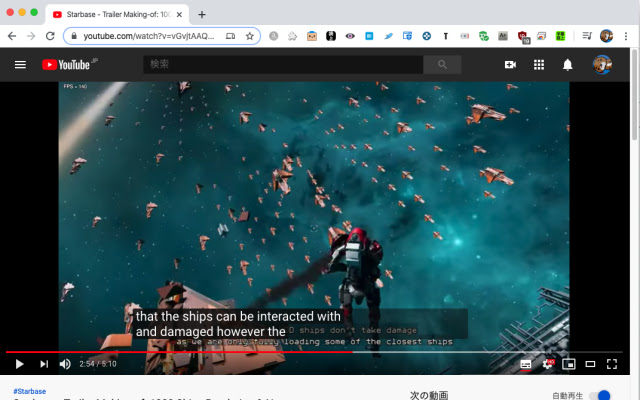
CaptionSpeaker is a chrome extension that allows you to hear subtitles in a specified language when they are set on youtube.
# Usage
1.Right-click the CaptionSpeaker icon to open the settings (Options) and save the appropriate speaker settings (Please be sure to do so as there is a possibility that the speech may fail in the standard setting.).
2.Open the video that you want YouTube to produce subtitles for
3.Click CaptionSpeaker icon to enable subtitle speech (If the icon is green, it is on.)
4.Start playing movie (The speech starts when the subtitles appear.)
If you want to stop the subtitle speech, you can turn it off by clicking the CaptionSpeaker icon.
When speaking, the speaker is the default setting of the browser at first. For example, in a Japanese environment, the speaker is Japanese, so if you want him to speak English, please set it on the setting page (Right-click the icon to select an option, or click the icon to select Options.).
You can also change the reading speed on the settings page.
When you change the speaker's language (Locale), you try to produce subtitles in that language (I sometimes fail.).
# Note
- CaptionSpeaker is a Chrome Extension that reads out the subtitles set for YouTube videos. It does not have the ability to translate Youtube videos. If the YouTube video does not have subtitles in the target language, it will not be spoken.
- CaptionSpeaker works only for videos whose URL starts at https://www.youtube.com. Youtube videos embedded in other websites are not targeted and will not work. (You can check the target URL on the extension management screen)
# Update History
# # Version 1.0
First release
# # Version 1.1
- Add an option to stop the previous utterance when a new utterance is made
- If the subtitle in the same language as the speech setting is default, add the option of not speaking
# # Version 1.2
- When reading is turned off, stop speaking if you are speaking.
- Addresses an issue that may cause a slight delay in reading
## Version 1.3
-Slightly changed the judgment criteria of "Subtitles in the same language as the speech setting"
## Version 1.4
-Added "Setting to read only when subtitles are displayed" setting item
## Version 1.4.2
- Fixed an issue where subtitles could not be read (November 26, 2020 JST)
# Known Issues
It seems that macOS Catalina may fail to speak with a standard speaker.
You can avoid it by setting the speaker who can make a test speech on the setting page and confirm that he can actually speak.
Extore is a team of professionals who are passionate about creating extensions for web browsers. This devotion also gives us opportunity to appreciate work of other people. We get inspired by useful, open source extensions made by developers all over the world. Our strong belief is that one should share helpful add-ons with others. That’s why we’d like to present you our ever-growing list of favourite extensions that have inspired us. Moreover, as you probably have already learned, sometimes struggling for the best brings an end to the good. Talking about add-ons it often turns out that an upgrade is worse then previous version. Also it can become really tricky to get back to the beloved version of your favourite extension. That’s why we’re going to make not only the latest, but all versions of our favourite (and we hope yours too) add-ons available for download. No more compromises, just stick to the version you really like!
 Preparing download link, please wait for seconds
Almost done...
Click to download
Error getting file. Please try again
Preparing download link, please wait for seconds
Almost done...
Click to download
Error getting file. Please try again







