



Flix Trix is a new extension designed to provide a number of tools to enhance your experiences with your streaming services.
Currently, Flix Trix allows you to compare your Netflix, Disney+ and Amazon Prime Video watchlists with another local profile to find items on both lists. So you don't have to look through both of your lists to figure out what you both want to watch.
Flix Trix also allows you to filter these items by TV shows/Movies, this works by default for Disney+ and Amazon Prime Video but for Netflix you must be using the “manual ordering” version of myList, that can be enabled here https://www.netflix.com/MyListOrder
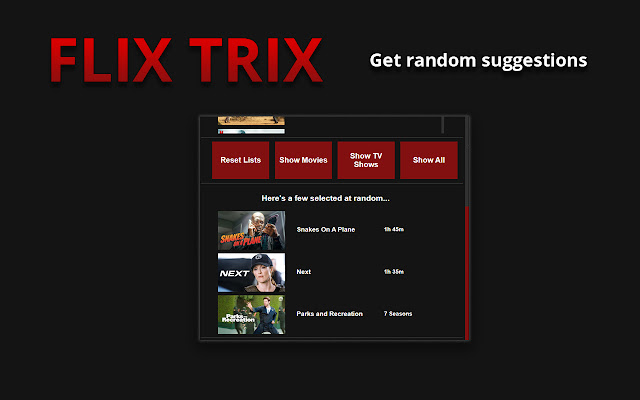
It also selects a few items at random, if you’d rather leave the decision up to the universe!
V1.1.0
Current Features:
Comparing two lists to find matches
Select three matches at random
Filter matches based on media type (TV show or Movie)
Current Services Flix Trix works on:
Netflix
Disney+
Amazon Prime Video
Current Experimental Features (Features not tested or working in 100% of cases):
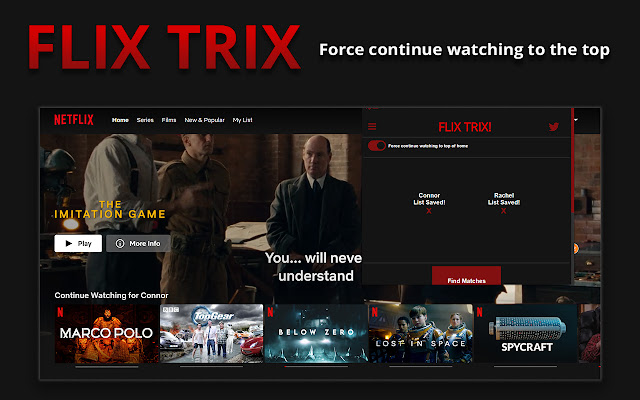
Force continue watching to top of home
How to use:
Finding shared items:
1. Install the extension by clicking the "Add to chrome" button above
2. Navigate to person 1's watchlist ( e.g https://www.netflix.com/browse/my-list )
3. Click the extension icon to open the popup
4. Click one of the "Load List" buttons to load your list into the extension
5. Navigate to person 2's watchlist
6. Open the popup and load person 2's list using the other "Load List" button
7. A new button "Find Matches" should appear underneath, click that button to find the items shared between your lists
Filter shared items:
1. STEP FOR NETFLIX ONLY Ensure at least one list is using the "Manual Ordering" option in Netflix settings ( found here - https://www.netflix.com/MyListOrder)
2. Follow the instructions above under 'Finding shared items'
3. After finding your shared items, there should be new buttons underneath that allow you to filter the list.
Force Continue watching to the top:
1. Install the extension by clicking the "Add to chrome" button above
2. Click the extension icon to open the popup
3. Click the hamburger button in the top left, a new box should appear with a slider button
4. Click the slider button to enable the feature
Planned Features:
Add delete button on matches to allow you to narrow your list down
Add re-roll button to randomly selected items
Add favourite button to items to make them stand out more
Add storage to save your generated match list
Add an option to load a single list to enable filtering (this can be achieved already by loading the same list into both slots )
Add ability to save items to a Flix Trix managed list, allowing for more control, and ability to notice when items have been removed from a service
Expand to other services
Please send any bug reports to [email protected]
Extore is a team of professionals who are passionate about creating extensions for web browsers. This devotion also gives us opportunity to appreciate work of other people. We get inspired by useful, open source extensions made by developers all over the world. Our strong belief is that one should share helpful add-ons with others. That’s why we’d like to present you our ever-growing list of favourite extensions that have inspired us. Moreover, as you probably have already learned, sometimes struggling for the best brings an end to the good. Talking about add-ons it often turns out that an upgrade is worse then previous version. Also it can become really tricky to get back to the beloved version of your favourite extension. That’s why we’re going to make not only the latest, but all versions of our favourite (and we hope yours too) add-ons available for download. No more compromises, just stick to the version you really like!
 Preparing download link, please wait for seconds
Almost done...
Click to download
Error getting file. Please try again
Preparing download link, please wait for seconds
Almost done...
Click to download
Error getting file. Please try again







