

IMPORTANT: If the extension does not work on a specific site, please post the details in the SUPPORT section, as this will help me fix it. It is pointless to complain that it doesn’t work without posting the details. Thank you.
RELEASES
Version 1.5 (2016-Mar-06)
• Updated script-injection technique so that it works also on pages with strict CSP.
Version 1.4 (2016-Mar-05)
• Extension was (unnecessarily) trying to patch functions in a cross-origin frame (like Hangouts frame in GMail, Disqus frame in several sites, etc.) from within the outer window. This was breaking the sites’ functionality; now this is avoided.
Version 1.3 (2016-Feb-28)
• Blocked iframe[@sandbox] canvas reads are now shown properly inside popup
• More detailed information per blocking
Version 1.2 (2016-Feb-27)
• Now also blocks read attempts from canvas inside a sandboxed iframe element
DETAILS
Canvas Fingerprinting is one of latest technologies being adopted by websites to track visitors without using cookies. Such websites do this by painting an image on a hidden HTML <canvas> element and then taking a snapshot of it and posting the snapshot back to themselves. Because the exact pixel values in the drawn canvas can differ subtly from one set of hardware to another, these websites can use those differences to distinguish between visitors as well as to recognize specific visitors from one visit to the next. Which is what tracking cookies are normally used for, except that cookies may be disabled or deleted or avoided by browsing in Incognito mode, whereas to avoid Canvas Fingerprinting you need to use a tool like CanvasFingerprintBlock.
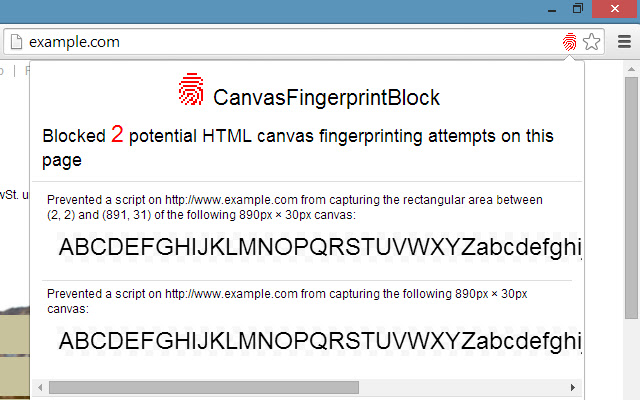
The HTML <canvas> element exposes two types of JavaScript functions: functions to draw to the canvas, and functions to export data from the canvas (for the nerds, these are toDataURL() and getImageData()). The canvas-drawing functions are not affected by CanvasFingerprintBlock, so websites that use the canvas for basic drawing will not be affected. On the other hand, when a website tries to export data from the canvas, CanvasFingerprintBlock will “fool” the website by showing it a blank canvas instead of the canvas containing the actual pixels. If the website is reading the canvas data to generate a fingerprint, the generated fingerprint will be useless because CanvasFingerprintBlock makes everyone’s fingerprint look the same.
If a little red fingerprint icon appears in the address bar beside the Bookmark ☆ icon, it means that the website you are visiting has tried to access the data of at least one canvas, and CanvasFingerprintBlock has blocked it. You will be surprised to discover how many websites employ Canvas Fingerprinting! Most websites are quite sneaky in how they create the fingerprint; the canvas is always hidden, and usually the canvas would have already been created, read and removed by the time the website has finished loading! Of course you will be curious to inspect what was being drawn right under your nose, and CanvasFingerprintBlock will let you see it by clicking on the little red fingerprint icon.
Lastly, it is noteworthy to mention that not all websites that are trying to export data from a canvas are doing it maliciously. For example, some photo uploaders will let you edit your photo on a canvas and when you are ready will export the edited photo and upload it to the server. Or some other websites will use a “rough” canvas to draw a gradient or pattern, and will then export the canvas to use that pattern somewhere else on the page. When you see the little red fingerprint icon, by clicking on it it is usually easy to tell whether the blocked canvas was drawn for fingerprinting purposes or not. However it is not so simple to detect this automatically. So for the time being, CanvasFingerprintBlock will block all canvas data exports, and the only way of allowing a canvas read is to disable the extension temporarily. This will be fixed in a future update of CanvasFingerprintBlock.
You may test CanvasFingerprintBlock on this website: http://www.browserleaks.com/canvas
Note: If you are a user of Chrome’s Incognito mode, then to be fully protected it is advisable to enable the CanvasFingerprintBlock extension also in Incognito mode (check “Allow in Incognito”).
Extore is a team of professionals who are passionate about creating extensions for web browsers. This devotion also gives us opportunity to appreciate work of other people. We get inspired by useful, open source extensions made by developers all over the world. Our strong belief is that one should share helpful add-ons with others. That’s why we’d like to present you our ever-growing list of favourite extensions that have inspired us. Moreover, as you probably have already learned, sometimes struggling for the best brings an end to the good. Talking about add-ons it often turns out that an upgrade is worse then previous version. Also it can become really tricky to get back to the beloved version of your favourite extension. That’s why we’re going to make not only the latest, but all versions of our favourite (and we hope yours too) add-ons available for download. No more compromises, just stick to the version you really like!
 Preparing download link, please wait for seconds
Almost done...
Click to download
Error getting file. Please try again
Preparing download link, please wait for seconds
Almost done...
Click to download
Error getting file. Please try again







