



version 1.0.14 - Download ZIP file
version 1.0.11 - Download ZIP file
version 1.0.9 - Download ZIP file
version 1.0.8 - Download ZIP file
version 1.0.6 - Download ZIP file
Otto — Be mindful while working✨
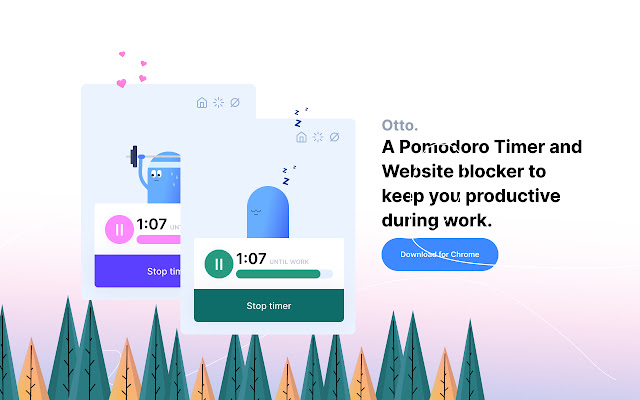
A Pomodoro timer and website blocker to help you stay focused and be more productive.
Otto is a unique take on Pomodoro timers. It introduces a point-based reward system to make work a bit more fun and also to remind you every action has a price.
How does it work?⭐
Otto is your digital tamagotchi and you need to look after it. Every time you visit a site that's in the block list while the work timer is on, Otto's health depletes. So, keep an eye on the health meter. If it hits zero, well...
To Regain health, stay away from blocked sites, and complete one work session. Otto loves to workout so don't make him miss it!
Features⭐
- Work/Break timer
- Block websites
- Point-based reward system
- Autoblock websites (Pro)
- Hard mode (soon)
- Insights (Basic, working on advance insights)
- Notifications
- Break mode (websites are unblocked during a Pomodoro break)
- Advanced Insights (Pro)
Work/Break timer⭐
Starting the timer creates a work session and a break session. The duration is up to you but the idea duration is 25 minutes for work and 5 minutes for a break. If you are focused while working, you'll hear a chime at the end of the session to remind you to take a break. You'll also hear a chime when your break ends so be ready to go back to work.
Autoblock Websites⭐
You can now autoblock sites based on the amount of time you spend on them.
After the specified duration is completed Otto will block the site automatically. To view the website again, go to the Settings -> Autoblock section and click on "unblock" to reset autoblock so that the site will be auto blocked all over again.
How to use Autoblock?⭐
Go to the settings tab in otto and in the "Auto block" section add a new rule and then click on "Block".
If you want to add a new site to the autoblock list, click on "New+" or go to the blocklist tab and add it over there.
Auto block is on by default but won't work if there aren't any websites in the list. Auto block can be turned on/off in the settings. On the free tier, you can only block 1 site.
What about Data collection? ⭐
No browser data is sent to a third party or me. As for the insights feature, the data will be stored in the local storage of your browser.
To improve the product, I'm tracking events and page views in google analytics. This will be optional soon, I'll be working on adding a button to turn it off :)
Data that's being collected via google analytics
- how long people use the extension
- the number of daily/weekly/monthly users
- what part of the UI is most active (via GA events)
Websites you visit or browse will not be sent to me or any 3rd party application. At the moment there is no code that collects your website history, but advanced insights is a new feature that I'm working on and it'll will collect data on how long you spend on websites and what websites you visit. These are stored only in your computer and no where else.
Got questions? Bug reports? Email me at [email protected] ✌️
Extore is a team of professionals who are passionate about creating extensions for web browsers. This devotion also gives us opportunity to appreciate work of other people. We get inspired by useful, open source extensions made by developers all over the world. Our strong belief is that one should share helpful add-ons with others. That’s why we’d like to present you our ever-growing list of favourite extensions that have inspired us. Moreover, as you probably have already learned, sometimes struggling for the best brings an end to the good. Talking about add-ons it often turns out that an upgrade is worse then previous version. Also it can become really tricky to get back to the beloved version of your favourite extension. That’s why we’re going to make not only the latest, but all versions of our favourite (and we hope yours too) add-ons available for download. No more compromises, just stick to the version you really like!
 Preparing download link, please wait for seconds
Almost done...
Click to download
Error getting file. Please try again
Preparing download link, please wait for seconds
Almost done...
Click to download
Error getting file. Please try again







