


“MirrorOp Sender” wirelessly shares content from any Chromebook to a big screen. Great ideas can be communicated clearly and instantly, inspiring creative and collaborative minds. Effective meetings/classes have never been made so easy!
➜ How MirrorOp Sender Works
Step 1. Make sure that your display (big screen) is attached to an authorized receiver device (i.e. a wePresent base unit).
Step 2. Install the MirrorOp Sender app on your Chromebook from which you want to share content.
Step 3. Connect your Chromebook to the receiver device via WiFi.
Step 4. All is set. You can now seamlessly share content to the display and engage with meeting participants via MirrorOp Sender.
➜ Use Cases
Share Ideas Wirelessly
With MirrorOp Sender, you can project any content from your Chromebook to the display handily and wirelessly. You can even stream your apps to the display!
Inspire Collaboration Effortlessly
MirrorOp Sender enables multiple Chromebook users to share content to the same display simultaneously. Group activities can be easily facilitated, which in turn inspires collaboration.
➜ Product Features
Quick Search
Once launched, MirrorOp Sender will automatically search for available receiver devices. You can also manually locate them by entering their IP addresses or hostnames.
Favorite List
You can save the receiver devices you use most frequently as a Favorite List. The receiver devices stored in Favorites will always be placed on the top of the receiver list.
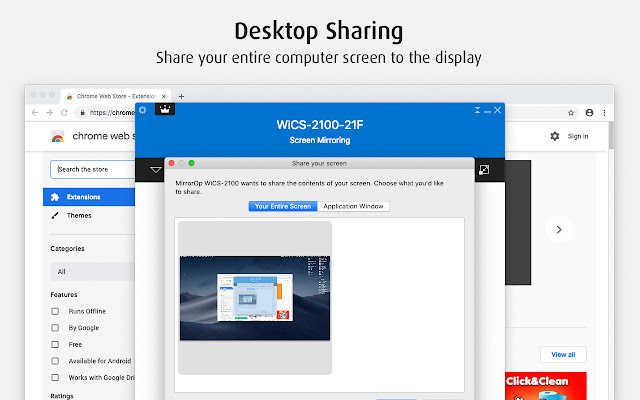
Desktop Sharing
A Chromebook user can instantly share his/her desktop to the display by simply clicking the Play button. The display will show everything that is on the Chromebook desktop.
Application Sharing
Application Sharing makes it possible to share a specific application (rather than the whole Chromebook desktop) to the display.
Student Monitor
A teacher can use a Chromebook to preview students’ device screens before they are projected to the display, and moderation can be done directly on the UI of MirrorOp Sender. (“Student Monitor” can only work if it is supported by the receiver device.)
Extore is a team of professionals who are passionate about creating extensions for web browsers. This devotion also gives us opportunity to appreciate work of other people. We get inspired by useful, open source extensions made by developers all over the world. Our strong belief is that one should share helpful add-ons with others. That’s why we’d like to present you our ever-growing list of favourite extensions that have inspired us. Moreover, as you probably have already learned, sometimes struggling for the best brings an end to the good. Talking about add-ons it often turns out that an upgrade is worse then previous version. Also it can become really tricky to get back to the beloved version of your favourite extension. That’s why we’re going to make not only the latest, but all versions of our favourite (and we hope yours too) add-ons available for download. No more compromises, just stick to the version you really like!
 Preparing download link, please wait for seconds
Almost done...
Click to download
Error getting file. Please try again
Preparing download link, please wait for seconds
Almost done...
Click to download
Error getting file. Please try again







