

version 1.5 - Download ZIP file
version 1.4 - Download ZIP file
version 1.2 - Download ZIP file
Simple to use!
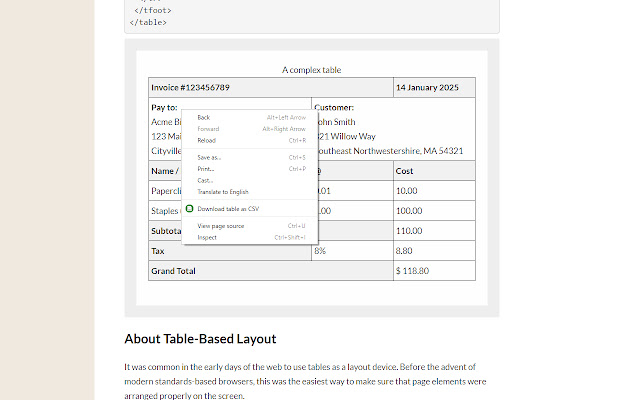
Right click on the table, then select 'Download table as CSV' from the context menu.
Alternatively you can click the icon and then click on the table to download
The extension downloads the HTML tables in MS Excel style CSV format.
Images will be show in the CSV file as the source URL.
Inputs and text-areas will be indicated in the CSV file with a '(i)'
Note: Sometimes special characters, symbols will not look as you might expect, this is not a bug, rather a limitation of the format.
Attempts to follow RFC4180
Source code: https://github.com/arktiv/table-csv-chrome
Extore is a team of professionals who are passionate about creating extensions for web browsers. This devotion also gives us opportunity to appreciate work of other people. We get inspired by useful, open source extensions made by developers all over the world. Our strong belief is that one should share helpful add-ons with others. That’s why we’d like to present you our ever-growing list of favourite extensions that have inspired us. Moreover, as you probably have already learned, sometimes struggling for the best brings an end to the good. Talking about add-ons it often turns out that an upgrade is worse then previous version. Also it can become really tricky to get back to the beloved version of your favourite extension. That’s why we’re going to make not only the latest, but all versions of our favourite (and we hope yours too) add-ons available for download. No more compromises, just stick to the version you really like!
 Preparing download link, please wait for seconds
Almost done...
Click to download
Error getting file. Please try again
Preparing download link, please wait for seconds
Almost done...
Click to download
Error getting file. Please try again







