
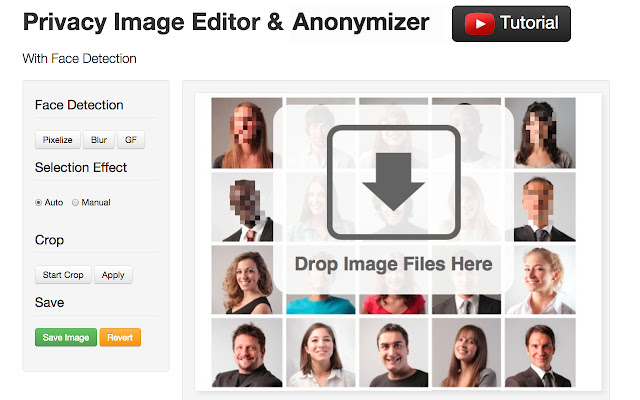
Use Facepixelizer to quickly hide information in images that you don't want to become public. For example, you can blur out text and pixelate faces that appear in your images.
Your images are secure because they never leave your browser and are never sent over the network. All the processing happens in your browser.
- Who is it for?
* Authors of tutorials who need hide email addresses etc. in screenshots.
* Bloggers that want to use personal photos in their blogs.
* Photographers that don't want to get sued.
* Journalists that want to protect the identity of people in photos.
* Facebook users that don't want to lose their jobs for posting photos.
* Parents that want to share photos of their children.
* Employees and business owners that need submit private credit card statements in lieu of lost receipts for expense reimbursement and would like to obscure private information.
* Anyone needing to redact documents.
- How do you use it?
1) Drag a photo (.jpg or. png) onto the facepixelizer web page.
2) Click and drag your mouse over any regions that need to be blurred or pixelated.
3) Save your image.
- Fast Workflow
The workflow in Facepixelizer is optimized for anonymizing images with the fewest clicks possible.
Facepixelizer requires only one click per anonymization. Compare that to over 10 clicks in Photoshop. Unlike many other editors, you do not need to first select an area and then apply an effect.
The main reason Facepixelizer is so efficient is that you don't need to adjust the settings of the effect to apply, Facepixelizer figures it out for you.
- Face Detection
Facepixelizer has face detection built in that quickly finds and pixelates faces in an image.
- Pixelate, Blur or Redact
Facepixelizer has an "intelligent" tool that adjusts the amount of blurring or pixelation automatically depending on the size of the region. However, you can switch to manual mode to control the effect.
- Versions
New in version 1.4:
* Japanese Version of Facepixelizer.
* Better handling of large images.
Extore is a team of professionals who are passionate about creating extensions for web browsers. This devotion also gives us opportunity to appreciate work of other people. We get inspired by useful, open source extensions made by developers all over the world. Our strong belief is that one should share helpful add-ons with others. That’s why we’d like to present you our ever-growing list of favourite extensions that have inspired us. Moreover, as you probably have already learned, sometimes struggling for the best brings an end to the good. Talking about add-ons it often turns out that an upgrade is worse then previous version. Also it can become really tricky to get back to the beloved version of your favourite extension. That’s why we’re going to make not only the latest, but all versions of our favourite (and we hope yours too) add-ons available for download. No more compromises, just stick to the version you really like!
 Preparing download link, please wait for seconds
Almost done...
Click to download
Error getting file. Please try again
Preparing download link, please wait for seconds
Almost done...
Click to download
Error getting file. Please try again







