
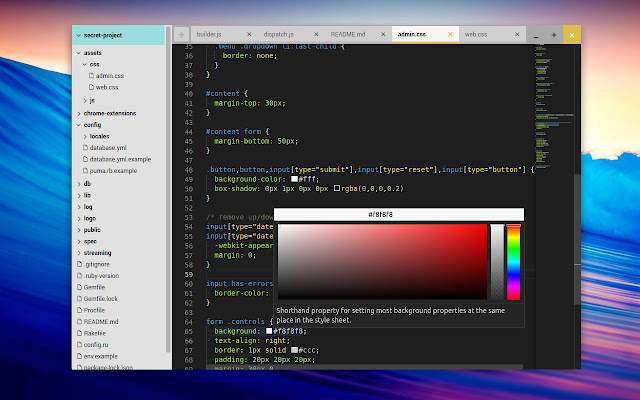

A native code editor for Chrome OS that doesn't require Crouton or Crostini. Among other tricks, it features:
- Multiple cursors
- Code minimap
- Code folding
- Directory browser with right-click support (add/rename/delete)
- Code formatting via Prettier (prettier.io)
- Ctrl + Scrollwheel Zoom
Currently in beta and free for personal use.
Changelog
=========
## Version 0.7.1
- Fix menu icon not showing on some versions of Chrome (SVG path fill).
- Allow closing tabs by middle-clicking on them.
## Version 0.7.0
- New logo and icon
- Update Monaco to v0.21.2
- Updated 'new/open' menu with a few options
- Added monaco-ace-tokenizer (syntax highlight for 20 new languages).
- Fixed a few bugs regarding the open/save dialog.
## Version 0.6.1
- Initial (beta) theme support. Open with Alt+Shift+T
- Add tab menu for language and tab configuration
- Added convert indentation function (tabs <-> spaces)
- Skip more directories when searching (.git, .hg, .svn, CVS, .cache, node_modules)
- Fix syntax highlight for files with no extension (eg. "README")
- Added commands.showWelcome and map it to Ctrl+Alt+?
- Fixed event listener logic when using child selectors
- Recalculate search resuts height when toggling line visibility
- Add new mappings (.c, .h, .rs, .gemspec, .jinja, .rst, .ink, .jwmrc)
- UI tweaks (window buttons, tab positioning and icons, etc)
## Version 0.6.0
- New 'Search Files' option, within dir or globally (mapped to Ctrl+Shift+F)
- Speed up file finder initial render
- Move tab close button to beginning of tab
- Restore cursor position on tab.reload()
- Update tab entry when renaming files
- Add file type mapping from 'bash' extension
- Added support for .vue files
- Several minor UI tweaks (padding, tabs, buttons, icons, etc)
- Move close prompt behaviour to ui.js
- Added icons in different sizes
## Version 0.5.3
- Added 'new version' page: shows the changelog when a new version is released
- Palette: Sort files by proximity, from closest to farthest
- Refactored tabs.js module a bit, close open tab when deleting file, if found
- Fixed overflow of text in file finder palette
- Add support for reopen closed tab with Ctrl+Shift+T
- Update tabs.setModified logic, to handle abort when showing prompt
- Add Ctrl+R for reloading current tab
- Prevent close tab or app from being called when prompt is already shown
- Fix race condition that prevented open file from Files app randomly
- Reduce timeout wait for hold + click in newtab
- Better prompt when input is shown (cancel, focuCurrently in beta and free. s, etc)
## Version 0.5.2
- Fixed error when closing an open/shown directory.
## Version 0.5.1
- Better session restore (reopen all previous tabs and directories)
- Remove formatting when copying text (copyWithSyntaxHighlighting)
- Add shebang file type detection for files without extension
- Add line/word wrapping command and detection (plaintext vs code)
- Map Alt + Space to Command Palette
- Set language correctly when saving new files (untitled.txt)
- Fix keyboard shortcut when using nonstandard layouts (e.g. dvorak)
- Fix tab config (tab size and insert spaces) save/restore
- Fix Prettify command
- Handle additional extensions for language detection
## Version 0.5.0
- Initial release
Extore is a team of professionals who are passionate about creating extensions for web browsers. This devotion also gives us opportunity to appreciate work of other people. We get inspired by useful, open source extensions made by developers all over the world. Our strong belief is that one should share helpful add-ons with others. That’s why we’d like to present you our ever-growing list of favourite extensions that have inspired us. Moreover, as you probably have already learned, sometimes struggling for the best brings an end to the good. Talking about add-ons it often turns out that an upgrade is worse then previous version. Also it can become really tricky to get back to the beloved version of your favourite extension. That’s why we’re going to make not only the latest, but all versions of our favourite (and we hope yours too) add-ons available for download. No more compromises, just stick to the version you really like!
 Preparing download link, please wait for seconds
Almost done...
Click to download
Error getting file. Please try again
Preparing download link, please wait for seconds
Almost done...
Click to download
Error getting file. Please try again







