
NativeExt -- Management extension
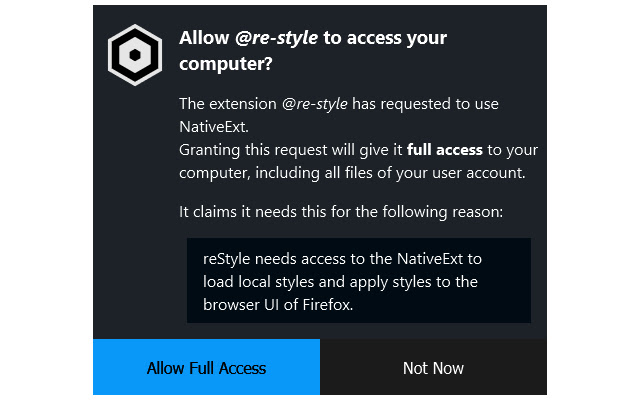
The NativeExt extension manages access to the NativeExt application, which gives other browser extensions full access to your computer.
NativeExt will explicitly ask you for every extension before granting it access to your system.
To use NativeExt, you must download and install the application, and then click the Apply button in the options.
Description
NativeExt doesn't do anything on its own. It is a special module that extends the capabilities of other browser extensions. It allows extensions that were explicitly allowed by the user to execute node.js JavaScript code on the computer, with the full access of the current user account.
While this is, from a security perspective, generally equivalent to installing a program on the computer, it is much easier to install and update for the user (once initially set up, allowing an extension requires only a single click, and updates are implicitly included with the extension itself) and easier to develop and maintain for the developers (write/bundle standard node.js modules and ship them with the extension; no platform specific installation or update code required).
For more information on what and why NativeExt is, see the project homepage.
Permissions used:
* Exchange messages with programs: Manage and launch the extension process
* Display notifications: Inform about setup status and errors
* Recently closed tabs: Remove own popups from closed windows
Extore is a team of professionals who are passionate about creating extensions for web browsers. This devotion also gives us opportunity to appreciate work of other people. We get inspired by useful, open source extensions made by developers all over the world. Our strong belief is that one should share helpful add-ons with others. That’s why we’d like to present you our ever-growing list of favourite extensions that have inspired us. Moreover, as you probably have already learned, sometimes struggling for the best brings an end to the good. Talking about add-ons it often turns out that an upgrade is worse then previous version. Also it can become really tricky to get back to the beloved version of your favourite extension. That’s why we’re going to make not only the latest, but all versions of our favourite (and we hope yours too) add-ons available for download. No more compromises, just stick to the version you really like!
 Preparing download link, please wait for seconds
Almost done...
Click to download
Error getting file. Please try again
Preparing download link, please wait for seconds
Almost done...
Click to download
Error getting file. Please try again







