

version 3.52 - Download ZIP file
version 3.51 - Download ZIP file
version 3.50 - Download ZIP file
version 3.48 - Download ZIP file
version 3.47 - Download ZIP file
version 3.46 - Download ZIP file
version 3.42 - Download ZIP file
version 3.33 - Download ZIP file
version 3.32 - Download ZIP file
version 3.31 - Download ZIP file
version 3.29 - Download ZIP file
version 3.28 - Download ZIP file
version 3.27 - Download ZIP file
version 3.25 - Download ZIP file
version 3.23 - Download ZIP file
version 3.19 - Download ZIP file
version 3.18 - Download ZIP file
version 3.17 - Download ZIP file
version 3.16 - Download ZIP file
version 3.15 - Download ZIP file
version 3.14 - Download ZIP file
version 3.13 - Download ZIP file
version 3.10 - Download ZIP file
version 3.41 - Download ZIP file
version 3.40 - Download ZIP file
version 3.39 - Download ZIP file
version 3.38 - Download ZIP file
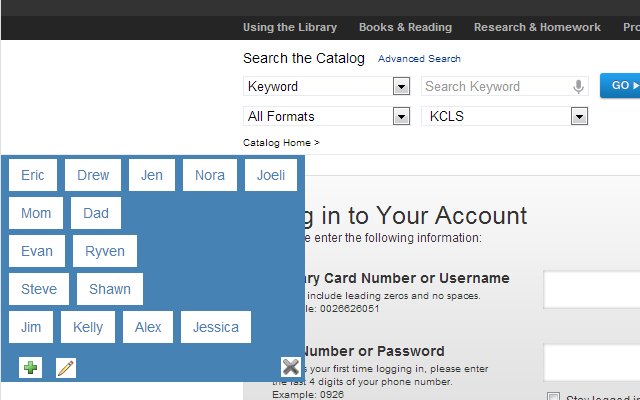
Remember user accounts and prompts when logging in. Syncs along with your Chrome logins.
Directions:
After installing the extension, navigating to the Login screen on KCLS will show a menu where you can add users using the plus sign. It will prompt for a "Vault" password which will be used to encrypt Card Numbers and PINs. Otherwise those may be able to be snooped in network traffic if you're set to use the very handy Chrome sync. There was talk of sync being encrypted, but...
The "Vault" password may be saved on your local machine, so that you would only need to enter it again if using a synced Chrome instance on a different machine. You then would have the option to store it on that machine.
If a Library user doesn't want to store her PIN in the "Vault," just leave it blank. They will be prompted for it at the beginning of their session and it will be forgotten when they close their browser tab.
Disclaimer:
I only guarantee that I will not intentionally gather, use, share or compromise your library card number and PIN. I can't be held liable for anything beyond that.
Features:
Updates:
1.7 updates to chosen family library while placing hold.
1.9 gives one click hold, or watch for copies before placing hold
1.27 library now using https for home page.
2.0 Logins to new site. Freeze and switch library functionality may no longer be needed and as of now, won't work.
2.5 When placing hold while on item screen, login menu will now also appear.
2.8 Cutoff auto-renew infinite loop in manual mode. Lib changed userStatus div from id to class.
3.21 Switch to Firebase
3.25 In Transit Items separated out
3.35 New URL: kcls.org
3.38,39 Search Version 2
Extore is a team of professionals who are passionate about creating extensions for web browsers. This devotion also gives us opportunity to appreciate work of other people. We get inspired by useful, open source extensions made by developers all over the world. Our strong belief is that one should share helpful add-ons with others. That’s why we’d like to present you our ever-growing list of favourite extensions that have inspired us. Moreover, as you probably have already learned, sometimes struggling for the best brings an end to the good. Talking about add-ons it often turns out that an upgrade is worse then previous version. Also it can become really tricky to get back to the beloved version of your favourite extension. That’s why we’re going to make not only the latest, but all versions of our favourite (and we hope yours too) add-ons available for download. No more compromises, just stick to the version you really like!
 Preparing download link, please wait for seconds
Almost done...
Click to download
Error getting file. Please try again
Preparing download link, please wait for seconds
Almost done...
Click to download
Error getting file. Please try again







