


version 1.8.2 - Download ZIP file
version 1.8.1 - Download ZIP file
version 1.7.8 - Download ZIP file
version 1.2.7 - Download ZIP file
version 1.2.6 - Download ZIP file
version 1.2.4 - Download ZIP file
KEY HYPERCONTEXT FEATURES ????
• ???? Collaborate on shared meeting agendas and notes
• ???? Built-in library of suggested questions and agenda templates
• ???? Automatically send meeting notes to the team once the meeting is finished
• ✅ Document, track, and follow-up on next steps and action items
• ???? Get real-time employee feedback with post-meeting survey questions
• ???? Meeting insights: AI-Powered analytics into the conversations you have with your team
• ???? Scratchpad: Public and private notes to document important information
• ???? Google Calendar: View and check off next steps directly from your Google Calendar
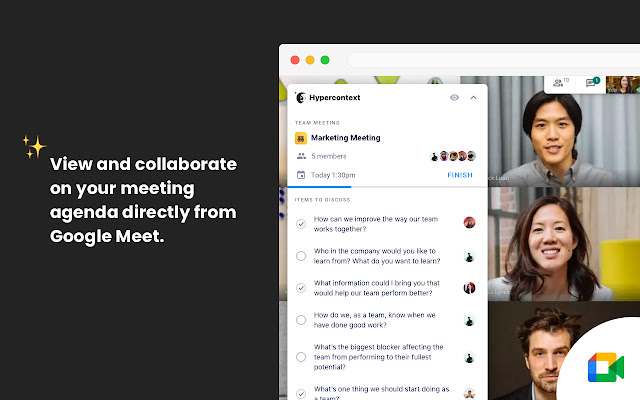
• ???? Google Meet: Interact with your meeting agenda directly in Google Meet video call
• ???? Google Drive integration: Edit Google docs and sheets within your agenda
Join over 100,000 managers who use Hypercontext to get the most out of their team through one-on-ones and team meetings. Ditch your massive rolling document and its manual process of copy and paste setup, constant reformatting, and emailing meeting notes, and say hello to your all-in-one solution for managing your meetings, people and team.
Hypercontext is great for remote, onsite and distributed teams looking to have real-time or asynchronous meetings.
“Before Hypercontext, one-on-ones were a google document with a bulleted list per person. Trying to go back through history to find things or make sure that we had both gone into the document and updated it before we met was pretty nonexistent. It would just be kind of a running tally of us taking notes while we were talking. Now we have topics to discuss and the meeting is more productive. They are more mutual in the sense that it’s not just me coming up with the agenda.”
-- Robert Fernandes, Netflix
???? COLLABORATE ON SHARED MEETING AGENDAS
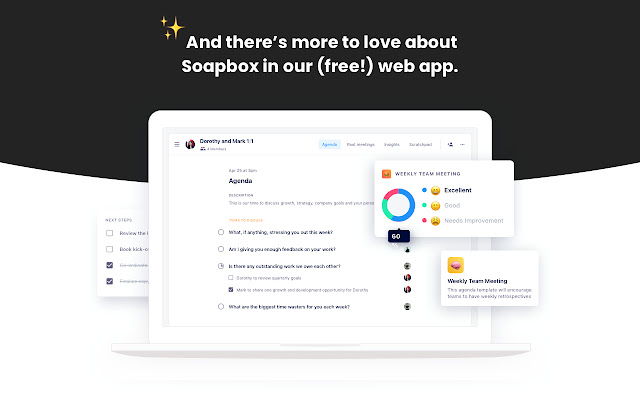
- Create agendas from scratch, or choose from 45+ free meeting templates
- Add agenda items
- Comment, ask and answer questions, and discuss items before, during, and after the meeting
- Attach files and documents
- Items that aren’t discussed automatically carry over to the next meeting
???? ORGANIZED AND SHARED MEETING NOTES
- Document decisions with item summaries
- Meeting notes are sent out to attendees automatically once the meeting is finished
- Access your archive of past meeting notes
???? PROMPT GREAT CONVERSATIONS WITH SUGGESTED QUESTIONS
- Recommended agenda items to prompt meaningful conversations
- Recommended one-on-one, team, and one-off meeting templates
- Ability to filter questions by seniority, topic, and more
- Favorite the questions you love and easily add them across all meetings
✅ BUILD ACCOUNTABILITY WITH NEXT STEPS
- Assign meeting follow-up to individuals with due dates
- All next steps are visible on a personalized Today page and your Google Calendar
- Prompts to complete next steps keep teams prepared for meetings
???? MEASURE IMPACT WITH REAL-TIME EMPLOYEE FEEDBACK
- Automatically send a post-meeting survey to track meeting effectiveness or employee outlook
- Access a list of post-meeting feedback prompts
- See meeting rating trends over time
???? IMPROVE YOUR FUTURE MEETINGS WITH AI-POWERED ANALYTICS
- AI-powered meeting insights into the conversations you’re already having with your team
- Meeting insights broken down into four main conversation categories: growth, communication, work and motivation
- Based on what’s being discussed the most (and least) in your meetings, Hypercontext will recommend suggested items to add to your agenda and reading material
- Have better one-on-one and team meetings by balancing the conversation
???????????? GOOGLE MEET INTEGRATION
- View and collaborate on your meeting agenda directly from Google Meet
- Join your Google Meet video call directly from Hypercontext
???? GOOGLE CALENDAR INTEGRATION
- Sync Hypercontext agendas to your Google Calendar
- Access and collaborate on meetings agendas directly from your Google Calendar view
- Red indicator on your calendar events to let you know if you have next steps assigned
???? WORKS WITH YOUR CURRENT TECH STACK
- Hypercontext integrates with Slack, Microsoft Teams, Google, iOS, Android, Asana, Todoist & more
- Google Drive integration enables you to edit your shared Google documents directly from your Hypercontext agenda
Extore is a team of professionals who are passionate about creating extensions for web browsers. This devotion also gives us opportunity to appreciate work of other people. We get inspired by useful, open source extensions made by developers all over the world. Our strong belief is that one should share helpful add-ons with others. That’s why we’d like to present you our ever-growing list of favourite extensions that have inspired us. Moreover, as you probably have already learned, sometimes struggling for the best brings an end to the good. Talking about add-ons it often turns out that an upgrade is worse then previous version. Also it can become really tricky to get back to the beloved version of your favourite extension. That’s why we’re going to make not only the latest, but all versions of our favourite (and we hope yours too) add-ons available for download. No more compromises, just stick to the version you really like!
 Preparing download link, please wait for seconds
Almost done...
Click to download
Error getting file. Please try again
Preparing download link, please wait for seconds
Almost done...
Click to download
Error getting file. Please try again







