
version 0.2.5 - Download ZIP file
version 0.2.4 - Download ZIP file
version 0.2.3 - Download ZIP file
version 0.2.1 - Download ZIP file
version 0.2.0 - Download ZIP file
version 0.1.7 - Download ZIP file
version 0.1.6 - Download ZIP file
version 0.1.4 - Download ZIP file
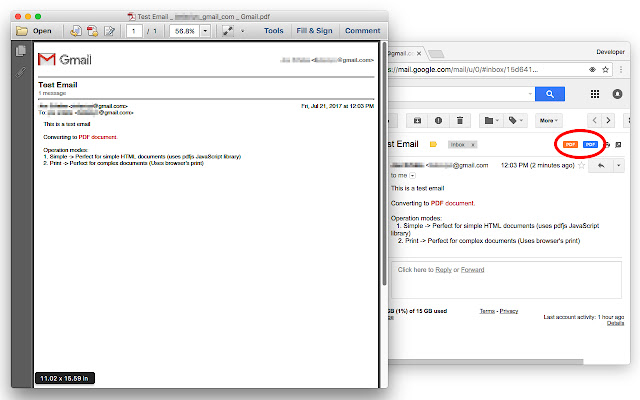
This extension adds two new buttons to your Gmail interface. One orange PDF button and one blue PDF button. The orange button can be used to generate distraction-free PDF documents and the blue one generates a normal PDF document. It is also possible to press the toolbar button (action button) to convert multiple emails to PDF at once. For bulk conversion, you need to select a few threads first.
Notes:
1. The orange button is called the "simple" mode of operation. In this mode, your emails are reformated and all the images, lines, and any other distracting elements are removed from the document before the PDF file is generated. This is useful to generate PDF for fast reading.
2. The blue button is called the "normal" mode of operation. In this mode, the "window.print()" function is called and the generated document is in the standard format.
3. This extension does NOT send your documents to an external server for conversion as this violates the user's privacy. The extension uses a local JavaScript library called jsPDF for all its conversions.
4. By default, no image is attached to your document if the "simple" mode is selected so that there would be no image fetching from remote servers.
For more info please visit:
https://add0n.com/to-pdf.html?from=gmail
To report bugs please visit:
https://github.com/ray-lothian/to-pdf/issues
Change Log:
version 0.1.5
1. You can now customize the filename
2. There are options to hide both or either print and simple mode buttons
3. The extension now embeds a few popular fonts to the PDF document so it will look better in the simple printing mode.
version 0.1.7
1. It is now possible to use managed storage to control settings
2. Font detection algorithm is improved
version 0.2.3
1. Extension supports printing in multiple logged-in accounts
version 0.2.4
1. Supports bulk conversion. Select a few threads and press the action button to convert each email to PDF one by one.
Extore is a team of professionals who are passionate about creating extensions for web browsers. This devotion also gives us opportunity to appreciate work of other people. We get inspired by useful, open source extensions made by developers all over the world. Our strong belief is that one should share helpful add-ons with others. That’s why we’d like to present you our ever-growing list of favourite extensions that have inspired us. Moreover, as you probably have already learned, sometimes struggling for the best brings an end to the good. Talking about add-ons it often turns out that an upgrade is worse then previous version. Also it can become really tricky to get back to the beloved version of your favourite extension. That’s why we’re going to make not only the latest, but all versions of our favourite (and we hope yours too) add-ons available for download. No more compromises, just stick to the version you really like!
 Preparing download link, please wait for seconds
Almost done...
Click to download
Error getting file. Please try again
Preparing download link, please wait for seconds
Almost done...
Click to download
Error getting file. Please try again







