

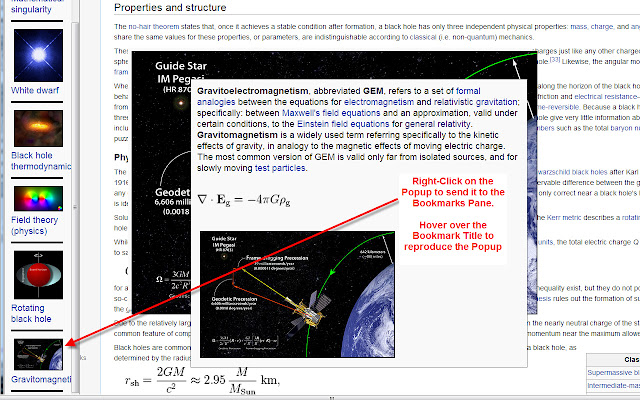
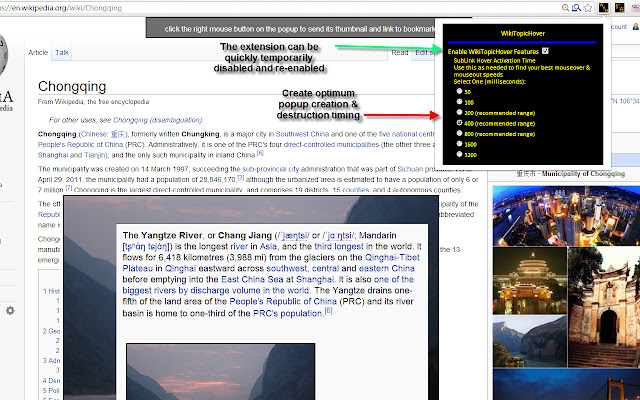

This extension will provide the Wikipedia user a popup view of the introductory paragraph along with the first image thumbnail and the first math equation - if they exist - from the linked topic when hovering the mouse over the embedded topic link. When the user then mouses over the popup, the thumbnail is zoomed to about 1/2 width of the browser, behind the popup. Finally, when the user mouses out of the popup, but stays over the (larger) image, the image remains and the popup goes away. This mimics a sequence of reading the subtopic and the equation and if the thumbnail is inadequate to view detail, a study can then be made of the image detail. Popups can be bookmarked to a vertical, scrollable side-pane from where they can be recalled later.
Often, linked topics are from Wiktionary and not Wikipedia. In that case the popup will display the various definitions from the Wiktionary page - there will be no equation or image.
Overall, this extension has value as a study and research aid by limiting the clutter and extra work and time of opening several Wiki pages in separate browser tabs or windows while doing research on a primary topic, when quick definitions and introductions to subsidiary topics, and then highlighting/retrieval of them are all that are needed.
A new feature in 3.2 is the ability to alter and set the mouse hover activation time in the options popup. The new setting takes effect immediately. This will provide flexibility to the users in how rapidly the popups are created and destroyed. Some users may want to slow down the activity if they tend to move the mouse over the page rapidly while reading the main page. Slowing it will avoid unwanted popups and will also allow more relaxed movements after creation of the popups that are some distance from the hovered link. Making the activation faster can allow more rapid popup browsing. Each user will have one or more optimum settings depending on his or her usage patterns.
A new feature added to 3.0 is an options popup. Click on the WTH icon in the extensions bar and the selection box can be checked or unchecked to enable/disable the extended features. This is useful if the base capability of the browser is needed without the extended capabilities provided by this extension. These options will be enhanced further in future revisions. 3.1.1 fixes a problem with https subtopic links
A new feature added to 2.0 is the capability to right click on the popup to add a snapshot bookmark of the popup to a vertical, scrollable pane on the left edge of the browser page. Each bookmark consists of a thumbnail of the image in the popup if one exists, and the same link title as found in the text initially. Hovering over the bookmark linked title will reproduce the popup without having to hunt for the link again in the main text. Clicking on the bookmarked linked title will then take the user to the linked topic page the same way it would in the original text. There is no limit to the number of bookmarks the user can create, and the pane of bookmarks is scrollable after the list grows beyond the size of the browser page. This feature allows the user to "highlight" interesting topics in order of discovery, then revisit them later for efficient review.
(The original popup idea was inspired by and initial code adapted from a userscript for Wikipedia footnotes by a coder named: no.good.at.coding [http://nogoodatcoding.com/projects/wikipedia-footnote-popup-script])
Extore is a team of professionals who are passionate about creating extensions for web browsers. This devotion also gives us opportunity to appreciate work of other people. We get inspired by useful, open source extensions made by developers all over the world. Our strong belief is that one should share helpful add-ons with others. That’s why we’d like to present you our ever-growing list of favourite extensions that have inspired us. Moreover, as you probably have already learned, sometimes struggling for the best brings an end to the good. Talking about add-ons it often turns out that an upgrade is worse then previous version. Also it can become really tricky to get back to the beloved version of your favourite extension. That’s why we’re going to make not only the latest, but all versions of our favourite (and we hope yours too) add-ons available for download. No more compromises, just stick to the version you really like!
 Preparing download link, please wait for seconds
Almost done...
Click to download
Error getting file. Please try again
Preparing download link, please wait for seconds
Almost done...
Click to download
Error getting file. Please try again







