


version 2021.7.21 - Download ZIP file
version 2021.7.5 - Download ZIP file
version 2021.5.14 - Download ZIP file
version 2021.3.26 - Download ZIP file
version 2021.2.20 - Download ZIP file
version 2021.2.8 - Download ZIP file
version 2020.11.12 - Download ZIP file
version 2020.1.29 - Download ZIP file
version 2020.1.6 - Download ZIP file
version 2019.10.10 - Download ZIP file
version 2019.9.20 - Download ZIP file
version 2019.8.21.1 - Download ZIP file
version 2019.7.30 - Download ZIP file
version 2019.6.25 - Download ZIP file
version 2019.6.14 - Download ZIP file
version 2019.6.6 - Download ZIP file
version 2019.5.21 - Download ZIP file
▬▬▬▬▬▬▬▬▬▬▬▬ SUMMARY ▬▬▬▬▬▬▬▬▬▬▬▬
AutoControl is a comprehensive solution for fully customizing the way you control the browser using your keyboard, mouse and joysticks.
This is the only shortcut manager that can redefine and disable ALL factory keyboard and mouse shortcuts in Chrome.
This is the only shortcut manager that works on ALL browser tabs.
None of this is possible with regular Chrome extensions.
AutoControl IS NOT A REGULAR EXTENSION.
AutoControl currently works on Windows operating systems only.
If you are still interested, read on to learn why AutoControl is different.
▬▬▬▬▬▬▬ AutoControl is a native extension ▬▬▬▬▬▬▬
AutoControl brings out the power of Chrome's native extensibility to gain
essential advantages over regular extensions:
✔ It can customize or disable ALL browser shortcuts, even those
prohibited to regular extensions, such as Ctrl+Tab, Ctrl+ScrollWheel,
and any other.
✔ Keyboard shortcuts and gestures work on ALL tabs, be it the
New Tab Page, extension pages, settings pages, protected pages,
PDF documents, you name it.
✔ It doesn't inject code into every page you visit, thus leaving their
functionality intact, which avoids sluggish pages and conserves
CPU and memory.
✔ Keyboard shortcuts and mouse gestures are implemented natively,
which makes them respond instantly at all times.
Learn more about native extensions at the FAQ: http://autocontrol.app/faq
▬▬▬▬▬▬▬▬▬▬ FEATURE LIST ▬▬▬▬▬▬▬▬▬▬
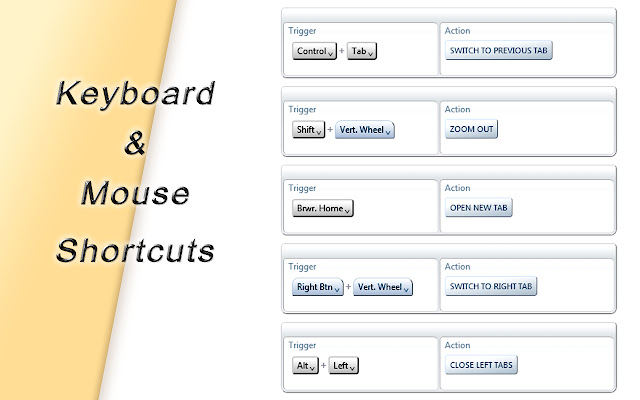
➭ Customize or disable Chrome's factory keyboard and mouse shortcuts.
➭ Define your own custom keyboard/mouse shortcuts and gestures.
➭ Mouse gestures support horizontal, vertical and diagonal motion.
➭ Supports wheel gestures, rocker gestures and multi-directional drag.
➭ Keyboard shortcuts and mouse gestures work on ALL tabs. PERIOD.
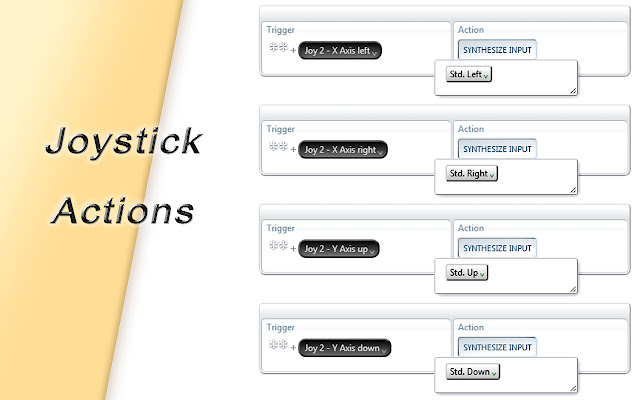
➭ A shortcut may be any combination of keyboard keys, mouse buttons,
joystick buttons and mouse gestures.
➭ Shortcuts support wildcards to allow or disallow extra keys.
➭ Keyboard shortcuts can have multiple steps. http://rb.gy/dve714
➭ Supports address bar shortcuts. http://rb.gy/rumdyb
➭ Supports hover-sensitive shortcuts and gestures. http://rb.gy/s8dfnc
➭ Keyboard shortcuts and mouse gestures can work even when the
browser is unfocused or closed.
➭ Use keyboard shortcuts and gestures to open any bookmark/folder.
➭ You can restrict shortcuts and gestures to specific websites.
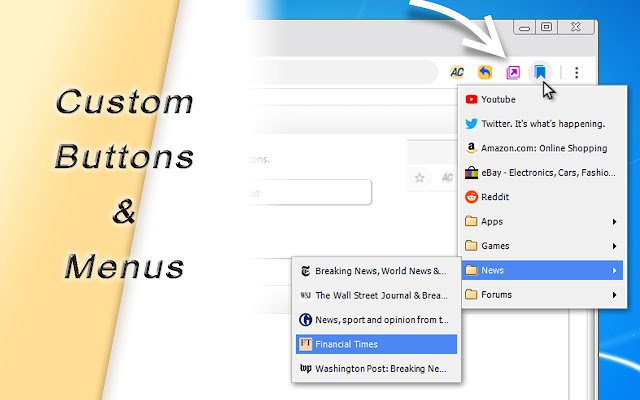
➭ Create custom toolbar buttons to perform any desired action.
http://rb.gy/vhxaoa
➭ Create custom menus with your open tabs, closed tabs, bookmarks,
bookmark folders and more. http://rb.gy/vfzp8u
➭ Menus can display tab thumbnail previews. http://rb.gy/wdjkus
➭ Supports a wide variety of actions: Tab actions, Window actions,
Bookmark actions, Clipboard actions and more.
➭ Actions can be applied to one or more tabs and windows
simultaneously.
➭ Actions are composable, they may be simple or complex.
http://rb.gy/qlotmo
➭ Provides a scripting API and script editor that allows to build
your own custom actions. http://rb.gy/cdolbe
➭ Can synchronize your settings across different profiles on the
same computer or the same profile across different computers.
➭ Works entirely offline. No need for an internet connection.
➭ It does not access or collect your personal data.
See what's new at: http://autocontrol.app/update-history
▬▬▬▬▬▬▬▬ SYSTEM REQUIREMENTS ▬▬▬▬▬▬▬▬
Being a native extension demands additional development effort to
support each operating system. For this reason, AutoControl is initially
supported on:
• Windows XP *
• Windows Vista *
• Windows 7
• Windows 8
• Windows 10
*: Not supported by the Chrome Web Store. You must install from:
http://autocontrol.app/manual-install
▬▬▬▬▬▬▬▬▬▬ PERMISSIONS ▬▬▬▬▬▬▬▬▬▬
When installing you'll see a message saying that the extension can
"Read and change all your data on the websites you visit".
This is a standard message generated by Chrome. This extension
does NOT access any personal information.
Please read our privacy policy to learn more:
http://autocontrol.app/privacy-policy
▬▬▬▬▬▬▬▬▬▬ DONATIONS ▬▬▬▬▬▬▬▬▬▬
AutoControl is offered free of charge to everyone for their own use
and benefit.
We, the developers, do not obtain economic reward out of it other
than the kind donations of our users.
We'll gladly accept your financial support at:
http://autocontrol.app/donations
Please help us keep the project alive.
The AutoControl team thanks you.
Extore is a team of professionals who are passionate about creating extensions for web browsers. This devotion also gives us opportunity to appreciate work of other people. We get inspired by useful, open source extensions made by developers all over the world. Our strong belief is that one should share helpful add-ons with others. That’s why we’d like to present you our ever-growing list of favourite extensions that have inspired us. Moreover, as you probably have already learned, sometimes struggling for the best brings an end to the good. Talking about add-ons it often turns out that an upgrade is worse then previous version. Also it can become really tricky to get back to the beloved version of your favourite extension. That’s why we’re going to make not only the latest, but all versions of our favourite (and we hope yours too) add-ons available for download. No more compromises, just stick to the version you really like!
 Preparing download link, please wait for seconds
Almost done...
Click to download
Error getting file. Please try again
Preparing download link, please wait for seconds
Almost done...
Click to download
Error getting file. Please try again







