


version 1.20 - Download ZIP file
version 1.19 - Download ZIP file
version 1.16 - Download ZIP file
version 1.15 - Download ZIP file
version 1.14 - Download ZIP file
version 1.13 - Download ZIP file
???? Please watch the short video above to see how to scrape ????
Simplescraper is designed to be the most simple and most powerful web scraper you've ever used.
Run locally in your browser (no need to signup) or create automated scraping recipes that can scrape thousands of web pages and turn them into APIs.
Start here: https://simplescraper.io/guide
---
Recent reviews:
"Exceptionally easy to use" - ★★★★★
"Simply the best/easiest Scraper I've found" - ★★★★★
"This is a great scraper. It's better than all the other scrapers I tried on the Google web store" - ★★★★★
"Amazing extension saved me a ton of time" - ★★★★★
---
Useful features include:
⚡ A simple point and click tool to select the data you need
⚡ Smart selection that captures table columns as well as urls from links and images
⚡ Download in csv or JSON format
⚡ Unlimited free local scraping
⚡ Pagination (cloud scraping)
⚡ Save scrape jobs so you can run again without having to re-select the data you want (cloud scraping)
⚡ Navigate between recipes easily and run multiple scrape jobs simultaneously (cloud scraping)
⚡ Historical snapshots of all the data you have downloaded in the past (cloud scraping)
⚡ Free cloud scraping starting credits
---
⭐ New in update 1.20:
- Improved API tab
- Improved cookie feature
---
Past updates:
⭐ Update 1.18/1.19:
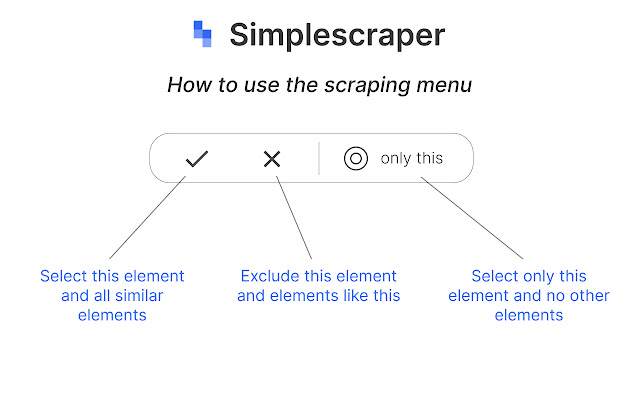
- Improved selection process: easily select a single element using the new 'only this' menu option
⭐ Update 1.17:
- Improved crawler - scrape up to 3000 pages at a time!
- Improved next page selection process
- Wider selection of scrape recipe templates
⭐ Update 1.16:
- Improved crawler - scrape up to 2000 pages at a time!
- 'Manage account' section added
- Design and layout improvements
⭐ Update 1.15:
- Google Sheets integration - save scraped data to Google Sheets instantly!
- CSS editor - you can now edit the CSS selector when selecting elements
- New logo
- Updated help guide
⭐ Update 1.14:
- Ability to schedule recipes
- Ability to edit recipes
- Ability to crawl multiple urls
- New simpler layout
⭐ Update 1.13:
- selection made easier (automatically chooses first selection)
- improved top menu
- infinite scroll added
Extore is a team of professionals who are passionate about creating extensions for web browsers. This devotion also gives us opportunity to appreciate work of other people. We get inspired by useful, open source extensions made by developers all over the world. Our strong belief is that one should share helpful add-ons with others. That’s why we’d like to present you our ever-growing list of favourite extensions that have inspired us. Moreover, as you probably have already learned, sometimes struggling for the best brings an end to the good. Talking about add-ons it often turns out that an upgrade is worse then previous version. Also it can become really tricky to get back to the beloved version of your favourite extension. That’s why we’re going to make not only the latest, but all versions of our favourite (and we hope yours too) add-ons available for download. No more compromises, just stick to the version you really like!
 Preparing download link, please wait for seconds
Almost done...
Click to download
Error getting file. Please try again
Preparing download link, please wait for seconds
Almost done...
Click to download
Error getting file. Please try again







